<?xml version="1.0" encoding="utf-8"?>
<feed xmlns="http://www.w3.org/2005/Atom" xml:lang="en">
  <title>Posts tagged with “Azure” on Mark van Lent’s weblog</title>
  <updated>2019-03-21T00:00:00+00:00</updated>
  <link rel="self" type="application/atom+xml" href="https://markvanlent.dev/tags/azure/index.xml" hreflang="en"/>
  <id>tag:markvanlent.dev,2010-04-02:/tags/azure/index.xml</id>
  <link rel="alternate" type="text/html" href="https://markvanlent.dev/tags/azure/" hreflang="en"/>
  <author>
      <name>Mark van Lent</name>
      <uri>https://markvanlent.dev/about/</uri>
    </author>
  <rights>Copyright (c) Mark van Lent, Creative Commons Attribution 4.0 International License.</rights>
  <icon>https://markvanlent.dev/favicon.ico</icon>
  <entry>
    <title type="html"><![CDATA[Microsoft Ignite | The Tour: Amsterdam — day two]]></title>
    <link rel="alternate" href="https://markvanlent.dev/2019/03/21/microsoft-ignite-the-tour-amsterdam-day-two/" type="text/html" />
    <id>https://markvanlent.dev/2019/03/21/microsoft-ignite-the-tour-amsterdam-day-two/</id>
    <author>
      <name>map[name:Mark van Lent uri:https://markvanlent.dev/about/]</name>
    </author>
    <category term="azure" />
    <category term="cloud" />
    <category term="devops" />
    <category term="infrastructure as code" />
    <category term="monitoring" />
    <category term="observability" />
    <category term="sre" />
    
    <updated>2021-11-09T20:09:33Z</updated>
    <published>2019-03-21T00:00:00Z</published>
    <content type="html"><![CDATA[<p>On the second day of <em>Microsoft Ignite | The Tour: Amsterdam</em> I attended talks in
the &ldquo;Operating applications and infrastructure in the cloud&rdquo; learning path.</p>
<p>(On the <a href="/2019/03/20/microsoft-ignite-the-tour-amsterdam-day-one/">first day</a>
I followed the sessions of the &ldquo;Building your application for the cloud&rdquo;
learning path.)</p>
<p><img src="/images/mitta2019_banner.jpg" alt="Microsoft Ignite | The Tour: Amsterdam banner at the RAI Amsterdam"></p>
<h2 id="modernizing-your-infrastructure-moving-to-infrastructure-as-code-iac--emily-freeman">Modernizing your infrastructure: moving to Infrastructure as Code (IaC) &mdash; Emily Freeman</h2>
<p>Operations is changing&mdash;modernizing. DevOps reduces or eliminates the friction
between the development and operations teams.</p>
<p>One way of defining DevOps is with the CALMS acronym:</p>
<ul>
<li>Culture</li>
<li>Automation</li>
<li>Lean</li>
<li>Measurement</li>
<li>Sharing</li>
</ul>
<p>SRE has evolved beyond its original form. SRE can be seen as a prescriptive
implementation of DevOps. It has a focus on deploying and maintaining
applications.</p>
<p>About failure:</p>
<blockquote>
<p>In the cloud, sometimes it is rainy.</p></blockquote>
<p>If you are using the cloud, you are using APIs continuously. This allows us to
automate a lot of things. And do configuration via (YAML) files which can be
version controlled. This gives us repeatability and reliability.</p>
<p>Toil is defined as manual, repetitive work. Automation removes the toil. By
creating code to do the work, we can reuse it.</p>
<p><a href="https://docs.microsoft.com/en-us/azure/azure-resource-manager/templates/">Azure Resource Manager templates</a>:
you can manually deploy infrastructure and then view the template from within
the Azure portal. This template is a configuration file which you can store and
use over and over again.</p>
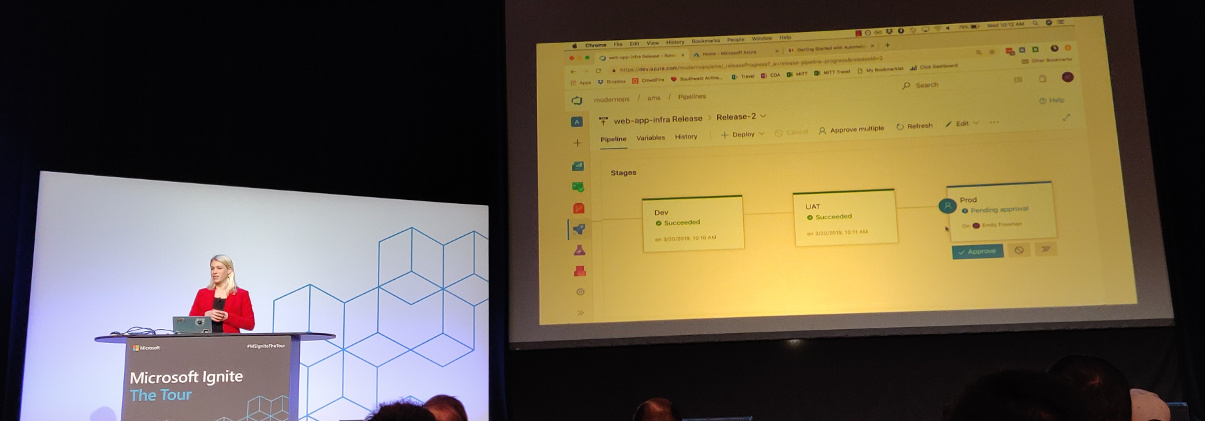
<p>Deploying small batches of code is key. The risk of small changes is less than
having big (and many) changes. Small batches also make it simpler to identify
bugs. Releasing often makes sure feedback on changes is received faster.</p>
<p><img src="/images/mitta2019_emily_freeman_1.jpg" alt="Emily Freeman demonstrating Azure Pipeline"></p>
<p>Microsoft works hard to make sure that
<a href="https://azure.microsoft.com/en-us/services/devops/pipelines/">Azure Pipelines</a> work
with the tools you already use.</p>
<p>Additional resources:</p>
<ul>
<li><a href="https://github.com/Microsoft/IgniteTheTour/tree/master/SRE%20-%20Operating%20applications%20and%20infrastructure%20in%20the%20cloud/SRE10">Code</a></li>
<li><a href="https://queue.acm.org/detail.cfm?id=2945077">The Small Batches Principle</a></li>
</ul>
<h2 id="monitoring-your-infrastructure-and-applications-in-production--jason-hand">Monitoring your infrastructure and applications in production &mdash; Jason Hand</h2>
<p>Why, what and how do we monitor?</p>
<p>Let&rsquo;s first have a look at a definition of SRE:</p>
<blockquote>
<p>Site Reliability Engineering is an engineering discipline devoted to helping
an organization sustainably achieve the <strong>appropriate</strong> level of
<strong>reliability</strong> in their systems, services, and products.</p></blockquote>
<p>Note the terms &ldquo;appropriate&rdquo; and &ldquo;reliability.&rdquo; Hundred percent reliability is
expensive but not always needed. For planes and pacemakers you want absolute
reliability. For applications, this usually is not needed. Ask yourself what the
parts of reliability are that you want to be concerned with.</p>
<p>Why monitor?</p>
<ul>
<li>Are apps doing what we expect from them?</li>
<li>Are apps doing what <em>others</em> (customers) expect?</li>
<li>Are we meeting our goals or at least moving in the right direction?</li>
<li>Our systems are constantly in change. What is happening with these changes?</li>
</ul>
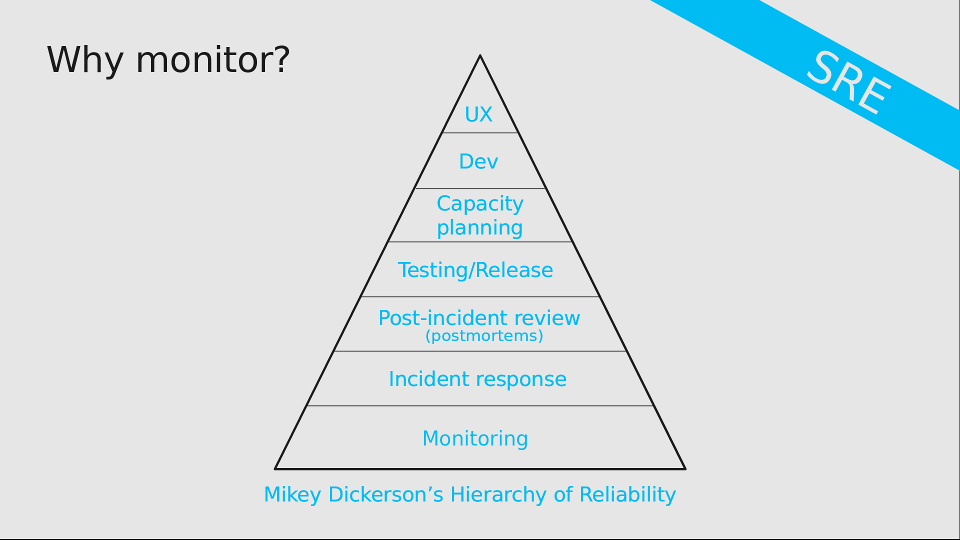
<p>Monitoring is the most important part of reliability.</p>
<figure><img src="/images/mitta2019_why_monitor_sheet.png"
    alt="Mikey Dickerson’s Hierarchy of Reliability"><figcaption>
      <p>Source: sheets from this presentation</p>
    </figcaption>
</figure>

<p>The difference between <em>reacting</em> and <em>responding</em> to incidents is being
prepared or not. You&rsquo;ll want to be prepared to be able to respond, not just
react.</p>
<p>Some organizations perform <a href="https://en.wikipedia.org/wiki/Root_cause_analysis">root cause analyses</a>
after failures. Complex systems usually don&rsquo;t have a single root cause though&mdash;more
often than not it is a combination of causes. Since having more than one root
cause is a contradiction in terms, Jason much rather talks about &ldquo;post-incident
reviews.&rdquo;</p>
<p>Back to the term <em>reliability</em>. This can be measured in a lot of ways. To name a
few:</p>
<ul>
<li>Availability: will the system respond when I ask it something?</li>
<li>Latency: &ldquo;slow is the new down&rdquo; (we don&rsquo;t have the time for slow applications).</li>
<li>Throughput: can you get the volume of data from one point to another in a way you expect?</li>
<li>Coverage: can a process plough through all the available data?</li>
<li>Correctness: did it do what it was supposed to do?</li>
<li>Fidelity: See for example Netflix: perhaps the search is temporarily
unavailable but you can still scroll through the catalog and watch a movie.</li>
<li>Freshness: is the data you get the most recent stuff?</li>
<li>Durability: if you write data, can you retrieve it again?</li>
</ul>
<p>It is not just about what <em>we</em> see, but also about what <em>our customer</em> experiences. We
should put the customer first and look at things from their perspective.</p>
<p>Service Level Indicators (SLIs) are a ratio/proportion. For instance: the
number of successful HTTP calls divided by the total number of HTTP calls.</p>
<p>But where do the numbers come from? A few options:</p>
<ul>
<li>Reported by the server</li>
<li>Reported by clients</li>
<li>Reported by the application</li>
<li>Reported by the front-end (load balancer)</li>
<li>Reported by our monitoring / testing infrastructure</li>
</ul>
<p>You need to include the way you measure in the SLI.</p>
<p>There is no &ldquo;right way&rdquo; to measure things, but there are trade-offs. And you
need to be aware of them. Ideally you should monitor as close to the user as
possible.</p>
<p>The SLIs are the measurements. The Service Level Objectives (SLOs) determine
what is acceptable. If the SLI (indicator) dips below the SLO (objective), we
need to get people involved.</p>
<p>How to build a good SLO? Take the thing to monitor (e.g. HTTP requests), look at
the SLI proportions and add a time statement. An example: &ldquo;90% of the HTTP
requests as reported by the load balancer succeeded in the last 30 day window.&rdquo;
You can make your SLOs more complex if needed, e.g. by having a lower and upper
bound.</p>
<p>Alert on actionable things. Alerts are <strong>not</strong> logs, notifications, heartbeats
or normal situations. Alerts are about things a person needs to go do. And not
just any person, but the right person. It should not be something that can
be automated. Ideally alerts are pretty simple and include:</p>
<ul>
<li>Where is this coming from?</li>
<li>Which SLO is breached?</li>
<li>What is the impact for the customer?</li>
<li>What systems are impacted?</li>
<li>What are the first couple of steps to take?</li>
</ul>
<p>Possible future direction of monitoring:</p>
<ul>
<li>There&rsquo;s no one silver bullet. We&rsquo;ll probably want to integrate multiple monitoring solutions.</li>
<li>Modular monitoring</li>
<li>Aggregate monitoring (measure the system as a whole)</li>
<li>Correlation and anomaly detection (AI / ML)</li>
<li>Monitoring the monitoring</li>
</ul>
<p>Additional resources:</p>
<ul>
<li><a href="https://github.com/Microsoft/IgniteTheTour/tree/master/SRE%20-%20Operating%20applications%20and%20infrastructure%20in%20the%20cloud/SRE20">Code</a></li>
<li><a href="https://docs.microsoft.com/en-us/azure/azure-monitor/overview">Azure Monitor overview</a></li>
</ul>
<h2 id="troubleshooting-failure-in-the-cloud--jason-hand">Troubleshooting failure in the cloud &mdash; Jason Hand</h2>
<p>Our systems have become more complex than they have been in the past. We are now
using microservices, containers, functions, etc. Our focus for this session:
going from the detection phase (previous session) to the response phase.</p>
<p>Before talking about how to detect something is wrong, you need to define that
you mean with &ldquo;wrong.&rdquo;</p>
<p>Azure has a nice toolbox to help you:</p>
<ul>
<li><a href="https://azure.microsoft.com/en-us/services/monitor/">Azure monitor</a></li>
<li><a href="https://docs.microsoft.com/en-us/azure/service-health/service-notifications">Service health alerts</a></li>
<li><a href="https://docs.microsoft.com/en-us/azure/azure-monitor/app/app-insights-overview">Azure Application Insights</a></li>
<li><a href="https://docs.microsoft.com/en-us/azure/azure-monitor/essentials/platform-logs-overview">Diagnostic logs</a> (application and system)</li>
<li>Live debugging via log streams</li>
<li><a href="https://docs.microsoft.com/en-us/azure/azure-monitor/logs/log-query-overview">Log Analytics</a></li>
</ul>
<p>The first question is often: is it just me? Azure (and the other cloud
providers) can also have problems. The
<a href="https://docs.microsoft.com/en-us/azure/service-health/resource-health-overview">Azure Resource Health</a>
page in the Service Health section shows you if your components have problems.
It even has historical data. But because you don&rsquo;t want to stare at a dashboard
all day long, you&rsquo;ll want to also have health alerts for when something goes
wrong.</p>
<p>Guidance for creating service health alerts:</p>
<ul>
<li>Don&rsquo;t create too many, but also not too few. Find your sweet spot.</li>
<li>Make sure they don&rsquo;t overlap (to avoid confusion).</li>
<li>Don&rsquo;t alert on non-production environments.</li>
<li>Keep the responders in mind (what would they want).</li>
<li>Separate alerts for issues, planned maintenance and advisories.</li>
</ul>
<p><a href="https://docs.microsoft.com/en-us/azure/azure-monitor/app/app-map">Application Map</a> shows
components and how they interact with each other. Where is slowness? Where are
problems?</p>
<p>You will need to
<a href="https://docs.microsoft.com/en-us/azure/app-service/troubleshoot-diagnostic-logs">enable diagnostic logging</a>
to get a bunch of logs. And you don&rsquo;t have to go to the portal, you can use the
CLI tool to download them. You can then use a separate tool to analyse the logs.</p>
<div class="highlight"><pre tabindex="0" class="chroma"><code class="language-bash" data-lang="bash"><span class="line"><span class="cl">az webapp log download --resource-group &lt;name&gt; --name &lt;webapp name&gt;
</span></span></code></pre></div><p><a href="https://azure.microsoft.com/en-us/features/cloud-shell/">Azure Cloud Shell</a>
allows you to have a terminal session in your browser. You don&rsquo;t need your
local CLI.</p>
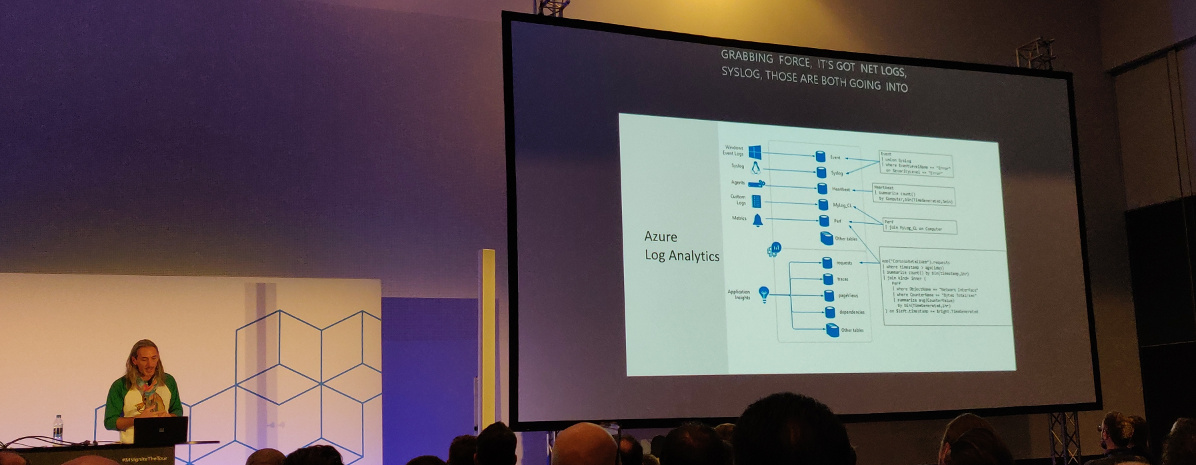
<p>Use Log Analytics for more complex troubleshooting. It collects a lot of
information from a log of sources.</p>
<p><img src="/images/mitta2019_jason_hand_3.jpg" alt="Jason Hand about Azure Log Analytics"></p>
<p>You&rsquo;ll need to use the <a href="https://docs.microsoft.com/en-us/azure/data-explorer/kusto/query/">Kusto Query Language</a>
to get to the information. Queries start with a table, then commands to filter,
sort, specify time range, etc. Once you have queries that answer your questions,
you can keep them handy by saving them right in the Azure portal.</p>
<p>Azure <a href="https://docs.microsoft.com/en-us/azure/azure-monitor/visualize/workbooks-overview">Monitor Workbooks</a>
and Troubleshooting Guides (a.k.a. runbooks) combine text, queries, metrics and
parameters into reports. This helps with onboarding and will also help your
first responders.</p>
<p>Workbooks are editable by others that have access to the same resources.
Troubleshooting Guides are like workbooks, but for dealing with problems.</p>
<p>Future for troubleshooting:</p>
<ul>
<li>Observability (<a href="https://opencensus.io/">OpenCensus</a> and other distributed
tracing tools)</li>
<li>Anomaly detection</li>
</ul>
<p>Additional resources:</p>
<ul>
<li><a href="https://github.com/Microsoft/IgniteTheTour/tree/master/SRE%20-%20Operating%20applications%20and%20infrastructure%20in%20the%20cloud/SRE30">Code</a></li>
<li><a href="https://docs.microsoft.com/en-us/azure/azure-monitor/logs/get-started-queries">Get started with Azure Monitor log queries</a></li>
</ul>
<h2 id="scaling-for-growth-and-resiliency--jeramiah-dooley">Scaling for growth and resiliency &mdash; Jeramiah Dooley</h2>
<p>How do we take an application and how do we scale it? Bigger picture: asking a
lot of &ldquo;why?&rdquo; questions.</p>
<p>Do we need to scale out our application and the underlying infrastructure? Maybe.</p>
<ul>
<li>Perhaps we should first check if the application is buggy (memory leaks) or if
we can optimize it for performance (e.g. database queries).</li>
<li>Is there a temporary (or artificial) reason the site has a spike?</li>
<li>Is there unused capacity we can move around?</li>
<li>Scaling costs money, but if we don&rsquo;t do it we give the customers a bad
experience. This is a risk vs expense issue.</li>
<li>When is the application no longer meeting our expectations (SLOs)?</li>
</ul>
<p>We need to factor for both the anticipated and unanticipated spikes.</p>
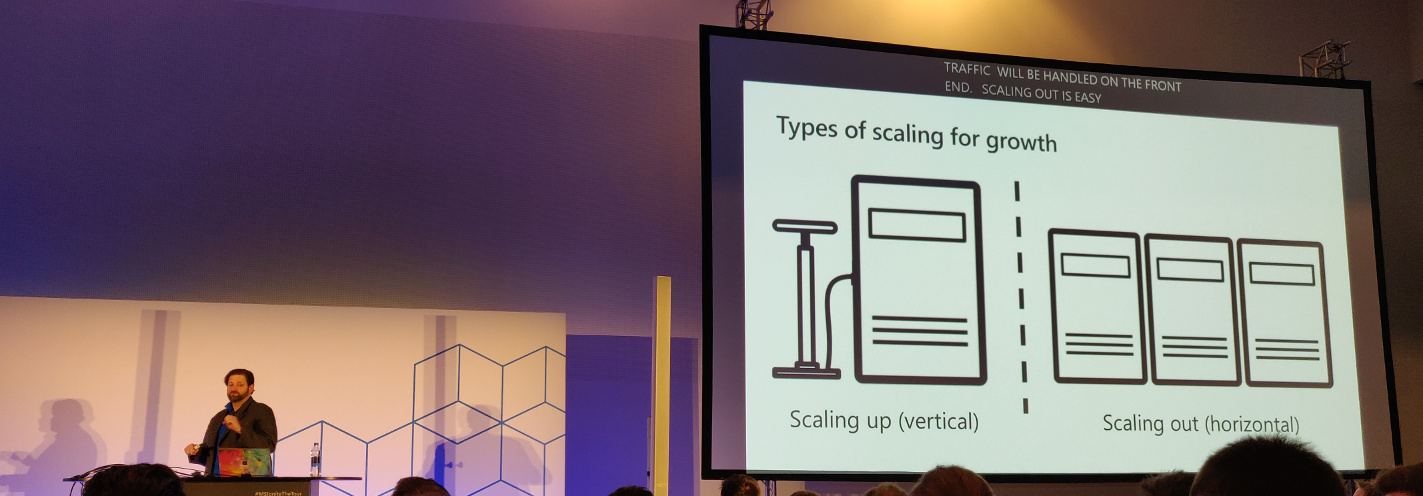
<p>One can scale up (vertical) or out (horizontal). Scaling up is adding more
resources (CPU, memory) to an instance. Scaling out is adding more machines.
When scaling out, the application needs to be aware of the change (additional or
less instances).</p>
<p><img src="/images/mitta2019_jeramiah_dooley_2a.jpg" alt="Jeramiah Dooley about scaling up vs scaling out"></p>
<p>You might not want to scale just one portion of an app since it can cause
problems in another part of the app.</p>
<p>Autoscaling can trigger on quite specific conditions: only today if CPU &gt; 80%
add more instances.</p>
<p>But should you use autoscaling?</p>
<ul>
<li>Do you know your app? When do you need to add more resources? How will your
app respond? How quickly? What happens when you scale down?</li>
<li>Do you know your traffic?</li>
<li>Autoscaling also has its limits. (E.g. there is going to be a delay.)</li>
<li>Do you understand the metrics that matter?</li>
</ul>
<blockquote>
<p>It&rsquo;s not magic, it&rsquo;s just automation.</p></blockquote>
<p>An autoscaling profile has:</p>
<ul>
<li>Capacity:
<ul>
<li>Minimum</li>
<li>Maximum</li>
<li>Default</li>
</ul>
</li>
<li>Triggers (a metric we want to trigger on and a value for that metric)</li>
<li>Recurrence (when do we want this to happen? Always? First week of the month?)</li>
</ul>
<p>Warnings with regards to autoscaling:</p>
<ul>
<li>Scaling out will happen when <em>any</em> of the triggers are met.</li>
<li>Scaling in will trigger when <em>all</em> triggers are met.</li>
<li>Autoscaling always wins over manual scaling settings.</li>
</ul>
<p>Okay, we know how to handle load. But do we know what to do when we have a
localized failure (e.g. a data center that goes down)? Use:</p>
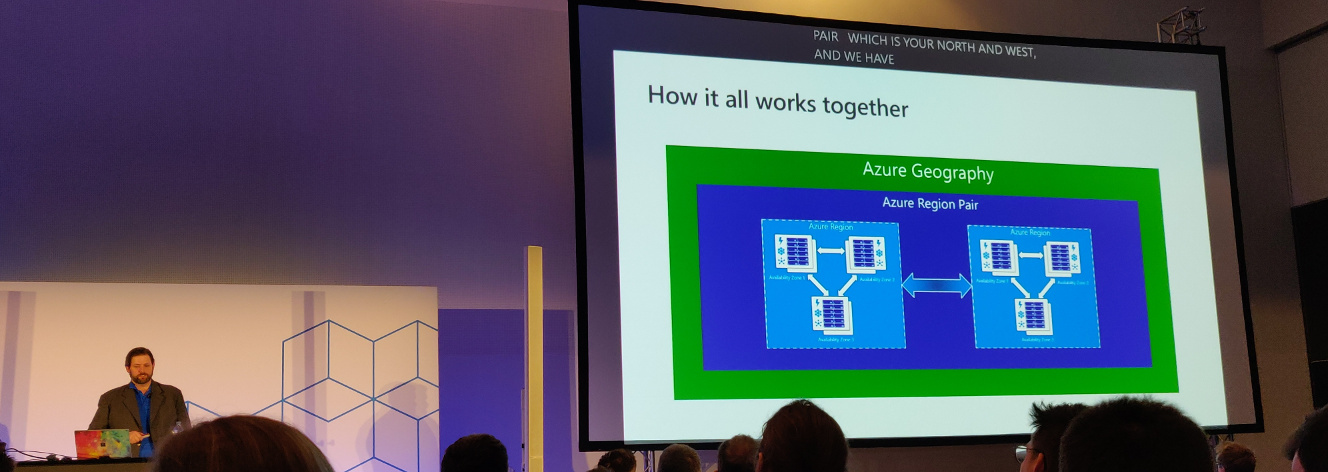
<ul>
<li>Multiple regions/geographies</li>
<li>Region pairs</li>
<li>Availability zones</li>
</ul>
<figure><img src="/images/mitta2019_jeramiah_dooley_2b.jpg"
    alt="Jeramiah Dooley about the relation between Geography, Region Pairs, Regions and Availability Zones"><figcaption>
      <p>Jeramiah Dooley about the relation between Geography, Region Pairs, Regions and Availability Zones</p>
    </figcaption>
</figure>

<p><a href="https://azure.microsoft.com/en-us/services/frontdoor/">Azure Front Door</a>:</p>
<ul>
<li>Global HTTP load balancer with instance failover</li>
<li>Bonuses:
<ul>
<li>SSL offloading</li>
<li>Firewall and DDoS Protections</li>
<li>Central control plane for traffic orchestration</li>
</ul>
</li>
</ul>
<p>Future possible directions for scaling:</p>
<ul>
<li>Content delivery networks (CDNs)</li>
<li>Failovers</li>
<li>Traffic shaping</li>
<li>Draining data centers</li>
</ul>
<p>Additional resources:</p>
<ul>
<li><a href="https://github.com/Microsoft/IgniteTheTour/tree/master/SRE%20-%20Operating%20applications%20and%20infrastructure%20in%20the%20cloud/SRE40">Code</a>
(Tip: the code apparently has a very nice deployment script.)</li>
<li><a href="https://docs.microsoft.com/en-us/azure/app-service/manage-scale-up">Scale up an app in Azure</a></li>
<li><a href="https://docs.microsoft.com/en-us/azure/azure-monitor/autoscale/autoscale-get-started">Get started with Autoscale in Azure</a></li>
<li><a href="https://docs.microsoft.com/en-us/azure/best-practices-availability-paired-regions">Business continuity and disaster recovery (BCDR): Azure Paired Regions</a></li>
<li><a href="https://docs.microsoft.com/en-us/azure/frontdoor/front-door-overview">What is Azure Front Door Service?</a></li>
</ul>
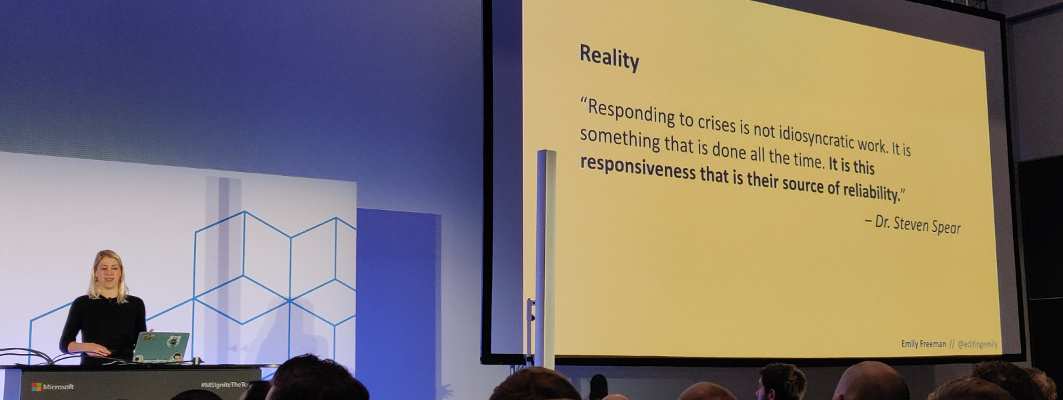
<h2 id="responding-to-and-learning-from-failure--emily-freeman">Responding to and learning from failure &mdash; Emily Freeman</h2>
<p>Failure is inevitable.</p>
<p>Teach people how to solve problems. It will prevent you from being woken up for
everything at night.</p>
<p><img src="/images/mitta2019_emily_freeman_2.jpg" alt="Emily Freeman"></p>
<p>Having to react to failure leads to:</p>
<ul>
<li>Unplanned work</li>
<li>Context switching</li>
<li>Confusion</li>
<li>Increased time to repair</li>
</ul>
<p>We tolerate a certain level of failure every day. Things that are <strong>not</strong> fine
however:</p>
<ul>
<li>Alerts to inbox</li>
<li>Alerts to a common channel where memes are combined with alerts since you&rsquo;ll miss
the important stuff</li>
<li>Shoulder tapping</li>
<li>Delays in communication</li>
<li>Tiered and off-shore support</li>
<li>Network Operations Center</li>
</ul>
<p>We can borrow concepts from other disciplines. Like creating a space to
communicate and collaborate. Ideally there is a single space for all
communication for an incident; a space devoted to that single incident. The
benefits of having such a space: you&rsquo;ll have a time stamped record (which helps
the post-incident review), and it focusses communication.</p>
<p>Train your first responders and provide them with context and clear escalation
procedures.</p>
<p>Update your stakeholders throughout the incident.</p>
<p>Important when alerting is adding a severity of the incident:</p>
<ul>
<li>Sev1 (critical): complete outage</li>
<li>Sev2 (critical): major functionality broken, revenue affected</li>
<li>Sev3 (warning): minor problem</li>
<li>Sev4 (warning): redundant component failure</li>
<li>Sev5 (info): false alarm or unactionable alert</li>
</ul>
<p>The life cycle of an incident:</p>
<ul>
<li>Detection: discovering that there is an issue. You&rsquo;ll have to figure out what
is wrong ASAP.</li>
<li>Response: about 1/3 of your time is spent in this phase. The incident
commander (IC) is the person in charge of the incident response. A
communication chief (or scribe, or whatever you call this person) documents
the situation for a historical record. Don&rsquo;t use this to place blame, but to
analyze what happened.</li>
<li>Remediation: you know what went wrong and how to fix it. Always under-promise
and over-deliver in your timeline. ChatOps tools might help to remediate a
situation.</li>
<li>Analysis: host a post-incident review to learn from what happened. The goal is
not to produce artifacts, instead the goal is to maximize organizational
learning. Prevent a similar incident in the future. Record counter measures
and assign a date and responsible person.</li>
<li>Readiness: prepare for the future.</li>
</ul>
<blockquote>
<p>Incidents are not linear and neither is the response.</p></blockquote>
<p>The last two phases are often forgotten while they are the most important. Since
these will prevent the same failure in the future from happening.</p>
<p>Additional resources:</p>
<ul>
<li><a href="https://github.com/Microsoft/IgniteTheTour/tree/master/SRE%20-%20Operating%20applications%20and%20infrastructure%20in%20the%20cloud/SRE50">Code</a></li>
<li><a href="https://risk-engineering.org/concept/Rasmussen-practical-drift">Rasmussen and practical drift</a></li>
<li><a href="https://docs.microsoft.com/en-us/azure/logic-apps/">Azure Logic Apps Documentation</a> (concerning building automated workflows)</li>
<li><a href="https://docs.microsoft.com/en-us/azure/azure-monitor/alerts/alerts-overview">Overview of alerts in Microsoft Azure</a></li>
<li><a href="https://docs.microsoft.com/en-us/learn/modules/build-chat-bot-with-azure-bot-service/">Build a chat bot with the Azure Bot Service</a></li>
</ul>]]></content>
  </entry>
  <entry>
    <title type="html"><![CDATA[Microsoft Ignite | The Tour: Amsterdam — day one]]></title>
    <link rel="alternate" href="https://markvanlent.dev/2019/03/20/microsoft-ignite-the-tour-amsterdam-day-one/" type="text/html" />
    <id>https://markvanlent.dev/2019/03/20/microsoft-ignite-the-tour-amsterdam-day-one/</id>
    <author>
      <name>map[name:Mark van Lent uri:https://markvanlent.dev/about/]</name>
    </author>
    <category term="azure" />
    <category term="cloud" />
    <category term="devops" />
    <category term="serverless" />
    <category term="tools" />
    
    <updated>2021-11-09T20:09:33Z</updated>
    <published>2019-03-20T00:00:00Z</published>
    <content type="html"><![CDATA[<p><em>Microsoft Ignite | The Tour: Amsterdam</em> is a two day tech conference organized by
Microsoft. On this first day I attended the talks in the &ldquo;Building your
application for the cloud&rdquo; learning path.</p>
<p>(On the <a href="/2019/03/21/microsoft-ignite-the-tour-amsterdam-day-two/">second day</a>
I followed the sessions of the &ldquo;Operating applications and infrastructure in the
cloud&rdquo; learning path.)</p>
<p><img src="/images/mitta2019_welcome.jpg" alt="Welcome to Microsoft Ignite | The Tour: Amsterdam"></p>
<h2 id="designing-resilient-cloud-applications--jeremy-likness">Designing resilient cloud applications &mdash; Jeremy Likness</h2>
<p>Most of the things in this talk allow you to scale your app without changing
your application itself.</p>
<p>We want to design for security. So instead of relying on e.g. environment
variables to distribute secrets, you are better off using a centralized solution,
like <a href="https://azure.microsoft.com/en-us/services/key-vault/">Azure Key Vault</a>.</p>
<p>Some of its features:</p>
<ul>
<li>You can version your secrets</li>
<li>Manage all secrets in one place</li>
<li>Manage secrets across environments (dev, QA, production)</li>
<li>Easy to integrate</li>
</ul>
<p>Use <a href="https://docs.microsoft.com/en-us/azure/active-directory/managed-identities-azure-resources/overview">Managed identities</a>
(formerly &ldquo;Managed Service Identity&rdquo; or MSI) on your VM, app service or function
to authenticate to Azure Key Vault.</p>
<p>To make your database more resilient, you can use
<a href="https://azure.microsoft.com/en-us/services/cosmos-db/">Cosmos DB</a>,
which has features like:</p>
<ul>
<li>Global distribution (get the DB as close to you as possible, without having to
change connection strings)</li>
<li>Elastic scale</li>
<li>Consistency ranging from strong (wait until every replica is up to date) to
&ldquo;eventually consistent&rdquo; (it might take a while until all the replicas are up to
date).</li>
</ul>
<p>Failovers can be done automatically and manually. But whatever you choose, you
don&rsquo;t have to touch your application. It is possible (and easy) to have a multi
master setup. (It is more expensive though.)</p>
<p>There are several extensions for VS Code to connect to e.g. Cosmos DB from
within VS Code. This means you could edit data from within VS Code.
However, it might be better to hand out read-only credentials for your
production database.</p>
<p><a href="https://azure.microsoft.com/en-us/services/app-service/">Azure App Service</a> is
a managed platform that makes it easy to run your application (like .NET, .NET
Core, Node.js, Java or Python). It makes scaling up and scaling out on the fly
easy. Even better: you can configure your application to autoscale.</p>
<p>Check out the <a href="https://marketplace.visualstudio.com/items?itemName=ms-vscode.vscode-azureextensionpack">Azure Extension Pack</a>
extension for VS Code. It has a lot of useful features like connecting with
your Cosmos DB, as mentioned above, but you can also do things like deploying
your application from within your editor.</p>
<p><a href="https://azure.microsoft.com/en-us/product-categories/storage/">Azure Storage</a> is useful
for static things you want stored in the cloud, e.g. blobs, tables, files and
queues. <a href="https://azure.microsoft.com/en-us/blog/static-websites-on-azure-storage-now-generally-available/">Azure Static Sites</a>
are currently in preview. It allows you to serve static files via a web server.
Even the right MIME types are returned.</p>
<p><img src="/images/mitta2019_jeremy_likness_1.jpg" alt="Jeremy Likness about the Azure Front Door Service"></p>
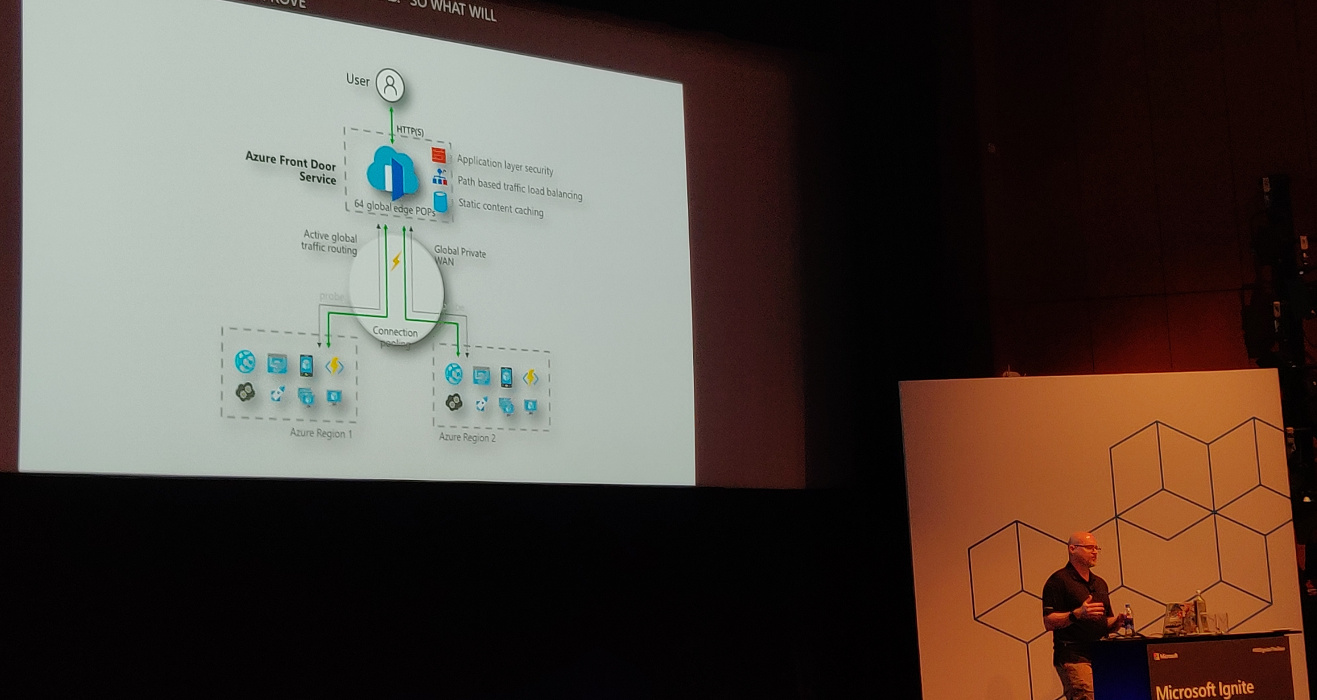
<p>To have a resilient architecture, you&rsquo;ll have to have the service available
across multiple regions. Use <a href="https://azure.microsoft.com/en-us/services/frontdoor/">Azure Front Door Service</a>
(currently in preview). It can be used with <a href="https://azure.microsoft.com/en-us/services/traffic-manager/">Traffic Manager</a>.
In the Front Door designer there are &ldquo;frontend hosts&rdquo; (domains the service is
hosted on), &ldquo;backend pools&rdquo; (the available backends) and &ldquo;routing rules&rdquo; which
map frontend hosts to backend pools based on path patterns (e.g.
<code>/api/products/.*</code>).</p>
<p>Additional resources:</p>
<ul>
<li><a href="https://github.com/Microsoft/IgniteTheTour/tree/master/DEV%20-%20Building%20your%20Applications%20for%20the%20Cloud/DEV10">Code</a></li>
<li><a href="https://docs.microsoft.com/en-us/learn/modules/manage-secrets-with-azure-key-vault/">Manage secrets in your server apps with Azure Key Vault</a></li>
<li><a href="https://docs.microsoft.com/en-us/azure/frontdoor/">Azure Front Door Documentation</a></li>
</ul>
<h2 id="deploying-your-application-faster-and-safer--damian-brady">Deploying your application faster and safer &mdash; Damian Brady</h2>
<p>Damian Brady uses the analogy of a pit stop in 1905 compared to one in 2013.
Summary: much faster, more people involved.</p>
<p>What is &ldquo;DevOps&rdquo;? There are a number of different definitions. At Microsoft it
is defined as:</p>
<blockquote>
<p>DevOps is the union of people, process and products to enable continuous
delivery of value to our end users.</p></blockquote>
<p>Why DevOps is important:</p>
<ul>
<li>Increases velocity</li>
<li>Decreases downtime and human error</li>
<li>Your competitors are already doing this</li>
</ul>
<p>Have a look at the <a href="https://puppet.com/resources/?query=state%20of%20devops">State of DevOps Report</a>. It is
a yearly report full of interesting information. The report compares the high
performing teams with low performing teams. The high performers have a 46
times higher deployment frequency, fail less frequently, fix failures 2555 times
faster, etc. It&rsquo;s a great report to convince your manager to change things.</p>
<p>Development used to toss software over the wall to the operations team. When
things go wrong, people tend to blame the other team. Developers want change but
operations want to have stability (in other words: not change anything)&mdash;the
teams have opposite incentives.</p>
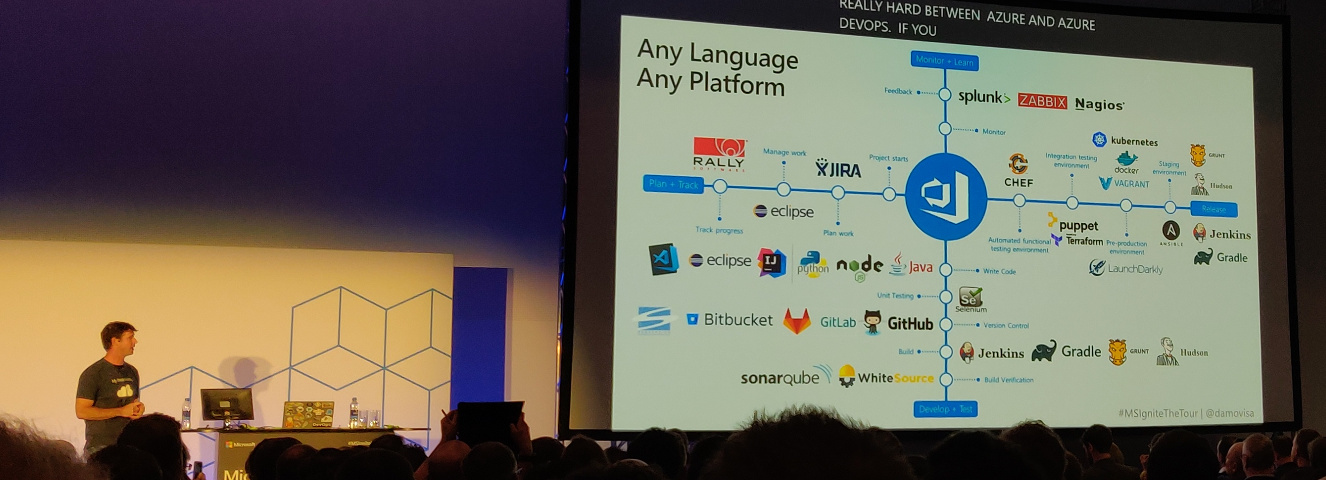
<p>To change this, you&rsquo;ll need a process. And you&rsquo;ll need good products to help you
with the process. <a href="https://azure.microsoft.com/en-us/services/devops/">Azure DevOps</a>
can do everything you need.  Fortunately Microsoft does allow you to use your
current products as well.</p>
<p><img src="/images/mitta2019_damian_brady.jpg" alt="Damian Brady showing Azure DevOps can be used in combination with many other products"></p>
<p>Azure DevOps components:</p>
<ul>
<li><a href="https://azure.microsoft.com/en-us/services/devops/boards/">Azure Boards</a>: track work</li>
<li><a href="https://azure.microsoft.com/en-us/services/devops/pipelines/">Azure Pipelines</a>: CI/CD</li>
<li><a href="https://azure.microsoft.com/en-us/services/devops/repos/">Azure Repos</a>: Git repos</li>
<li><a href="https://azure.microsoft.com/en-us/services/devops/test-plans/">Azure Test Plans</a>: coordinate your testing efforts</li>
<li><a href="https://azure.microsoft.com/en-us/services/devops/artifacts/">Azure Artifacts</a>: build artifacts storage</li>
</ul>
<p>This talk will demo Azure Pipelines.</p>
<p>Azure Pipelines is on the <a href="https://github.com/marketplace/azure-pipelines">GitHub Marketplace</a>.
It is free, assuming you stay within the limits set.</p>
<p>You can configure your Pipeline in your browser and by doing so, a file called
<code>azure-pipelines.yml</code> is created in your repository. This immediately creates a
build check in GitHub.</p>
<p>Build configuration is similar to deployment configuration.</p>
<p>You can have multiple stages and have pre-deployment conditions between them.
This way you can for instance make sure that person X or group Y has to approve
the deployment to production.</p>
<p>You can have build artifacts, which you can use in your build pipeline. These
artifacts are not available externally&mdash;they are part of the release pipeline.
If you need more persistent artifacts, you&rsquo;ll want to use Azure Artifacts.</p>
<p>You can configure canary deployments and do so in different ways. In this demo
&ldquo;deployment slots&rdquo; are used. They allow you to create a duplicate deployment and
direct a part of the traffic to the cloned slot (canary environment).</p>
<p><a href="https://launchdarkly.com/">LaunchDarkly</a> allows you to roll out based on many
more criteria (e.g. regional, a specific customer, etc). Note that this is a
paid service.</p>
<p>Manual approval can be replaced by a so called deployment gate. These deployment
gates are automated approval processes. You can perform a number of checks
(security and compliance assessment, work items, Azure Monitor Alerts or invoke
a REST API or Azure Function). When they are successful, the application is deployed,
otherwise not. This makes deployment faster and safer.</p>
<p>Additional resources:</p>
<ul>
<li><a href="https://github.com/Microsoft/IgniteTheTour/tree/master/DEV%20-%20Building%20your%20Applications%20for%20the%20Cloud/DEV20">Code</a></li>
<li><a href="https://docs.microsoft.com/en-us/azure/devops/">Azure DevOps documentation</a></li>
<li><a href="https://docs.microsoft.com/en-us/devops/">DevOps Resource Center</a></li>
</ul>
<h2 id="detecting-application-anomalies-with-telemetry--jason-hand">Detecting application anomalies with Telemetry &mdash; Jason Hand</h2>
<p>A demonstration of <a href="https://docs.microsoft.com/en-us/azure/azure-monitor/app/app-insights-overview">Azure Application Insights</a>.</p>
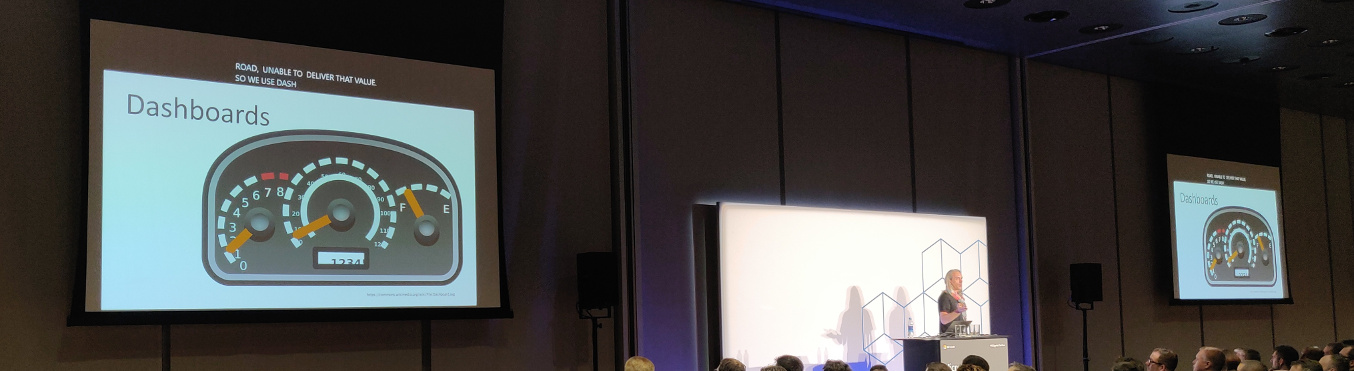
<p>Jason Hand is using the analogy of a car: if it breaks down (e.g. runs out of
gas), it becomes useless. You&rsquo;ll want to prevent this. Cars have dashboards to
warn if things go out of bounds.</p>
<p><img src="/images/mitta2019_jason_hand_1.jpg" alt="Jason Hand about cars that have dashboards to warn if things go out of bounds"></p>
<p>Application Insights has a lot of tools to help you monitor your application.
Going back to the car analogy: it&rsquo;s like having a mechanic with tools in the
vehicle with you. It has, among other things,
<a href="https://docs.microsoft.com/en-us/azure/azure-monitor/app/proactive-diagnostics">Smart Detection</a>
to warn about performance problems and failures. Something else it provides is
<a href="https://azure.microsoft.com/en-us/services/azure-maps/">Application Map</a> where
you can more easily spot performance issues.</p>
<p>More in depth information in his other talks:</p>
<ul>
<li><a href="/2019/03/21/microsoft-ignite-the-tour-amsterdam-day-two/#monitoring-your-infrastructure-and-applications-in-production-----jason-hand">Monitoring your infrastructure and applications in production</a></li>
<li><a href="/2019/03/21/microsoft-ignite-the-tour-amsterdam-day-two/#troubleshooting-failure-in-the-cloud-----jason-hand">Troubleshooting failure in the cloud</a></li>
</ul>
<p>Additional resources:</p>
<ul>
<li><a href="https://docs.microsoft.com/en-us/azure/azure-monitor/app/app-insights-overview">Application Insights documentation</a></li>
<li><a href="https://docs.microsoft.com/en-us/azure/traffic-manager/traffic-manager-manage-profiles">Manage an Azure Traffic Manager profile</a></li>
<li><a href="https://docs.microsoft.com/en-us/azure/azure-monitor/logs/log-analytics-overview">Analytics in Application Insights</a></li>
</ul>
<h2 id="selecting-the-right-data-storage-strategy-for-your-cloud-application--jeramiah-dooley">Selecting the right data storage strategy for your cloud application &mdash; Jeramiah Dooley</h2>
<p>It is important to think about your data storage. The benefits of having a
storage strategy:</p>
<ul>
<li>It facilitates an upgrade of legacy processes without running past the
operational teams supporting this.</li>
<li>It provides guardrails to keep everyone aligned.</li>
<li>To build a strategy, you have to break things down into manageable pieces.
This will help you down the line.</li>
<li>A strategy can function as a plan on how to swap pieces in and out.</li>
<li>If everyone is on board on the strategy it is easier to maintain security
posture.</li>
</ul>
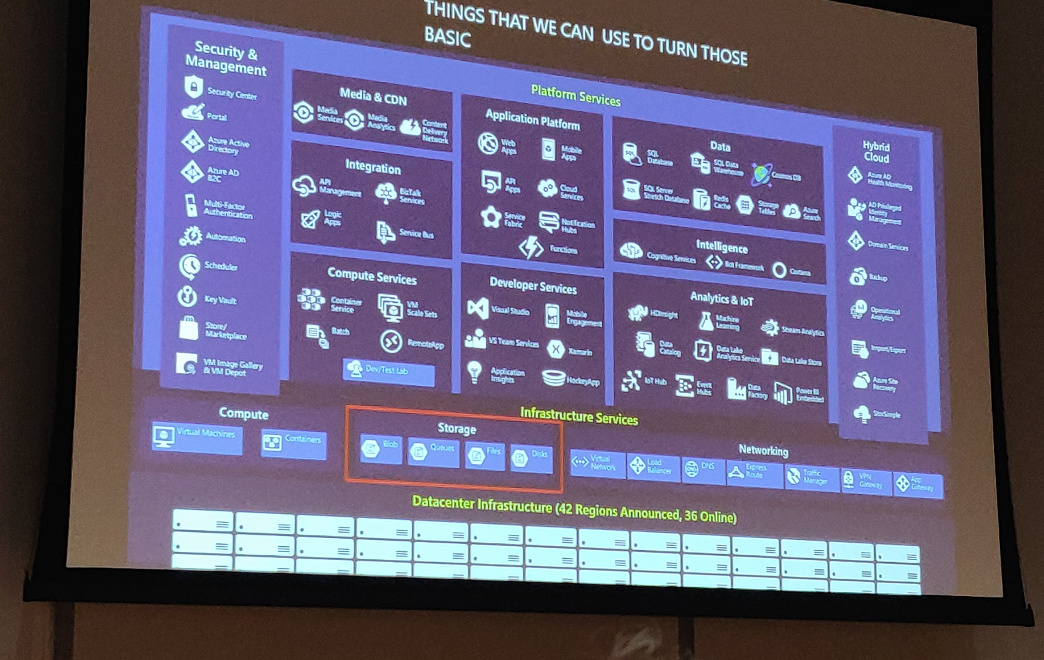
<p>Azure might give you a different way to look at data storage. There are a number
of different storage options. Do note that storage is only a small part of the
whole.</p>
<p><img src="/images/mitta2019_jeramiah_dooley_1.jpg" alt="Jeramiah Dooley"></p>
<p>Storage and compute are abstracted away more and more these days, but everything
eventually depends on the storage sitting beneath it. If your storage breaks,
you will have a bad day.</p>
<p>Why not use a relational database to store all data? By using other options, we
may make the application more granular to deploy and/or give developers more
control.</p>
<p>Different kinds of data:</p>
<ul>
<li>Structured data: this is where we came from with relational databases.</li>
<li>Semi-structured data: this is data that <em>is</em> structured, but cannot be fit
into a table that easily.</li>
<li>Unstructured data: for example video and images.</li>
</ul>
<p>Different properties of data:</p>
<ul>
<li>Volume: how big is it going to be?</li>
<li>Velocity: how much is it going to change?</li>
<li>Variety: how much different kinds of data will you have?</li>
</ul>
<p>Strategies:</p>
<ul>
<li>Storage driven: the operations team or the business decides on the storage and
development will have to use it. This means developers need to know a lot of
low-level details about the storage. And we probably don&rsquo;t want that.</li>
<li>Cloud-driven: deploy storage to what makes sense. Not much better for
development, the main difference is that the storage is not on premise.</li>
<li>Function-driven: build what you need, storage comes with it.</li>
</ul>
<p>An example of function driven approach is building a search functionality. We
could implement it as full-text search on our existing SQL database. However,
this has an impact on the production database. If we would use <a href="https://azure.microsoft.com/en-us/services/search/">Azure
Search</a>
(search-as-a-service), we would not have to worry about the storage or paying
for storage we don&rsquo;t use.</p>
<p>Data architectures summary:</p>
<ul>
<li>More complex and more options than in the past</li>
<li>Easier to choose, especially based on function</li>
<li>More direct access by developers</li>
<li>More control over experience and cost</li>
</ul>
<p>Additional resources:</p>
<ul>
<li><a href="https://docs.microsoft.com/en-us/learn/modules/choose-storage-approach-in-azure/">Choose a data storage approach in Azure</a></li>
<li><a href="https://docs.microsoft.com/en-us/azure/search/">Azure Search Documentation</a></li>
<li><a href="https://docs.microsoft.com/en-us/azure/cosmos-db/graph/graph-introduction">Introduction to Azure Cosmos DB: Gremlin API</a></li>
<li><a href="https://docs.microsoft.com/en-us/azure/data-lake-analytics/">Azure Data Lake Analytics Documentation</a></li>
</ul>
<h2 id="investing-in-serverless-less-servers-more-code--jeremy-likness">Investing in Serverless: less servers, more code &mdash; Jeremy Likness</h2>
<p>On premise infrastructure requires you to answer a lot of questions, like:</p>
<ul>
<li>What media should I use to keep backups?</li>
<li>How can I scale my app?</li>
<li>Who monitors my servers?</li>
<li>What happens if the power goes out?</li>
<li>Who has physical access to my servers?</li>
</ul>
<p>Moving to infrastructure as a service still means dealing with a bunch of
questions, but less lower level. You pay for the service of someone else
worrying about the hardware, access, etc. You are left with questions like:</p>
<ul>
<li>How can I scale my app?</li>
<li>How often should I patch my servers?</li>
<li>How do I deploy new code to my servers?</li>
</ul>
<p>Platform as a service means even higher level questions:</p>
<ul>
<li>What is the right size of my server?</li>
<li>How many servers do I need?</li>
</ul>
<p>With serverless, you are down to a single question: how do I architect my app?
You focus on the event that happened (a request was sent to an endpoint) not on
the whole infrastructure to make that happen.</p>
<p>What is serverless (according to Jeremy)?</p>
<ul>
<li>Abstraction of servers</li>
<li>Event driven / instant scale</li>
<li>Micro-billing (focus on what you are using)</li>
</ul>
<p>Checklist to determine if something is serverless:</p>
<ul>
<li>Is it capable of running entirely in the cloud?</li>
<li>Does it run and scale without configuring a VM/cluster?</li>
<li>Do I only get billed for active invocations?</li>
</ul>
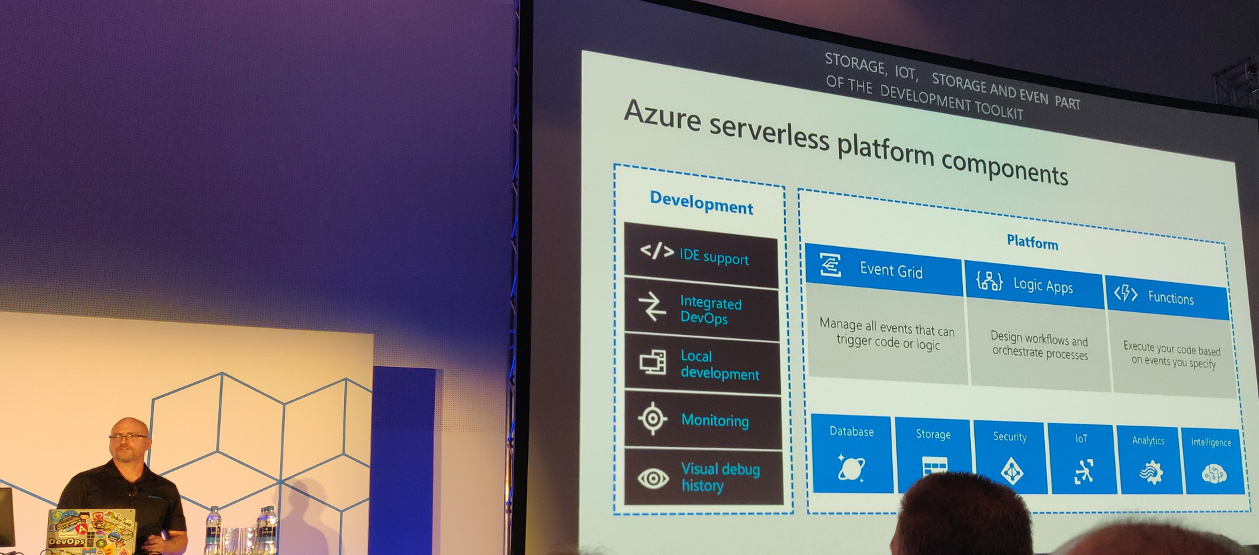
<p><img src="/images/mitta2019_jeremy_likness_2.jpg" alt="Jeremy Likness with an overview of serverless components in Azure"></p>
<h3 id="functions">Functions</h3>
<p>Functions: you pay for functions that get called and consume memory, not for
servers. You don&rsquo;t care how much machines are needed to handle the number of
requests.</p>
<p>Functions have triggers and bindings. Triggers are things like blob storage,
Cosmos DB, HTTP, timer and a webhook. Bindings allow you to work with resources
(like files, tables, emails, notifications).</p>
<p>Example: a file is added to storage, a function parses and transforms the file
and stores a chart graphic.</p>
<h3 id="event-grid">Event grid</h3>
<p>Managing events is cumbersome. Event grid can help you. It offers:</p>
<ul>
<li>Fully managed event routing to get a message from A to B.</li>
<li>Near real-time event delivery at scale.</li>
<li>Broad coverage within Azure and beyond.</li>
</ul>
<p>You can focus on the messages. The infrastructure ensures reliability and
performance. It can, for instance, handle ten million events per second per
region.</p>
<p>Event grid delivers the event to you; you never have to go out to grab events.</p>
<p>Scenarios:</p>
<ul>
<li>Serverless apps</li>
<li>Ops automation</li>
<li>Application integration</li>
</ul>
<p>Durable functions are an extension to functions for stuff that e.g. has to wait
for an asynchronous event. They are paused, but state is stored. And you are
only billed for the time the function is actually doing things; you don&rsquo;t pay
when the function is paused.</p>
<p>Durable function patterns:</p>
<ul>
<li>Sequential asynchronous calls</li>
<li>Fan out / fan in</li>
<li>Human approval</li>
<li>Ongoing monitoring</li>
</ul>
<h3 id="logic-apps">Logic apps</h3>
<p>Logic apps are the integration engine that connect things together. They allow
you to design workflows and processes. For example: when a new product is added,
an email is sent to the products team to add an image, etc.</p>
<p>Logic apps also have triggers.</p>
<p>Additional resources:</p>
<ul>
<li><a href="https://github.com/Microsoft/IgniteTheTour/tree/master/DEV%20-%20Building%20your%20Applications%20for%20the%20Cloud/DEV50">Code</a></li>
</ul>]]></content>
  </entry>
</feed>