<?xml version="1.0" encoding="utf-8"?>
<feed xmlns="http://www.w3.org/2005/Atom" xml:lang="en">
  <title>Posts tagged with “Blog” on Mark van Lent’s weblog</title>
  <updated>2021-12-10T00:00:00+00:00</updated>
  <link rel="self" type="application/atom+xml" href="https://markvanlent.dev/tags/blog/index.xml" hreflang="en"/>
  <id>tag:markvanlent.dev,2010-04-02:/tags/blog/index.xml</id>
  <link rel="alternate" type="text/html" href="https://markvanlent.dev/tags/blog/" hreflang="en"/>
  <author>
      <name>Mark van Lent</name>
      <uri>https://markvanlent.dev/about/</uri>
    </author>
  <rights>Copyright (c) Mark van Lent, Creative Commons Attribution 4.0 International License.</rights>
  <icon>https://markvanlent.dev/favicon.ico</icon>
  <entry>
    <title type="html"><![CDATA[Migrating to Hugo]]></title>
    <link rel="alternate" href="https://markvanlent.dev/2021/12/10/migrating-to-hugo/" type="text/html" />
    <id>https://markvanlent.dev/2021/12/10/migrating-to-hugo/</id>
    <author>
      <name>map[name:Mark van Lent uri:https://markvanlent.dev/about/]</name>
    </author>
    <category term="blog" />
    <category term="hugo" />
    
    <updated>2021-12-10T12:24:36Z</updated>
    <published>2021-12-10T00:00:00Z</published>
    <content type="html"><![CDATA[<p>Once again have I rebuilt this website with a completely different technology
stack. This post dives into some of the details.</p>
<p><em>To be honest I&rsquo;ve written this post mostly for myself. I&rsquo;ve edited all my posts
(see below) and it was fun to read about the (major) changes I made to this site
over the years and rediscover what I did and why I did it.</em></p>
<p><em>So here&rsquo;s another chapter&hellip;</em></p>
<p><img src="/images/hugo-logo.svg" alt="Hugo logo"></p>
<h2 id="bye-bye-acrylamid-hello-hugo">Bye bye Acrylamid, hello Hugo!</h2>
<p>I last changed the technology stack that generates this website in 2012 when I
<a href="/2012/10/01/migrating-to-acrylamid/">migrated to Acrylamid</a>. I&rsquo;ve been happy
with that choice for years but Acrylamid has been unmaintained since 2016 and I
wanted to use something else.</p>
<p>I shopped around for static site generators that allow me to write my posts in
Markdown. After looking at a couple of options I decided to pick
<a href="https://gohugo.io/">Hugo</a>. I like it because:</p>
<ul>
<li>It&rsquo;s open source (<a href="https://github.com/gohugoio/hugo">GitHub repo</a>)</li>
<li>Hugo is actively developed on</li>
<li>It seems to be quite popular (currently number 2 of the generators listed
<a href="https://jamstack.org/generators/">Jamstack.org</a>, based on the number of stars
on GitHub)</li>
<li>There is <a href="https://gohugo.io/documentation/">extensive documentation</a></li>
<li>It offers the flexibility I wanted</li>
<li>There are quite some <a href="https://themes.gohugo.io/">themes</a> available (at the moment
there are 285 listed with the tag &ldquo;blog&rdquo; for example)</li>
</ul>
<h2 id="process">Process</h2>
<p>At first I started out with one of the themes
(<a href="https://github.com/kimcc/hugo-theme-noteworthy">Noteworthy</a>) to get
up-and-running quickly. Later on in the process I started building my own theme,
using bits and pieces from Noteworthy. Funny thing is that I ended up with
something looking very similar to what I had for my Acrylamid site.</p>
<p>I chose to not render any raw HTML code in my Markdown. To compensate I have
created a couple of <a href="https://gohugo.io/templates/shortcode-templates/">custom Hugo shortcodes</a>
to be able to e.g. use the <code>&lt;blockquote&gt;</code> element with a citation attribute or
create tables. On the one hand it removes some flexibility you have when you can
write raw HTML, on the other hand it forces me to do things more consistently by
using the shortcodes.</p>
<p>Having to replace the raw HTML plus fix lots of broken links, led to the decision
to review each and every blog post I have written here. There are only about 150
of them, so that didn&rsquo;t seem like a massive job&hellip; In the end it took me way
more time than I expected to go through them all.</p>
<p><em>It was also fun to read the old posts, like the ones I wrote during
<a href="/tags/ploneconf2008/">my first Plone conference</a> in 2008. And when I read the
<a href="/2018/05/12/open-tabs/">open tabs</a> post I made in 2018 I rediscovered a book I wanted
to read. And although I still haven&rsquo;t actually read <a href="https://www.goodreads.com/book/show/27833670-dark-matter">Dark
Matter</a> yet, I have
purchased it and uploaded it to my e-reader.</em></p>
<p>While working on this version of my website I took the advice given by Rain Leander in her
<a href="/2021/06/29/devopsdays-online-2021/#getting-started-embrace-your-inner-child-----rain-leander">2021 devopsdays Amsterdam talk</a>:
<q>Playing is instrumental to life. No one can tell you how to play. Do
what is fun for you. And when it stops being fun, just stop doing it.</q>
As a result I alternated between editing old posts, working on the theme,
picking fonts, etc. Or not work on it at all if I didn&rsquo;t feel like it. This
meant I could have finished this sooner, but that&rsquo;s okay&mdash;it&rsquo;s only a hobby
project.</p>
<h2 id="theme">Theme</h2>
<p>As I&rsquo;ve said: I started out with an existing theme, but ended up with creating
my own theme. Unfortunately I do not have a clean separation between content and
theme at the moment. I might want to improve this in the future, but it is the
reason why I haven&rsquo;t made a separate Git repository for the theme now: the
project and theme are too tightly coupled.</p>
<p>The way this new site looks is only slightly different from
what it looked like before. Under the hood I&rsquo;m using newer CSS layout options:
<a href="https://developer.mozilla.org/en-US/docs/Learn/CSS/CSS_layout/Grids">grids</a> and
<a href="https://developer.mozilla.org/en-US/docs/Learn/CSS/CSS_layout/Flexbox">flexbox</a>.
I cannot call myself an expert on these topics, but it sure was fun to play
around with them.</p>
<p>I also wanted to jump on the <a href="https://developer.mozilla.org/en-US/docs/Web/CSS/CSS_Fonts/Variable_Fonts_Guide">variable
font</a>
train. I liked the idea of only having to include a single font which can then
be used in all kind of different weights. However I was not able to
get it down to an acceptable size. The closest I got was still about 5 times the
size of a regular font, which means a much bigger chunk of data to download for
the visitors of this site.</p>
<p>As a result I&rsquo;m sticking to standard fonts for now. I picked the fonts I liked
on <a href="https://fonts.google.com/">Google Fonts</a> and used
<a href="https://google-webfonts-helper.herokuapp.com/fonts">google-webfonts-helper</a> to
download the files needed to self-host them. My choice at this moment:</p>
<ul>
<li><a href="https://fonts.google.com/specimen/Merriweather">Merriweather</a> for the main content</li>
<li><a href="https://fonts.google.com/specimen/Fira+Sans+Extra+Condensed">Fira Sans Extra Condensed</a>
for the headings and other texts that need to stand out (menu, post meta data, footer, etc)</li>
<li><a href="https://fonts.google.com/specimen/Fira+Code">Fira Code</a> for code samples</li>
</ul>
<h2 id="build-times">Build times</h2>
<p>Although I never had complaints about the speed of Acrylamid in the past, Hugo
is quite a bit faster. This became obvious when I was writing my
<a href="/2021/10/28/all-day-devops-2021/">notes for All Day DevsOps</a>. I had been five
months since I had written something here, but in the meanwhile I had been
working with Hugo to edit my old posts and create the theme. And I had gotten
used to <a href="https://gohugo.io/getting-started/usage/#livereload">LiveReload</a>
which in practice meant that a page had already reloaded in my web browser in
the time it took to switch from my editor to my browser.</p>
<p>The live reload alone makes the process feel much snappier, but I was curious
about the actual difference in build times between Acrylamid and Hugo. So I
decided to test the two use cases that are most important for me since this is
what I do most of the time:</p>
<ul>
<li>A complete rebuild, e.g. to deploy to the live environment (without artifacts from
experiments/drafts, etc)</li>
<li>When I create/edit a post I have Acrylamid/Hugo watch the files and rebuild
the site on change.</li>
</ul>
<p>I ran these scenarios three times and took the shortest run for both tools.</p>


<table>
  
  
  <thead>
    
    
    <tr>
      
        
          <th>Action</th>


          <th class="numeric">Acrylamid (ms)</th>


          <th class="numeric">Hugo (ms)</th>
        
      
    </tr>
  </thead>
  
  <tbody>
  
    <tr>
      
        
          <td>Complete rebuild</td>


          <td class="numeric">1497</td>


          <td class="numeric">397</td>
        
      
    </tr>
  
    <tr>
      
        
          <td>Watch</td>


          <td class="numeric">1300</td>


          <td class="numeric">95</td>
        
      
    </tr>
  
  </tbody>
</table>

<p>This confirms what I had already suspected: Hugo takes only a fraction of the
time Acrylamid needs when rebuilding the site after I change a post (the 2nd use
case). Combined with the live reload this makes for a <strong>big</strong> difference in my
workflow.</p>
<h2 id="new-domain">New domain</h2>
<p>For this version of this site I also switched to a new domain. I got the
<code>vlent.nl</code> domain in 2003 and used it for my website ever since. Now, 18 years
later, I&rsquo;ve decided to start using a different domain for this site:
<code>markvanlent.dev</code>.</p>
<p>Although this frees up the <code>vlent.nl</code> domain for other stuff in the future, I
have setup a redirect for (I think) all the URLs I was
using. At first I wasn&rsquo;t sure if it would be worth the effort, but after going
through 13 years of blog posts I can tell you that it is really nice if old URLs
still exist or at least redirect to a new location for the content.</p>
<h2 id="new-hosting">New hosting</h2>
<p>I&rsquo;ve been managing my own virtual private servers for this site since
<a href="/2013/05/15/new-home-for-this-site/">2013</a> and it was fun. It offered me a lot
of control: <a href="/2019/04/10/new-blog-backend/#code-repository">deployment</a>,
<a href="/2019/04/10/new-blog-backend/#serving-the-content">web server</a>,
<a href="/2014/04/19/ocsp-stapling-in-nginx/">TLS configuration</a>, et cetera&mdash;I was all up to
me. And that&rsquo;s also the downside: there was only 1 person maintaining it: me. It
doesn&rsquo;t cost me that much time, but it&rsquo;s something I have to take care of
nonetheless. And if e.g. a new version of Docker
<a href="https://github.com/moby/moby/issues/41858">no longer proxies IPv6 requests by default</a>,
it&rsquo;s also up to me to (a) detect the update broke something and (b) solve it.</p>
<p>Because maintaining a VPS no longer brings me joy, and I&rsquo;ve heard good things
about <a href="https://www.netlify.com/">Netlify</a>, I thought this was a good moment to
try them out. Especially now that I&rsquo;m using Hugo, one of the <a href="https://docs.netlify.com/configure-builds/common-configurations/">common build
configurations</a>,
switching to Netlify quite simple.</p>
<h2 id="future">Future</h2>
<p>I might want to tweak the theme in the future or see if I can have a more clear
separation between the theme and the content. But for the moment I&rsquo;m happy and
enjoying the fact that this project is finished.</p>]]></content>
  </entry>
  <entry>
    <title type="html"><![CDATA[Continuous deployment for this website using GitLab CI/CD, SSH, Docker and systemd]]></title>
    <link rel="alternate" href="https://markvanlent.dev/2021/03/02/continuous-deployment-for-this-website-using-gitlab-ci-cd-ssh-docker-and-systemd/" type="text/html" />
    <id>https://markvanlent.dev/2021/03/02/continuous-deployment-for-this-website-using-gitlab-ci-cd-ssh-docker-and-systemd/</id>
    <author>
      <name>map[name:Mark van Lent uri:https://markvanlent.dev/about/]</name>
    </author>
    <category term="blog" />
    <category term="docker" />
    <category term="devops" />
    <category term="gitlab" />
    <category term="ssh" />
    <category term="systemd" />
    
    <updated>2021-11-27T22:20:54Z</updated>
    <published>2021-03-02T00:00:00Z</published>
    <content type="html"><![CDATA[<p>Almost two years ago I <a href="/2019/04/10/new-blog-backend/#the-future">wrote</a> that
ideally I would not have to log in to my VPS to update this website. Well, that
moment has finally arrived.</p>
<p>A couple of weeks ago I decided to pursue <a href="https://en.wikipedia.org/wiki/Continuous_deployment">continuous
deployment</a> for this site.
Not because it is such a hassle to deploy a new version myself and also not
because it is needed that often, but because I wanted to explore the concept.</p>
<p>To summarize the most relevant parts of what I wrote in 2019:</p>
<ul>
<li>The source code for this blog is hosted on <a href="https://gitlab.com/markvl/blog">GitLab</a>.</li>
<li>Whenever I push a commit, GitLab CI/CD builds a new Docker image.</li>
<li>Once the build is done I SSH into the VPS this site is hosted from, pull the
new image and use it to run this site.</li>
</ul>
<p>That last, manual step is now automated. The hardest part was figuring out a
method I was happy with; that is: not putting the keys to the kingdom in GitLab.
Not that I distrust GitLab, but if someone would get access to my GitLab
account, I would not want them to <em>also</em> have unlimited access to the VPS.</p>
<p>The solution I ended up with consists of three parts:</p>
<ul>
<li>Configuration on GitLab to trigger a deployment.</li>
<li>A user on the VPS so the GitLab job can log into the VPS.</li>
<li>A monitoring service on the VPS to redeploy when a trigger is detected.</li>
</ul>
<h2 id="gitlab-configuration">GitLab configuration</h2>
<p><em>This part is basically a summary of what David Négrier wrote in his article
<a href="https://thecodingmachine.io/continuous-delivery-on-a-dedicated-server">Continuous delivery with GitLab, Docker and Traefik on a dedicated server</a>.
If you want a more detailed explanation, I can highly recommend reading his
article.)</em></p>
<p>Before we can get into the job that I added to my pipeline, we need to prepare
some things. Starting with adding a couple of
<a href="https://docs.gitlab.com/ee/ci/variables/index.html">GitLab CI/CD variables</a>:</p>
<ul>
<li><code>SSH_HOST</code> and <code>SSH_PORT</code>: the SSH client needs to know
how to connect to the VPS.</li>
<li><code>SSH_USER</code> and <code>SSH_PRIVATE_KEY</code>: the SSH client needs authentication
information.</li>
<li><code>SSH_KNOWN_HOST</code>: the public SSH key of the server (<code>SSH_HOST</code>) so we can add
it to the <code>known_hosts</code> file and prevent
<a href="https://en.wikipedia.org/wiki/Man-in-the-middle_attack">man-in-the-middle attacks</a>. I got this
value by running <code>ssh-keyscan &lt;hostname&gt;</code> on my laptop and pasting the output
in GitLab.</li>
</ul>
<p>In a moment we&rsquo;ll see how these variables get used.</p>
<p>Since I want to use the digest of the Docker image that is built in this
pipeline, I&rsquo;ve added an artifact to store the digest so we can access it later
on:</p>
<div class="highlight"><pre tabindex="0" class="chroma"><code class="language-yml" data-lang="yml"><span class="line"><span class="cl"><span class="nt">build_image</span><span class="p">:</span><span class="w">
</span></span></span><span class="line"><span class="cl"><span class="w">  </span><span class="nt">script</span><span class="p">:</span><span class="w">
</span></span></span><span class="line"><span class="cl"><span class="w">    </span><span class="l">...</span><span class="w">
</span></span></span><span class="line"><span class="cl"><span class="w">    </span>- <span class="l">docker image ls --filter &#34;label=org.label-schema.vcs-url=https://gitlab.com/markvl/blog&#34; --filter &#34;label=org.label-schema.vcs-ref=$CI_COMMIT_SHA&#34; --format &#34;{{.Digest}}&#34; &gt; image-sha.txt</span><span class="w">
</span></span></span><span class="line"><span class="cl"><span class="w">  </span><span class="nt">artifacts</span><span class="p">:</span><span class="w">
</span></span></span><span class="line"><span class="cl"><span class="w">    </span><span class="nt">paths</span><span class="p">:</span><span class="w">
</span></span></span><span class="line"><span class="cl"><span class="w">      </span>- <span class="l">image-sha.txt</span><span class="w">
</span></span></span></code></pre></div><p>(The filters are probably not really necessary, but just in case there are
multiple images present, I want to be reasonably sure that I&rsquo;ve picked the right
one.)</p>
<p>Now finally the job that triggers the deployment:</p>
<div class="highlight"><pre tabindex="0" class="chroma"><code class="language-yml" data-lang="yml"><span class="line"><span class="cl"><span class="nt">deploy_image</span><span class="p">:</span><span class="w">
</span></span></span><span class="line"><span class="cl"><span class="w">  </span><span class="nt">stage</span><span class="p">:</span><span class="w"> </span><span class="l">deploy</span><span class="w">
</span></span></span><span class="line"><span class="cl"><span class="w">  </span><span class="nt">only</span><span class="p">:</span><span class="w">
</span></span></span><span class="line"><span class="cl"><span class="w">    </span><span class="nt">refs</span><span class="p">:</span><span class="w">
</span></span></span><span class="line"><span class="cl"><span class="w">      </span>- <span class="l">main</span><span class="w">
</span></span></span><span class="line"><span class="cl"><span class="w">  </span><span class="nt">services</span><span class="p">:</span><span class="w"> </span><span class="p">[]</span><span class="w">
</span></span></span><span class="line"><span class="cl"><span class="w">  </span><span class="nt">image</span><span class="p">:</span><span class="w"> </span><span class="l">alpine:latest</span><span class="w">
</span></span></span><span class="line"><span class="cl"><span class="w">  </span><span class="nt">script</span><span class="p">:</span><span class="w">
</span></span></span><span class="line"><span class="cl"><span class="w">    </span>- <span class="l">apk add --no-cache openssh</span><span class="w">
</span></span></span><span class="line"><span class="cl"><span class="w">    </span>- <span class="l">mkdir ~/.ssh</span><span class="w">
</span></span></span><span class="line"><span class="cl"><span class="w">    </span>- <span class="l">echo &#34;$SSH_KNOWN_HOSTS&#34; &gt;&gt; ~/.ssh/known_hosts</span><span class="w">
</span></span></span><span class="line"><span class="cl"><span class="w">    </span>- <span class="l">chmod 644 ~/.ssh/known_hosts</span><span class="w">
</span></span></span><span class="line"><span class="cl"><span class="w">    </span>- <span class="l">echo &#34;$SSH_PRIVATE_KEY&#34; &gt; ~/.ssh/private_key</span><span class="w">
</span></span></span><span class="line"><span class="cl"><span class="w">    </span>- <span class="l">chmod 600 ~/.ssh/private_key</span><span class="w">
</span></span></span><span class="line"><span class="cl"><span class="w">    </span><span class="c"># add ssh key stored in SSH_PRIVATE_KEY variable to the agent store</span><span class="w">
</span></span></span><span class="line"><span class="cl"><span class="w">    </span>- <span class="l">eval $(ssh-agent -s)</span><span class="w">
</span></span></span><span class="line"><span class="cl"><span class="w">    </span>- <span class="l">ssh-add ~/.ssh/private_key</span><span class="w">
</span></span></span><span class="line"><span class="cl"><span class="w">    </span>- <span class="l">ssh -p $SSH_PORT $SSH_USER@$SSH_HOST $(cat image-sha.txt)</span><span class="w">
</span></span></span></code></pre></div><p>Most of the code is just to get SSH working. All the magic happens in the last
line. Note that in contrast to David&rsquo;s article I don&rsquo;t actually execute commands
on my VPS, instead I only send one string.</p>
<p>(For the full <code>.gitlab-ci.yml</code> file see <a href="https://gitlab.com/markvl/blog/-/blob/32f876382900b6d4f25af988e7efdde3e17e4b52/.gitlab-ci.yml">the GitLab repo for this site</a>.)</p>
<p>Now every time the pipeline is run on the <code>main</code> branch, the digest of the
freshly built Docker image is sent to my VPS.</p>
<h2 id="vps-ssh-configuration">VPS SSH configuration</h2>
<p>On the VPS we need to make sure that the GitLab job can SSH into the machine.</p>
<p>The first step is to create a user to be used by GitLab (the <code>SSH_USER</code> variable
I mentioned above). Next we need to make sure that the <code>SSH_PRIVATE_KEY</code> stored
in GitLab can be used to log in. To make this possible <em>and</em> to mitigate the
risks of the SSH key in GitLab getting abused, I have added the following
content to the file <code>~/.ssh/authorized_keys</code> of the new user:</p>
<div class="highlight"><pre tabindex="0" class="chroma"><code class="language-plaintext" data-lang="plaintext"><span class="line"><span class="cl">command=&#34;/home/&lt;username&gt;/.ssh/ssh_commands.sh&#34;,no-agent-forwarding,no-port-forwarding,no-pty,no-user-rc,no-X11-forwarding &lt;public key&gt; &lt;comment&gt;
</span></span></code></pre></div><p>Using the <code>command</code> option is an idea I got from
<a href="https://serverfault.com/a/803873/25920">a ServerFault answer</a>
and Mauricio Tavares&rsquo; article
<a href="https://unixwars.blogspot.com/2014/12/getting-sshoriginalcommand.html">Getting the SSH_ORIGINAL_COMMAND</a>.
In my case the <code>ssh_commands.sh</code> file stores the original command (in my case
the digest) in a file called <code>deployment.raw</code>.</p>
<h2 id="vps-monitoring-service">VPS monitoring service</h2>
<p>To actually deploy the new image, we need just one more piece in this puzzle: a
script to pull and use the Docker image.</p>
<p>I&rsquo;ve opted for a systemd unit to monitor for the existence of the
<code>deployment.raw</code> file by adding the file
<code>/etc/systemd/system/blog-deployment.path</code> (note the &ldquo;<code>.path</code>&rdquo; at the end of the
filename):</p>
<div class="highlight"><pre tabindex="0" class="chroma"><code class="language-ini" data-lang="ini"><span class="line"><span class="cl"><span class="k">[Unit]</span>
</span></span><span class="line"><span class="cl"><span class="na">Description</span><span class="o">=</span><span class="s">Blog deployment path monitor</span>
</span></span><span class="line"><span class="cl"><span class="na">Wants</span><span class="o">=</span><span class="s">blog.service</span>
</span></span><span class="line"><span class="cl">
</span></span><span class="line"><span class="cl"><span class="k">[Path]</span>
</span></span><span class="line"><span class="cl"><span class="na">PathExists</span><span class="o">=</span><span class="s">/&lt;path&gt;/&lt;to&gt;/deployment.raw</span>
</span></span><span class="line"><span class="cl">
</span></span><span class="line"><span class="cl"><span class="k">[Install]</span>
</span></span><span class="line"><span class="cl"><span class="na">WantedBy</span><span class="o">=</span><span class="s">multi-user.target</span>
</span></span></code></pre></div><p>This systemd unit configuration file is accompanied by the following service
file (<code>/etc/systemd/system/blog-deployment.service</code>):</p>
<div class="highlight"><pre tabindex="0" class="chroma"><code class="language-ini" data-lang="ini"><span class="line"><span class="cl"><span class="k">[Unit]</span>
</span></span><span class="line"><span class="cl"><span class="na">Description</span><span class="o">=</span><span class="s">Blog deployment service</span>
</span></span><span class="line"><span class="cl">
</span></span><span class="line"><span class="cl"><span class="k">[Service]</span>
</span></span><span class="line"><span class="cl"><span class="na">Type</span><span class="o">=</span><span class="s">oneshot</span>
</span></span><span class="line"><span class="cl"><span class="na">ExecStart</span><span class="o">=</span><span class="s">/usr/local/bin/deploy_blog.sh</span>
</span></span><span class="line"><span class="cl">
</span></span><span class="line"><span class="cl"><span class="k">[Install]</span>
</span></span><span class="line"><span class="cl"><span class="na">WantedBy</span><span class="o">=</span><span class="s">multi-user.target</span>
</span></span></code></pre></div><p>In the <code>deploy_blog.sh</code> script I do things like reading the <code>deployment.raw</code>
file, checking its content, downloading the new Docker image, checking it and
restarting this website with the new image.</p>
<h2 id="summary">Summary</h2>
<p>To recap my continuous deployment solution:</p>
<ul>
<li>I push a commit to the <code>main</code> branch of the repo of this site.</li>
<li>GitLab CI/CD builds a new Docker image and sends its digest to my server.</li>
<li>My server watches for the existence of the digest file and uses it as a
trigger to deploy the new version of this website.</li>
</ul>
<p>And now that I&rsquo;ve written this down, I&rsquo;m going to commit this article to Git,
push it to GitLab and then sit back and wait (im)patiently for my website to
update itself. ;-)</p>]]></content>
  </entry>
  <entry>
    <title type="html"><![CDATA[Removing the comments from this website]]></title>
    <link rel="alternate" href="https://markvanlent.dev/2020/02/11/removing-the-comments-from-this-website/" type="text/html" />
    <id>https://markvanlent.dev/2020/02/11/removing-the-comments-from-this-website/</id>
    <author>
      <name>map[name:Mark van Lent uri:https://markvanlent.dev/about/]</name>
    </author>
    <category term="blog" />
    
    <updated>2021-11-10T20:38:54Z</updated>
    <published>2020-02-11T00:00:00Z</published>
    <content type="html"><![CDATA[<p>I&rsquo;ve taken the step to removed the comments from my website. In this
article I&rsquo;ll give some stats and offer a bit of an explanation.</p>
<p>Let&rsquo;s start with some fun facts.</p>
<p>The first comment was placed on the article
<a href="/2009/05/27/ioerror-errno-28-no-space-left-on-device/">IOError: [Errno 28] No space left on device</a>.
Over the last 10 years a total of 457 comment have been placed. (At least, that is
the number according to <a href="https://disqus.com/">Disqus</a>. I may have thrown away
some spam in the past.) Of these, only 210 are actually published&mdash;all the
others are spam.</p>
<p>A total of 45 articles got commented on. The top three most commented articles:</p>
<ul>
<li><a href="/2010/09/06/locked-myself-out-root-account-ec2-ubuntu-instance/">Locked myself out of root account on EC2 Ubuntu instance</a> (26 comments)</li>
<li><a href="/2013/11/02/merge-a-separate-git-repository-into-an-existing-one/">Merge a separate Git repository into an existing one</a> (24 comments)</li>
<li><a href="/2011/05/06/integrityerror-duplicate-key-value-violates-unique-constraint/">IntegrityError: duplicate key value violates unique constraint</a> (17 comments)</li>
</ul>
<p>To each and everyone that placed a comment here: <strong>thank you!</strong></p>
<p>So why remove the comments then? The main reason is that the option to comment
here adds bloat. Just to show the Disqus form your browser has to make 17
requests and download about 286 KB of data.</p>
<p><em>To be fair: if I write an article which uses all the fonts and their variants I
define on this site, about 220Kb of data is transferred. So that is also an area
where I can improve. But that is something for another day.</em></p>
<p>So from now on, I you want to send me feedback on an article, you will have to
<a href="/about/#contact">contact me</a> via e.g. <a href="https://twitter.com/mvlent">Twitter</a> or
<a href="mailto:mark@vlent.nl">email</a>.</p>]]></content>
  </entry>
  <entry>
    <title type="html"><![CDATA[New blog backend]]></title>
    <link rel="alternate" href="https://markvanlent.dev/2019/04/10/new-blog-backend/" type="text/html" />
    <id>https://markvanlent.dev/2019/04/10/new-blog-backend/</id>
    <author>
      <name>map[name:Mark van Lent uri:https://markvanlent.dev/about/]</name>
    </author>
    <category term="blog" />
    <category term="devops" />
    
    <updated>2021-11-18T07:08:38Z</updated>
    <published>2019-04-10T00:00:00Z</published>
    <content type="html"><![CDATA[<p>Recently I changed the way this website is hosted, served and deployed. I&rsquo;ll
describe what I changed and why I did so.</p>
<p>The topics I&rsquo;ll discuss:</p>
<ul>
<li><a href="#hosting">Hosting</a>: I moved from a RamNode virtual private server (VPS) to one from
DigitalOcean.</li>
<li><a href="#serving-the-content">Serving</a>: I am now using Docker containers to serve
this website.</li>
<li><a href="#code-repository">Deployment</a>: The code behind this website has moved from
GitHub to GitLab and I am using their CI/CD to build the Docker image for this
site.</li>
<li><a href="#performance">Performance</a>: The difference in performance between my old
RamNode setup and the new DigitalOcean machine is minimal.</li>
<li><a href="#the-future">Future</a>: Looking forward to new challenges.</li>
</ul>
<h2 id="hosting">Hosting</h2>
<h3 id="ramnode">RamNode</h3>
<p>I have used <a href="https://ramnode.com/">RamNode</a> since late 2012. They have been a
reliable partner throughout the years. Their support staff always responded
quickly to my questions, is very friendly and willing to go the extra mile. I
have been a very happy customer.</p>
<p>I have run this blog on a RamNode VPS since <a href="/2013/05/15/new-home-for-this-site/">April
2013</a>. However, my setup got
outdated. I was still running Debian Jessie which also meant that most
visitors could not use HTTP/2 with my website. The reason is that the OpenSSL
version in Jessie did not support
<a href="https://en.wikipedia.org/wiki/Application-Layer_Protocol_Negotiation">Application‑Layer Protocol Negotiation (ALPN)</a>.
(For more information about the exact issue, see
<a href="https://www.nginx.com/blog/supporting-http2-google-chrome-users/">Supporting HTTP/2 for Website Visitors</a>.)</p>
<p>Time to upgrade to Debian Stretch. And since <a href="/2013/05/15/new-home-for-this-site/">the machine was provisioned using
Puppet</a>, that should have been a
breeze, right? Well, sure. If not for two things:</p>
<ul>
<li>I had not used Puppet to install <a href="https://certbot.eff.org/">Certbot</a>, which is
responsible for the TLS certificates, so I needed to figure out again how to
install that software.</li>
<li>I had fallen out of love with Puppet and wanted to convert my code to Ansible.</li>
</ul>
<p>Basically this XKCD comic all over again:</p>
<figure><img src="/images/xkcd1319_automation.png"
    alt="Automation"><figcaption>
      <p>Source: <a href="https://xkcd.com/1319/">XKCD</a></p>
    </figcaption>
</figure>

<p>Where I previously used <a href="https://www.vagrantup.com/">Vagant</a> to test my (Puppet)
code, I wanted to use <a href="https://www.terraform.io/">Terraform</a> now. The big
advantage is that you don&rsquo;t have to work on a machine <em>similar</em> to what you will
have in real production, but you can actually use <em>the exact same</em> machine.</p>
<p>Unfortunately this also meant I could not use RamNode. They don&rsquo;t offer a
&ldquo;pay-as-you-go&rdquo; model like cloud providers do. And since I was going to work
intermittently on this project, I was looking for a provider where I could
create a machine, use it for however long I needed (ranging from a few minutes
to a couple of hours) and then destroy it, while only paying for the time I
actually used the resources.</p>
<h3 id="scaleway">Scaleway</h3>
<p>This is where <a href="https://www.scaleway.com/">Scaleway</a> comes into the picture. Not
only do they provide on-demand compute instances, there is also a
<a href="https://registry.terraform.io/providers/scaleway/scaleway/latest/docs">Scaleway provider</a>
for Terraform.</p>
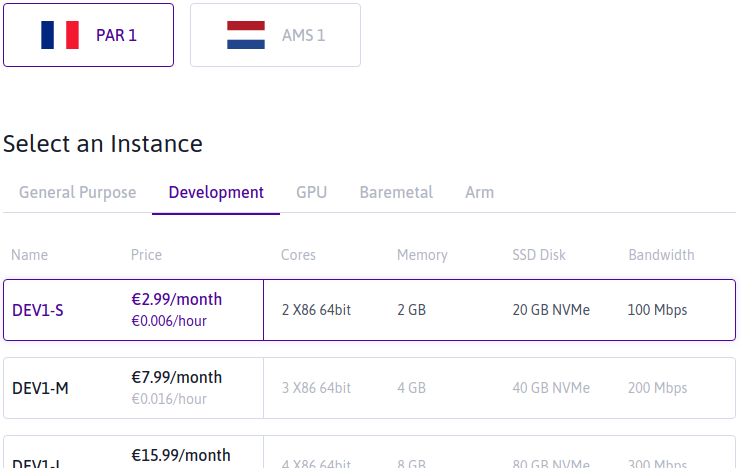
<p>Their pricing is also fantastic. You can get a &ldquo;development server&rdquo; (DEV1-S) with
2 cores and 2GB memory for €2.99 a month.</p>
<p><img src="/images/scaleway_par1.png" alt="Scaleway development servers overview (Paris)"></p>
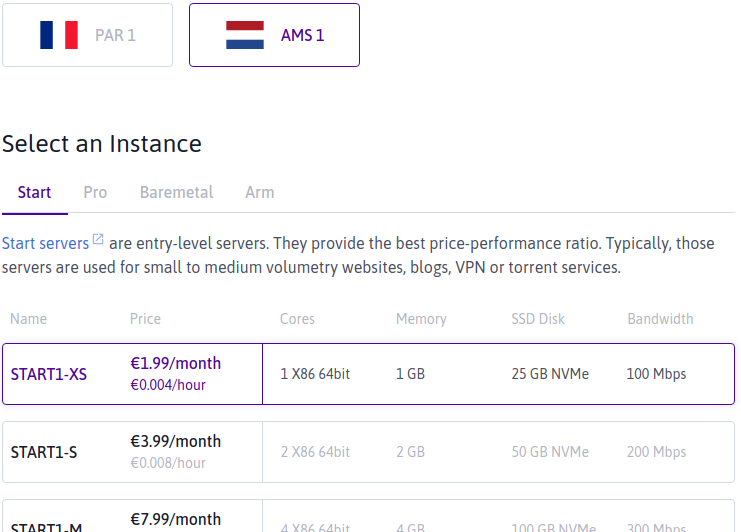
<p>In their Amsterdam data center, you can even get a &ldquo;Start server&rdquo; (START1-XS)
with 1 core and 1GB memory for as little as €1.99 a month.</p>
<p><img src="/images/scaleway_ams1.png" alt="Scaleway start servers overview (Amsterdam)"></p>
<p>(Note that the <a href="https://www.scaleway.com/en/pricing/">Scaleway pricing page</a> does
not list the Amsterdam offerings so they might align these options in the
future.)</p>
<p>For small applications (like this blog) or for experiments these are great
machines. Provisioning is quick and besides compute resources, Scaleway offers a
bunch of other services (like object storage and virtual firewalls).</p>
<p>Unfortunately I only discovered <em>after</em> migrating this site from RamNode to
Scaleway that the
<a href="https://web.archive.org/web/20181016143909/https://www.scaleway.com/faq/servers/network/#-Do-you-offer-IPv6">Scaleway IPv6 offering</a> is
not mature enough for my taste. So I migrated back to RamNode (that is: I
changed the DNS records back) and worked on plan B.</p>
<h3 id="digitalocean">DigitalOcean</h3>
<p>That new plan was to move to <a href="https://m.do.co/c/03f1fbc39551">DigitalOcean</a>
(referral link). I have used DigitalOcean in the past for a few experiments and
liked the experience. They provide a wide range of services, which include
managed Kubernetes clusters, object storage and cloud firewalls. There is a
<a href="https://registry.terraform.io/providers/digitalocean/digitalocean/latest/docs">DigitalOcean provider</a>
for Terraform and the IPv6 support seems to be what I need.</p>
<p>With this snippet of Terraform code:</p>
<div class="highlight"><pre tabindex="0" class="chroma"><code class="language-hcl" data-lang="hcl"><span class="line"><span class="cl"><span class="k">resource</span> <span class="s2">&#34;digitalocean_firewall&#34; &#34;webserver&#34;</span> {
</span></span><span class="line"><span class="cl">  <span class="p">...</span>
</span></span><span class="line"><span class="cl">
</span></span><span class="line"><span class="cl"><span class="n">  inbound_rule</span> <span class="o">=</span> <span class="p">[</span>
</span></span><span class="line"><span class="cl">    {
</span></span><span class="line"><span class="cl"><span class="n">      protocol</span>         <span class="o">=</span> <span class="s2">&#34;tcp&#34;</span>
</span></span><span class="line"><span class="cl"><span class="n">      port_range</span>       <span class="o">=</span> <span class="s2">&#34;80&#34;</span>
</span></span><span class="line"><span class="cl"><span class="n">      source_addresses</span> <span class="o">=</span> <span class="p">[</span><span class="s2">&#34;0.0.0.0/0&#34;, &#34;::/0&#34;</span><span class="p">]</span>
</span></span><span class="line"><span class="cl">    }<span class="p">,</span>
</span></span><span class="line"><span class="cl">    {
</span></span><span class="line"><span class="cl"><span class="n">      protocol</span>         <span class="o">=</span> <span class="s2">&#34;tcp&#34;</span>
</span></span><span class="line"><span class="cl"><span class="n">      port_range</span>       <span class="o">=</span> <span class="s2">&#34;443&#34;</span>
</span></span><span class="line"><span class="cl"><span class="n">      source_addresses</span> <span class="o">=</span> <span class="p">[</span><span class="s2">&#34;0.0.0.0/0&#34;, &#34;::/0&#34;</span><span class="p">]</span>
</span></span><span class="line"><span class="cl">    }<span class="p">,</span>
</span></span><span class="line"><span class="cl">  <span class="p">]</span>
</span></span></code></pre></div><p>I can configure my firewall to allow incoming traffic to port 80 and 443 from
all IPv4 and IPv6 sources:</p>
<p><img src="/images/digitalocean_firewall.png" alt="DigitalOcean firewall rules"></p>
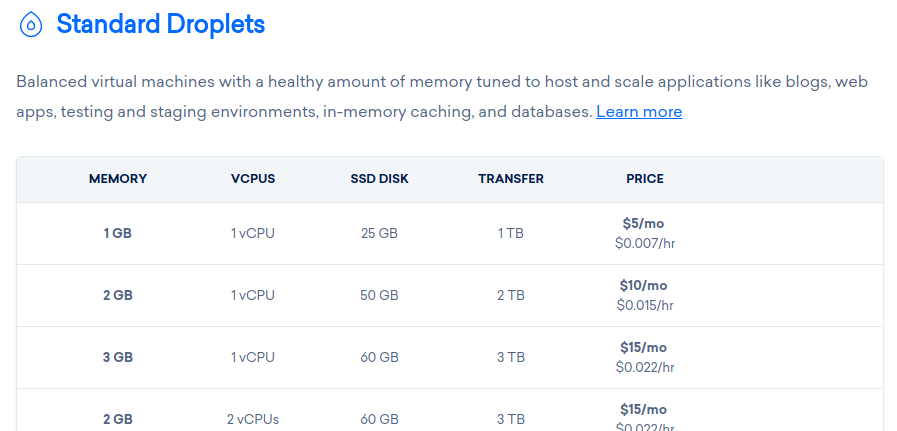
<p>Do note that DigitalOcean Droplets are less cheap than the Scaleway servers.
But I still think they provide good value for money.</p>
<figure><img src="/images/digitalocean_pricing_2019.png"
    alt="DigitalOcean Droplet prices, April 2019"><figcaption>
      <p>Source: the <a href="https://www.digitalocean.com/pricing/">DigitalOcean pricing page</a></p>
    </figcaption>
</figure>

<p>With the hosting sorted out, the next piece of the puzzle is the way this
website is served.</p>
<h2 id="serving-the-content">Serving the content</h2>
<p>I used to have Nginx running directly on the machine and it served the static
files that make up this website. And that is a perfectly fine setup, it does not
have too many moving parts and deployment of a new version can be as simple as
copying a bunch of files over to the machine. But&hellip;</p>
<p>It wasn&rsquo;t very exciting to me. And to be honest, that is also part of why I run
my own blog instead of using services like WordPress or Medium&mdash;I want to
tinker with this stuff. (That and the fact that I want to <a href="https://adactio.com/articles/13879">own my own
content</a>.)</p>
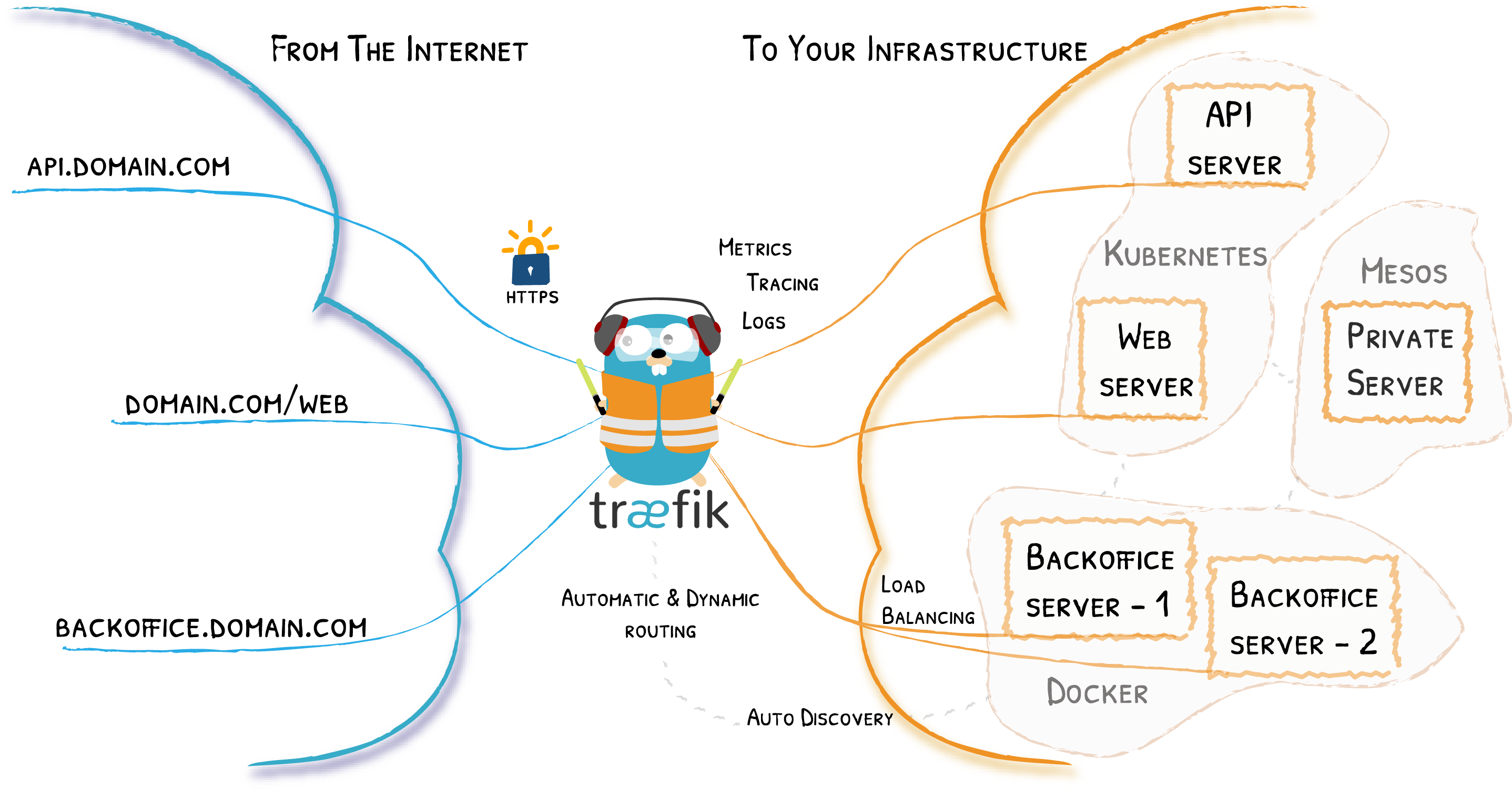
<p>So the new setup is using <a href="https://traefik.io/">Traefik</a> as a reverse proxy. The
big selling points for me are the fact that it handles the TLS certificates for
me (via <a href="https://letsencrypt.org/">Let&rsquo;s Encrypt</a>, which I was already using)
and that I can easily add backend services by spinning up Docker containers with
the right labels.</p>
<figure><img src="/images/traefik_architecture.png"
    alt="Traefik architecture"><figcaption>
      <p>Source: <a href="https://docs.traefik.io/v2.0/">Traefik documentation</a></p>
    </figcaption>
</figure>

<p>Which is exactly what I did for this blog. It is now a Docker container with
Nginx as webserver. This webserver still serves the static content that makes up
this website.</p>
<p>In the future I might spin up additional services (I am thinking about replacing
Disqus with something self hosted), and this setup should make that easier.</p>
<p>Note that running the services in Docker containers also means I no longer
receive automatic updates via <a href="https://wiki.debian.org/Apt">Apt</a> of the
services that are exposed to the internet (the reverse proxy and webserver). I
will have to keep the Docker images I am using up-to-date myself by either
building them myself or regularly pulling recent versions. On the upside: I am
no longer bound to the version available in a Debian repository; I can run any
version of Traefik or Nginx I like, as long as it is packaged in a Docker image.</p>
<p>A noticeable downside of this setup is that deploying a new version is a bit
more complex. I can no longer &ldquo;<code>scp</code>&rdquo; files to the right directory. Instead I
have to supply a Docker image.</p>
<h2 id="code-repository">Code repository</h2>
<p>Enter <a href="https://about.gitlab.com/">GitLab</a>. Their service not only
includes a Git repository, but also
<a href="https://about.gitlab.com/stages-devops-lifecycle/continuous-integration/">CI/CD</a> and a
<a href="https://docs.gitlab.com/ee/user/packages/container_registry/index.html">container registry</a>.
In other words: when I push a change, GitLab can automatically build a new image
for me.</p>
<p>And that is exactly what I have set up at the moment. When I&rsquo;m finished with
this article, I will:</p>
<ul>
<li><code>git push</code> it to GitLab,</li>
<li>wait a moment for the image to build (about 2 minutes currently),</li>
<li><code>ssh</code> in to my VPS,</li>
<li>pull the fresh image, and</li>
<li>start a container with the new image.</li>
</ul>
<p>Like I said, this is a bit more complex than before where I could copy over my
static files.</p>
<p>Then again, that is not a completely fair comparison. Compiling the static
files, generating the CSS from <a href="https://sass-lang.com/">SASS</a> and optimizing the
images were things I had to do manually before I could copy over the files. But
because those actions were triggered by a single command (“<code>make publish</code>”) it
<em>feels</em> like it was less complex.</p>
<p>On the bright side: now GitLab is building the content it means I have clean,
reproducible builds. There is no longer a risk of unfinished articles popping up
in production. (Assuming I don&rsquo;t accidentally commit and push them&hellip;)</p>
<h2 id="performance">Performance</h2>
<p>Just like the last time when I switched hosting providers, I was curious about
the impact of the change on the performance of this site. Especially because in
the new situation Chrome can use HTTP/2 instead of falling back to HTTP/1.1.</p>
<p>For reference: at RamNode I had a standard KVM with 512 MB RAM, 1 CPU
core and 10 GB storage on an SSD. At DigitalOcean I am using a droplet with
1 GB memory, 1 CPU and 25 GB storage on an SSD. Both machines are
running in a data center in the Netherlands.</p>
<h3 id="uptime-robot">Uptime Robot</h3>
<p>I am monitoring my website via <a href="https://uptimerobot.com/">Uptime Robot</a>. They
can show me the response time of the monitors.</p>


<table>
  
    <caption>Average response times (ms)</caption>
  
  
  <thead>
    
    
    <tr>
      
        
          <th></th>


          <th class="numeric">Old</th>


          <th class="numeric">New</th>
        
      
    </tr>
  </thead>
  
  <tbody>
  
    <tr>
      
        
          <td>Ping (<em>&lt;hostname&gt;</em>.vlent.nl)</td>


          <td class="numeric">119.56</td>


          <td class="numeric">118.14</td>
        
      
    </tr>
  
    <tr>
      
        
          <td>HTTPS request IPv4 (<a href="https://www.vlent.nl">https://www.vlent.nl</a>)</td>


          <td class="numeric">523.74</td>


          <td class="numeric">523.57</td>
        
      
    </tr>
  
    <tr>
      
        
          <td>HTTPS request IPv6 (<a href="https://www.vlent.nl">https://www.vlent.nl</a>)</td>


          <td class="numeric">1048.00</td>


          <td class="numeric">505.84</td>
        
      
    </tr>
  
  </tbody>
</table>

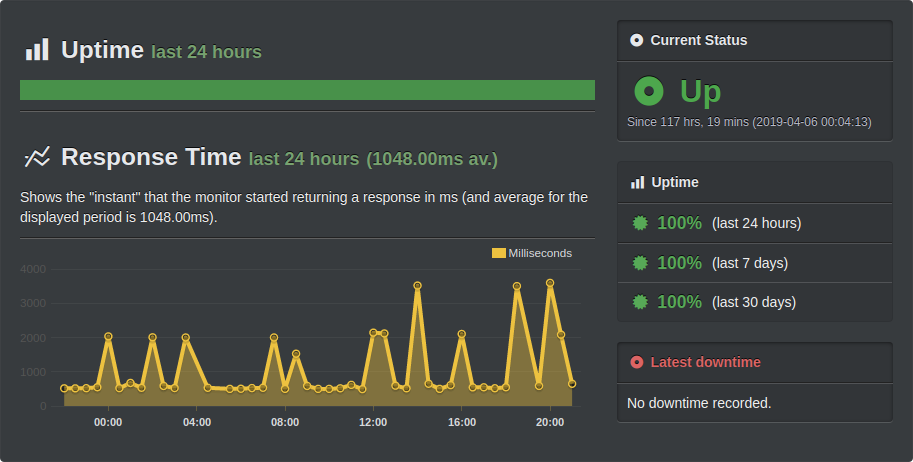
<p>These are averages over the last 24 hours. Overall the results are comparable.
The only big difference is the IPv6 times, but it looks like it was a bad day
for IPv6 at RamNode as you can see in the image below. (If you exclude the
spikes you are also in the 500-ish ms range.)</p>
<p><img src="/images/uptime_robot_response_time.png" alt="Uptime Robot response time overview"></p>
<h3 id="webpagetest">WebPageTest</h3>
<p>I also ran a few tests at <a href="https://webpagetest.org/">WebPageTest</a>. I picked a
(more or less) random page, my
<a href="/2019/03/21/microsoft-ignite-the-tour-amsterdam-day-two/">previous post</a>,
assuming it is representative of most of the content here: a page with a few images.</p>
<p>I ran two sets of tests. The first one was a run of 9 tests from Dulles, VA
using Chrome on a cable connection. The second set was a run of 5 tests from
Dulles, VA using Chrome on a Nexus 5 on a 3G connection. The results in the
table below are the values reported as the median run.</p>


<table>
  
    <caption>Median run times (s)</caption>
  
  
  <thead>
    
    
    <tr>
      
        
          <th></th>


          <th class="numeric">Cable/Old</th>


          <th class="numeric">Cable/New</th>


          <th class="numeric">3G/Old</th>


          <th class="numeric">3G/New</th>
        
      
    </tr>
  </thead>
  
  <tbody>
  
    <tr>
      
        
          <td>Load time</td>


          <td class="numeric">3.228</td>


          <td class="numeric">3.052</td>


          <td class="numeric">10.993</td>


          <td class="numeric">10.947</td>
        
      
    </tr>
  
    <tr>
      
        
          <td>First byte</td>


          <td class="numeric">0.638</td>


          <td class="numeric">0.488</td>


          <td class="numeric">2.368</td>


          <td class="numeric">2.145</td>
        
      
    </tr>
  
    <tr>
      
        
          <td>Start render</td>


          <td class="numeric">1.100</td>


          <td class="numeric">0.900</td>


          <td></td>


          <td class="numeric">3.975</td>
        
      
    </tr>
  
    <tr>
      
        
          <td><a href="https://docs.webpagetest.org/metrics/speedindex/">Speed index</a></td>


          <td class="numeric">1.305</td>


          <td class="numeric">1.847</td>


          <td></td>


          <td class="numeric">4.761</td>
        
      
    </tr>
  
    <tr>
      
        
          <td><a href="https://github.com/WPO-Foundation/webpagetest/blob/master/docs/Metrics/TimeToInteractive.md">First interactive</a></td>


          <td class="numeric">&gt;1.105</td>


          <td class="numeric">&gt;0.932</td>


          <td class="numeric">&gt;6.920</td>


          <td class="numeric">&gt;10.925</td>
        
      
    </tr>
  
    <tr>
      
        
          <td>Fully loaded</td>


          <td class="numeric">3.376</td>


          <td class="numeric">3.255</td>


          <td class="numeric">11.544</td>


          <td class="numeric">11.412</td>
        
      
    </tr>
  
  </tbody>
</table>

<p>In these the numbers there are no shocking differences between the old and the
new setup. The new site seems to be 100&ndash;200 ms faster then the old one
though, except for the load time and first interactive time on the Nexus 5 on
the 3G connection.</p>
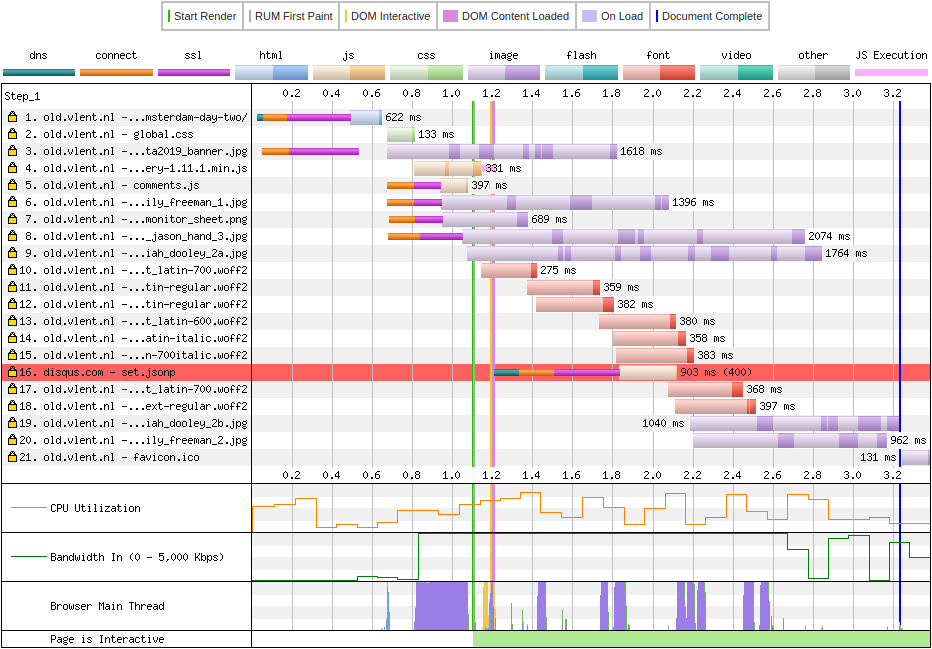
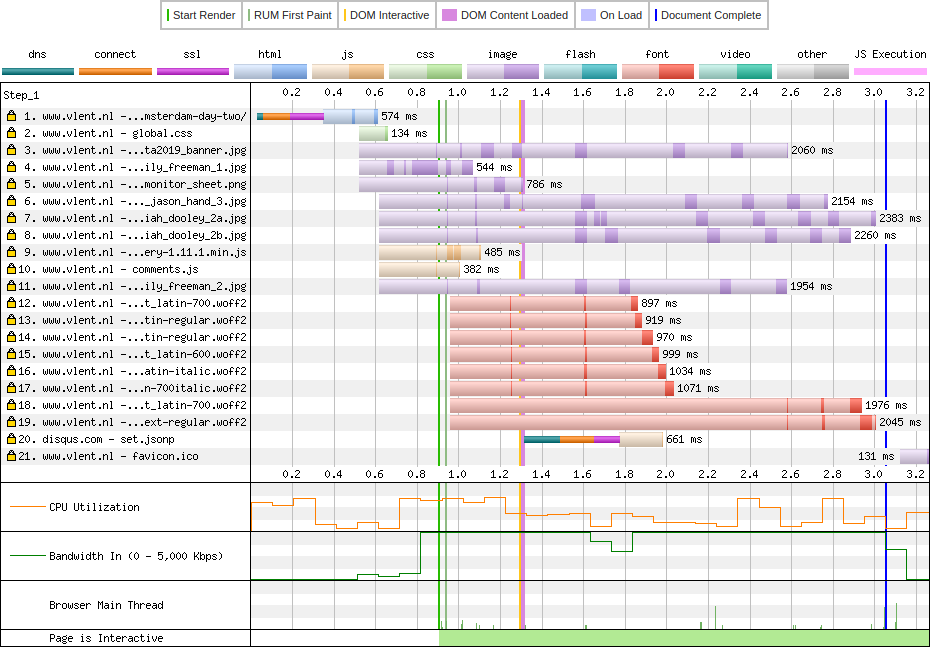
<p>The biggest differences are in the waterfall graphs.</p>
<figure><img src="/images/webpagetest_waterfall_2019_old.png"
    alt="Waterfall view of a test run of my old setup"><figcaption>
      <p>Waterfall view, old site</p>
    </figcaption>
</figure>

<figure><img src="/images/webpagetest_waterfall_2019_new.png"
    alt="Waterfall view of a test run of my new setup"><figcaption>
      <p>Waterfall view, new site</p>
    </figcaption>
</figure>

<p>You can nicely see the difference between HTTP/1.1 and HTTP/2 here. In the old
setup, you can see six separate connections to my site, where the new setup only
uses one.</p>
<h2 id="the-future">The future</h2>
<p>Migrating this site has been blocking me for a while. I felt like I <em>had</em> to do
this first before I could start working on other things. Now this is finished, I
can pick up those things.</p>
<p>Things like (in random order):</p>
<ul>
<li>I would like to replace Disqus with a self hosted solution
(<a href="https://posativ.org/isso/">Isso</a>?).</li>
<li><a href="https://indieweb.org/Webmention">Webmentions</a> look interesting. Perhaps I can
use them as well?</li>
<li>I might even migrate away from Acrylamid. I still like the idea of having a
static website though, and I&rsquo;m looking at <a href="https://gohugo.io/">Hugo</a> at the
moment.</li>
</ul>
<p>But I might also want to improve the current setup a bit more:</p>
<ul>
<li>The current Docker image building process works, but there are a few things I
could improve or at least clean up. (Then again: if I move to e.g. Hugo this
might not be as relevant anymore.)</li>
<li>Pulling a new Docker image and restarting the service with the new image is
something that I should be able to further (or even fully) automate. Ideally
there will no longer be a need for me to log into the server. Pushing the new
post to GitLab should be enough.</li>
</ul>
<p>So plenty of fun stuff to tinker with!</p>]]></content>
  </entry>
  <entry>
    <title type="html"><![CDATA[Open tabs — March 2019]]></title>
    <link rel="alternate" href="https://markvanlent.dev/2019/03/14/open-tabs-march-2019/" type="text/html" />
    <id>https://markvanlent.dev/2019/03/14/open-tabs-march-2019/</id>
    <author>
      <name>map[name:Mark van Lent uri:https://markvanlent.dev/about/]</name>
    </author>
    <category term="aws" />
    <category term="blog" />
    <category term="devops" />
    <category term="go" />
    <category term="observability" />
    <category term="monitoring" />
    <category term="sre" />
    <category term="tabs" />
    
    <updated>2021-11-09T20:09:33Z</updated>
    <published>2019-03-14T00:00:00Z</published>
    <content type="html"><![CDATA[<p>Last May I <a href="/2018/05/12/open-tabs/">published the list of tabs</a> I had
open on my phone at that moment in time. This another one of those posts.</p>
<p>I have switched phones but there were about 50 tabs open in the browser on my
old phone. This article is a selection of the pages I want to (re)read in the
future.</p>
<h2 id="go">Go</h2>
<p>I want to learn <a href="https://golang.org/">Go</a>. This is a list of resources that seem
useful:</p>
<dl>
<dt><a href="https://elsesiy.com/blog/containerization-of-golang-applications">Containerization of Golang applications</a></dt>
<dd>An example by Jonas-Taha El Sesiy (including a <code>Dockerfile</code> and <code>Makefile</code>) of how
you can deploy a Go application in a Docker image.</dd>
<dt><a href="https://golang.org/doc/effective_go">Effective Go</a></dt>
<dd>I&rsquo;ve heard positive things about this document.</dd>
<dt><a href="https://golang-for-python-programmers.readthedocs.io/en/latest/about.html">Go for Python Programmers</a></dt>
<dd>Well&hellip; I&rsquo;m a Python programmer and I want to learn Go. Nuff said. ;-)</dd>
<dt><a href="https://gobyexample.com/">Go by Example</a></dt>
<dd>Again practical examples to teach the concepts in Go. The examples are, as far
as I&rsquo;ve seen, relatively short. This is positive because it highlights the
concept at hand, but on the other hand it can be useful to have more complex
examples to get a better understanding of how concepts work together to create a
larger application.</dd>
<dt><a href="https://lets-go.alexedwards.net/">Let&rsquo;s Go! Learn to Build Professional Web Applications With Golang</a></dt>
<dd>This book promises to teach Go while building an application. I find having
practical examples helps me when learning a new programming language.</dd>
<dt><a href="https://github.com/hellerve/programming-talks">Programming Talks</a></dt>
<dd>A (community maintained) list of talks on programming language specifics.</dd>
<dt><a href="https://golang.org/ref/spec">The Go Programming Language Specification</a></dt>
<dd>It&rsquo;s always good to have the specs nearby.</dd>
</dl>
<h2 id="observability-and-monitoring">Observability and monitoring</h2>
<dl>
<dt><a href="https://www.integralist.co.uk/posts/monitoring-best-practices/">Observability and Monitoring Best Practices</a></dt>
<dd>Terminology and a set of best practices by Mark McDonnell.</dd>
<dt><a href="https://netflixtechblog.com/lessons-from-building-observability-tools-at-netflix-7cfafed6ab17">Lessons from Building Observability Tools at Netflix</a></dt>
<dd>Lessons learned from big companies usually make an interesting read. Even
though things might not apply to your situation.</dd>
<dt><a href="https://www.digitalocean.com/community/tutorials/monitoring-for-distributed-and-microservices-deployments">Monitoring for Distributed and Microservices Deployments</a></dt>
<dd>An article about the challenges of distributed architectures and adjustments
needed to be able to respond to incidents in this changed environment.</dd>
<dt><a href="https://medium.com/observability">Observability+</a></dt>
<dd>A blog with a number of interesting articles about observability.</dd>
<dt><a href="https://nickcraver.com/blog/2018/11/29/stack-overflow-how-we-do-monitoring/">Stack Overflow: How We Do Monitoring - 2018 Edition</a></dt>
<dd>This article (and Nick Craver&rsquo;s previous posts by the way) makes for
fascinating reading.</dd>
<dt><a href="https://www.linuxjournal.com/content/why-your-server-monitoring-still-sucks">Why Your Server Monitoring (Still) Sucks</a></dt>
<dd>Five reasons why your current monitoring sucks and what to do about it.</dd>
<dt><a href="https://techbeacon.com/devops/10-monitoring-talks-every-developer-should-watch">10 monitoring talks that every developer should watch</a></dt>
<dd>Enough material in here to learn from.</dd>
</dl>
<h2 id="cloud-services">Cloud services</h2>
<dl>
<dt><a href="https://nodramadevops.com/2019/01/how-many-aws-accounts-do-i-need/">How many AWS accounts do I need?</a></dt>
<dt><a href="https://nodramadevops.com/2019/01/how-should-i-organize-my-aws-accounts/">How should I organize my AWS accounts?</a></dt>
<dd>Two articles published on the #NoDrama DevOps blog about organizing your AWS account(s).</dd>
<dt><a href="https://www.awsadvent.com/2018/12/19/serverless-from-azure-to-aws/">Serverless: From Azure to AWS</a></dt>
<dd>Comparing Azure and AWS serverless offerings.</dd>
</dl>
<h2 id="other-devops-related-articles">Other devops related articles</h2>
<dl>
<dt><a href="https://medium.com/@tonistiigi/advanced-multi-stage-build-patterns-6f741b852fae">Advanced multi-stage build patterns</a></dt>
<dd>Tõnis Tiigi has a number of examples of multi-stage Docker image build
patterns.</dd>
<dt><a href="https://www.digitalocean.com/community/tutorials/how-to-use-git-hooks-to-automate-development-and-deployment-tasks">How To Use Git Hooks To Automate Development and Deployment Tasks</a></dt>
<dd>A list of available Git hooks and a demonstration on how to use hooks to
automate tasks.</dd>
<dt><a href="https://blog.gruntwork.io/open-sourcing-terratest-a-swiss-army-knife-for-testing-infrastructure-code-5d883336fcd5">Open sourcing Terratest: a swiss army knife for testing infrastructure code</a></dt>
<dd>I am using tools like <a href="https://www.terraform.io/">Terraform</a> and
<a href="https://www.packer.io/">Packer</a> quite a bit these days, but testing the code is
still something I&rsquo;m doing manually. Perhaps <a href="https://github.com/gruntwork-io/terratest">Terratest</a> is a nice solution?</dd>
<dt><a href="https://github.com/andrealmar/sre-university">SRE University</a></dt>
<dd>A list of resources related to Site Reliability Engineering.</dd>
<dt><a href="https://www.scalyr.com/blog/site-reliability-engineer">What Does a Site Reliability Engineer Do?</a></dt>
<dd>Activities an Site Reliability Engineer is participating in, according to Erik
Dietrich.</dd>
</dl>
<h2 id="blog-improvements">Blog improvements</h2>
<p>Once I get around to working on this site again, there are a few things I want
to have a look at.</p>
<dl>
<dt><a href="https://matthiasadler.info/blog/isso-comment-integration/">Bye, Bye Disqus - Say Hello to Isso</a></dt>
<dd>I am thinking about replacing the <a href="https://disqus.com/">Disqus</a> comments with
something else. <a href="https://posativ.org/isso/">Isso</a> is a contestant.</dd>
<dt><a href="https://www.sarasoueidan.com/blog/hex-rgb-to-hsl/">On Switching from HEX &amp; RGB to HSL</a></dt>
<dd>Sara Soueidan convinced me in this article that expressing colors in HSL (Hue,
Saturation and Lightness) can be an intuitive way to choose colors. I&rsquo;ll want to
keep this in mind if I overhaul the colors used on this site.</dd>
<dt><a href="https://securitytxt.org/">security.txt</a></dt>
<dd>A (proposed) standard to provide information on how to report security issues.</dd>
<dt><a href="https://www.zachleat.com/web/font-checklist/">The Font Loading Checklist</a></dt>
<dd>I like having pretty (IMHO) fonts for this site. This resource might help me
improve the use of them.</dd>
<dt><a href="https://www.fastly.com/blog/headers-we-dont-want">The headers we don&rsquo;t want</a></dt>
<dd>Time to review the response headers this site is returning.</dd>
</dl>
<h2 id="miscellaneous">Miscellaneous</h2>
<dl>
<dt><a href="https://gchq.github.io/CyberChef/">CyberChef</a></dt>
<dd><q>CyberChef is a simple, intuitive web app for carrying out all manner of
&ldquo;cyber&rdquo; operations within a web browser.</q></dd>
<dt><a href="https://charity.wtf/2019/01/04/engineering-management-the-pendulum-or-the-ladder/">Engineering Management: The Pendulum Or The Ladder</a></dt>
<dd>Another great article by Charity Majors. This time she writes about becoming
an engineering manager and career options.</dd>
<dt><a href="https://web.archive.org/web/20201112013936/https://www.mockingbirdconsulting.co.uk/blog/2019-01-05-hashicorp-at-home/">Hashicorp at Home</a></dt>
<dt><a href="https://web.archive.org/web/20201112020207/https://www.mockingbirdconsulting.co.uk/blog/2019-01-08-hashicorp-at-home-part-2/">Hashicorp at Home - Part 2</a></dt>
<dd>Matt Wallace improved his home network with <a href="https://www.vaultproject.io/">Vault</a>
(managing secret), <a href="https://www.consul.io/">Consul</a> (managing DNS and service
discovery), <a href="https://www.nomadproject.io/">Nomad</a> (managing containers),
<a href="https://traefik.io/">Traefik</a> (dynamic reverse proxy/load balancing) and
<a href="https://www.datadoghq.com/">DataDog</a> (monitoring).</dd>
<dt><a href="https://www.digitalocean.com/community/tutorials/how-to-use-sshfs-to-mount-remote-file-systems-over-ssh">How To Use SSHFS to Mount Remote File Systems Over SSH | DigitalOcean</a></dt>
<dd>Basically what the title says: instructions on how to mount a file system of a
remote machine, using SSH.</dd>
<dt><a href="https://www.oreilly.com/library/view/time-management-for/0596007833/">Time Management for System Administrators</a></dt>
<dd>Something I could get better at: time management. Now to make the time to
actually read this book&hellip;</dd>
</dl>]]></content>
  </entry>
  <entry>
    <title type="html"><![CDATA[New home for this site]]></title>
    <link rel="alternate" href="https://markvanlent.dev/2013/05/15/new-home-for-this-site/" type="text/html" />
    <id>https://markvanlent.dev/2013/05/15/new-home-for-this-site/</id>
    <author>
      <name>map[name:Mark van Lent uri:https://markvanlent.dev/about/]</name>
    </author>
    <category term="blog" />
    <category term="devops" />
    
    <updated>2021-08-20T20:23:14Z</updated>
    <published>2013-05-15T13:33:00Z</published>
    <content type="html"><![CDATA[<p>Since early April 2013 this blog has moved from a shared hosting environment
to a VPS.</p>
<h2 id="puppet">Puppet</h2>
<p>Ever since the
<a href="/2011/06/20/deployment-knowledge-sharing-session/">deployment knowledge sharing session</a>
I attended in 2011, I have fallen in love with
<a href="https://puppet.com/">Puppet</a>. About three months later I
started to use it in my day job. Unfortunately the investment to
completely provision our server with Puppet would be too high compared
to what we would gain.</p>
<p>But nothing stopped me from doing just that with my own VPS&hellip; So the box this
site now runs on, is completely configured using Puppet. The only thing that I
have not handled (yet?) is the actual content of this site. That is a separate
process handled by an
<a href="https://posativ.org/acrylamid/commands.html#deploy">Acrylamid task</a>
which I have to run after provisioning the server.</p>
<p>To accomplish this, I have a directory which contains the following:</p>
<div class="highlight"><pre tabindex="0" class="chroma"><code class="language-plaintext" data-lang="plaintext"><span class="line"><span class="cl">.
</span></span><span class="line"><span class="cl">├── install.sh
</span></span><span class="line"><span class="cl">├── manifests
</span></span><span class="line"><span class="cl">│   └── atlanta.pp
</span></span><span class="line"><span class="cl">└── modules
</span></span><span class="line"><span class="cl">    ├── firewall
</span></span><span class="line"><span class="cl">    ├── ...
</span></span><span class="line"><span class="cl">    └── webserver
</span></span></code></pre></div><p>The <code>install.sh</code> script contains these lines:</p>
<div class="highlight"><pre tabindex="0" class="chroma"><code class="language-bash" data-lang="bash"><span class="line"><span class="cl">apt-get update <span class="o">&amp;&amp;</span> apt-get -y upgrade
</span></span><span class="line"><span class="cl">apt-get -y install puppet
</span></span><span class="line"><span class="cl">puppet apply --modulepath<span class="o">=</span>./modules manifests/atlanta.pp
</span></span></code></pre></div><p>So all I need to do is <code>scp</code> this directory to the VPS and run the
<code>install.sh</code> script and the server is ready. A quick &ldquo;<code>acrylamid dp atlanta</code>&rdquo; command later and I am done. The whole process takes only a
few minutes.</p>
<h2 id="the-process">The process</h2>
<p>Most of the Puppet configuration was created and tested locally. To do
this I have a <a href="https://www.vagrantup.com/">Vagrant</a> box (which uses
<a href="https://www.virtualbox.org/">VirtualBox</a>) with almost the same setup
as the VPS. I am using Ubuntu 12.04 64-bit on both the VPS and the
Vagrant box, but after a reinstall (before I run Puppet) the VPS is
still configured a bit different than the Vagrant box. So I had to
make some tweaks to the Puppet configuration after trying it out on
the VPS.</p>
<p>Once I was satisfied with the result, I started with a fresh install
of the VPS, ran Puppet and copied the content of this site over. A
small DNS change later and I was up and running. (Since I have a
static site and use <a href="https://disqus.com/">Disqus</a> for commenting I did
not even have to worry about the DNS change propagation time.)</p>
<h2 id="what-does-google-think">What does Google think?</h2>
<p>My main reason to move from shared hosting to a VPS was to get more
control over the environment and get more freedom. Still, better
performance also would not hurt.</p>
<h3 id="time-to-download">Time to download</h3>
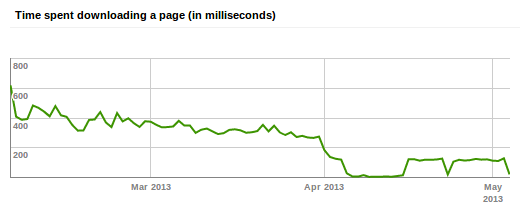
<p>This is what I saw in the Google Webmaster Tools:</p>
<p><img src="/images/gwt-2013-04-time-downloading.png" alt="Time to download a page: April is significantly lower"></p>
<p>As you can see, the time to download a page has about halved since
April. My initial thought was that this is probably related to the
location of the server: the shared hosting environment ran on a server
in The Netherlands while the VPS is running in a data centre in
Atlanta in the USA. That might make a huge difference if the pages are
crawled from the USA.</p>
<p>I did some quick measurements to get <em>some</em> data. To make a long story
short: the VPS is indeed a bit faster. There are too many differences
between the previous situation on the shared hosting environment and
the VPS to be able to tell what caused this difference. But I <em>am</em>
happy to see the previous graph none the less.</p>
<h3 id="other-statistics">Other statistics</h3>
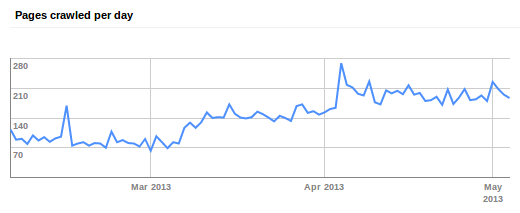
<p>Besides a change in time to download a page, I also saw that Google
crawls more pages a day:</p>
<p><img src="/images/gwt-2013-04-pages-crawled.png" alt="Number of pages crawled per day increased in April"></p>
<p>But since there is also an increase in March that I cannot explain, it
might be a coincidence that more pages were crawled per day since
early April.</p>
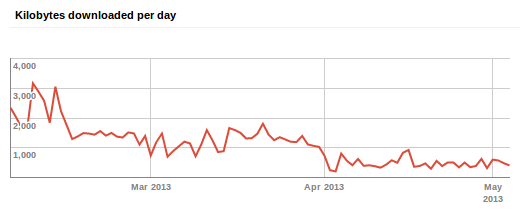
<p>What is remarkable is that there is less data downloaded per day while
more pages were crawled:</p>
<p><img src="/images/gwt-2013-04-kb-downloaded.png" alt="Less data downloaded per day"></p>
<p>This can&mdash;most likely&mdash;be explained by changes I made. In the old
shared environment I had no specific configuration to cache
content. On the VPS I have configured Nginx to send an expiry time (by
adding &ldquo;<code>expires 7d;</code>&rdquo; to the configuration which sets the appropriate
<code>Expires</code> and <code>Cache-Control</code> headers for the response).</p>
<h2 id="result">Result</h2>
<p>I got what I wanted: my site is running on an environment I can
completely control (from the operating system level up that is). This
allows for experimentation and perhaps even small side projects.</p>
<p>I also really liked tinkering with Puppet to get everything setup the
way I wanted it to. Both the sysadmin side of deciding how I wanted
things configured and the &lsquo;developer&rsquo; side of achieving that
configuration via Puppet were fun.</p>]]></content>
  </entry>
  <entry>
    <title type="html"><![CDATA[CloudFlare experiment]]></title>
    <link rel="alternate" href="https://markvanlent.dev/2012/12/27/cloudflare-experiment/" type="text/html" />
    <id>https://markvanlent.dev/2012/12/27/cloudflare-experiment/</id>
    <author>
      <name>map[name:Mark van Lent uri:https://markvanlent.dev/about/]</name>
    </author>
    <category term="blog" />
    <category term="development" />
    
    <updated>2021-08-19T13:13:50Z</updated>
    <published>2012-12-27T22:04:00Z</published>
    <content type="html"><![CDATA[<p>For about a month I have served this website using the CloudFlare free
plan. This article describes what I observed.</p>
<h2 id="why">Why</h2>
<p>Let me first explain why I started using
<a href="https://www.cloudflare.com/">CloudFlare</a>. Earlier this year I <a href="/2012/10/01/migrating-to-acrylamid/">migrated this
blog</a> from Django to a static site.  At the
same time I also switched from hosting at <a href="https://zestsoftware.nl/">Zest
Software</a> back to my old hosting provider,
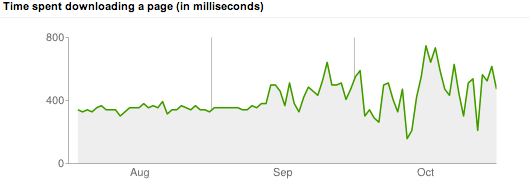
<a href="https://www.bhosted.nl/">bHosted</a>. Still, I expected to see a drop in the
time required to download a page and thus in the related graph in the Google
Webmaster Tools. This is what I saw:</p>
<p><img src="/images/webtoolsstats-october.png" alt="Time to download a page: September vs October"></p>
<p>As of October 1st&mdash;when I made the switch&mdash;the time needed to
download a page didn&rsquo;t necessarily drop; instead it became more
erratic and often higher than it was before.</p>
<p>I guessed that the expected speed improvement of having a static site
was negated by hosting the site on another server. At Zest my
site was dynamic but ran on a server that had a very light load and
was only hosting a couple of sites. And at bHosted the site is
running on a shared server with a load of 2&ndash;4 (based on a few
samples) and several hundred other sites.</p>
<p>I then by chance stumbled upon the content delivery network provided
by CloudFlare. And they even have a
<a href="https://www.cloudflare.com/plans/">free plan</a>.</p>
<h2 id="setup-and-first-experience">Setup and first experience</h2>
<p>First of all, the video on the CloudFlare homepage is absolutely right
about how easy it is to setup. Sure, I know a bit about DNS but
basically they do not require you to do very hard stuff. In fact, the
most complicated I had to do was to change the name servers so they
pointed to CloudFlare. (Actually: I found out that I could not change
them myself so I had to ask my domain registrar to do this for me.)</p>
<p>Unfortunately I lost the screenshots I made of my CloudFlare
statistics. But according to those statistics, CloudFlare handled
about half of the requests and traffic. And, on the side, also blocked
quite a few, supposedly, malicious requests.</p>
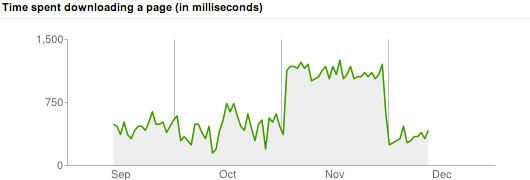
<p>I made the switch around the 1st of November. I expected that the
time to download a page would be more stable but also that is would be
lower. (That&rsquo;s one of the benefits of a content distribution network,
right?) Well, I was partially right&hellip;</p>
<p><img src="/images/webtoolsstats-december.png" alt="Time to download a page: October vs November"></p>
<p>As you can see, the time to download a page indeed did not fluctuate as much
anymore. But the download time increased dramatically! And that is the reason
why I switched back to serve the content directly from the bHosted server at the
end of November, as you can see in the graph.</p>
<p>Google also assigned &ldquo;special crawl rate settings&rdquo; in the period I was
using CloudFlare. I am not sure what this means and if it&rsquo;s positive
or not. Either way, within a week after taking CloudFlare out of the
loop, it was back to normal.</p>
<p><img src="/images/crawlratesetting.png" alt="Google assigned special crawl rate settings"></p>
<h2 id="measurements">Measurements</h2>
<p>Before I decided to switch back to just bHosted, I tried to do some
experiments to see if I could reproduce the differences measured by
Google. I gathered circa 30 URLs (the home page, the ten most recent
articles, a number of popular articles and a (more or less) random
selection) and told <a href="https://www.joedog.org/siege-home/">Siege</a> to have
a crack at it. More specifically I used the options &ldquo;<code>benchmark</code>&rdquo; (to
run the requests without a delay), &ldquo;<code>internet</code>&rdquo; (which randomly hits
the URLs I selected) and &ldquo;<code>concurrent</code>&rdquo; to experiment with different
number of concurrent users. These tests ran for 60 seconds each.</p>
<p>Since the bHosted servers are located in The Netherlands, I decided
to make the measurements a bit more fair. So I did not run the test
from my home (also in The Netherlands), but a
<a href="https://ramnode.com/">RamNode</a> VPS hosted in Atlanta,
Georgia.</p>
<h3 id="results">Results</h3>
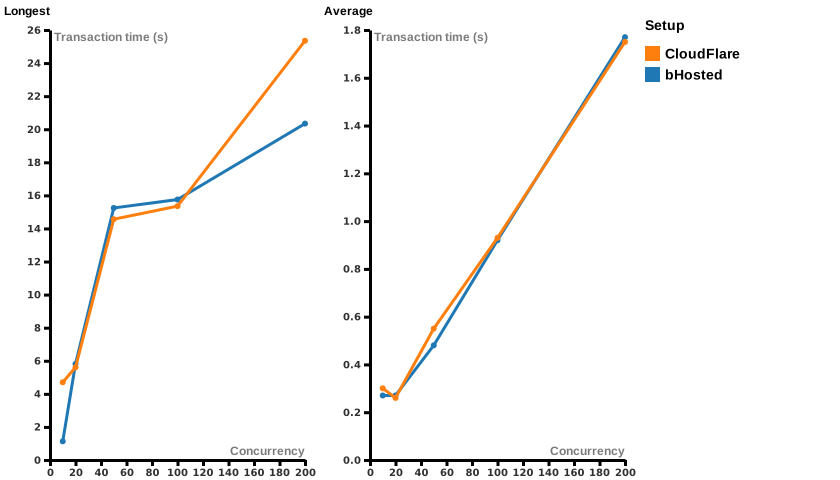
<p>The shortest transaction for both servers was stable: for bHosted it was 0.21
seconds and for CloudFlare it was 0.14 seconds. The average response time is
also comparable (the right graph lines in the image below). The longest
transactions however, differed a bit more.</p>
<figure><img src="/images/avg_max_transaction.svg"
    alt="Comparing the transaction times of the bHosted setup compared to CloudFlare for different concurrency settings"><figcaption>
      <p>Transaction times: bHosted vs CloudFlare (<a href="/files/avg_max_transaction.csv">raw data</a>, created via <a href="https://rawgraphs.io/">RAWGraphs</a>)</p>
    </figcaption>
</figure>

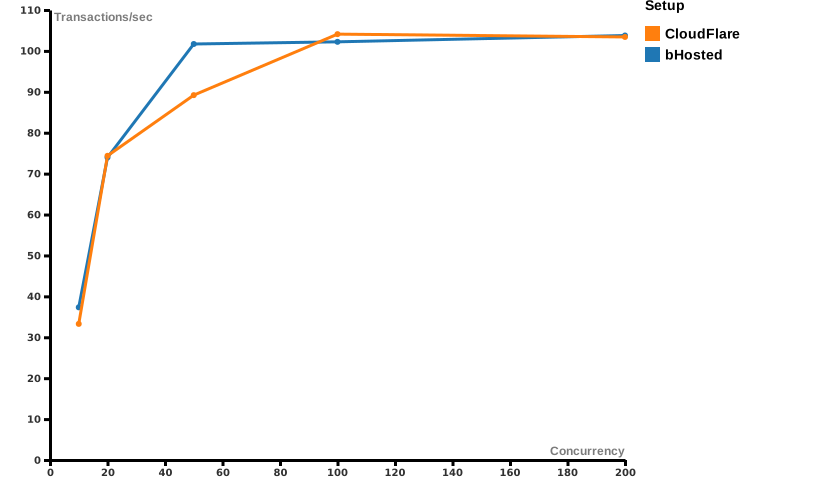
<p>The transaction rate of bHosted and CloudFlare seem to be comparable.
(Except for a spike in the bHosted setup at 50 concurrent simulated
users. But this could just be a happy accident&hellip;)</p>
<figure><img src="/images/transactions_per_second.svg"
    alt="Comparing the transactions/second of the bHosted setup compared to CloudFlare for different concurrency settings"><figcaption>
      <p>Transactions/sec: bHosted vs CloudFlare (<a href="/files/transactions_per_second.csv">raw data</a>, created via <a href="https://rawgraphs.io/">RAWGraphs</a>)</p>
    </figcaption>
</figure>

<h3 id="summary">Summary</h3>
<p>As you may have guessed, I am absolutely not an expert on the matter. But what I
conclude from this data is that there is not <em>that</em> much difference between
serving pages directly from a bHosted server or putting CloudFlare in between.</p>
<p>Sure, the longest transaction time in the CloudFlare setup is larger
in <em>some</em> situations. But for my blog 100+ concurrent users are
unlikely. (As a matter of fact in December an average of about 150
pages are requested per day. And Google only indexes an average of 80
pages per day at the moment of writing.) More importantly: the
<em>average</em> transaction time for bHosted and CloudFlare is
practically the same.</p>
<h2 id="conclusion">Conclusion?</h2>
<p>I am sure <strong>you</strong> should <strong>not</strong> draw the conclusion that using CloudFlare
is a bad thing. Nor do I want to complain about their service&mdash;after
all I did not pay them a dime. Having said that, my <strong>personal</strong>
conclusion was that since Google is
<a href="https://developers.google.com/search/blog/2010/04/using-site-speed-in-web-search-ranking">using site speed in web search ranking</a>
<strong>this site</strong> is better off by not using CloudFlare. Your mileage may
vary.</p>]]></content>
  </entry>
  <entry>
    <title type="html"><![CDATA[Acrylamid: a first evaluation]]></title>
    <link rel="alternate" href="https://markvanlent.dev/2012/11/08/acrylamid-first-evaluation/" type="text/html" />
    <id>https://markvanlent.dev/2012/11/08/acrylamid-first-evaluation/</id>
    <author>
      <name>map[name:Mark van Lent uri:https://markvanlent.dev/about/]</name>
    </author>
    <category term="acrylamid" />
    <category term="blog" />
    
    <updated>2021-08-19T13:13:50Z</updated>
    <published>2012-11-08T17:17:00Z</published>
    <content type="html"><![CDATA[<p>About a month ago I officially migrated this weblog to Acrylamid. This
is a first evaluation.</p>
<p>On the one hand, a month may not seem like a long time. So why
evaluate <a href="https://posativ.org/acrylamid/">Acrylamid</a> now? Well, for one
thing, I started working with it a bit earlier than
<a href="/2012/10/01/migrating-to-acrylamid/">October 1st</a> since I had
to migrate existing content and develop this site. Another reason is
that during the <a href="https://web.archive.org/web/20120414025842/http://www.ploneconf.org/">Plone Conference 2012</a> I
published more articles about those three days than I normally do in
a whole year.</p>
<h2 id="writing-articles">Writing articles</h2>
<p>During the conference I was not able to publish all articles immediately after
the talk was over. So I got into the habit of writing my notes in a drafts
folder. When I started making the notes ready for publication, I would move the
file to the normal directory. (Alternatively I could have added a <code>draft</code> field,
but by having them in a separate directory it was easier to see which articles
were not published yet.)</p>
<p>Although the Wi-Fi at the conference was almost perfect and the hotel
also offered free Wi-Fi, there were a couple of times where I did not
have a connection to the Internet while I <em>did</em> want to edit my
articles. But since I could do the writing on my own laptop, that
hardly mattered. The biggest issues were that I could not look up
things easily (I had to use my phone) and that the pages were not
rendered with the right fonts since these are hosted externally.</p>
<p>Another thing I liked was my tool set. I am still really happy with
Emacs as an editor. I love that I am able to hit <code>C-x C-s</code> as often as
I need&mdash;no matter the network state. That beats having to edit
articles online using e.g. TinyMCE. Not that the latter is a bad thing
by the way, I just prefer my good old Emacs.</p>
<p>As for marking up the articles: Markdown also proved to be a good syntax to do
so. Only once was I not able to get the result that I was after. I wanted to
have a code block inside an unordered list. I am pretty sure it is possible, I
just did not know how exactly and rewrote the article a little bit to work
around it. Lets chalk this up to me being too lazy and inexperienced with
Markdown.</p>
<h2 id="output">Output</h2>
<p>One of the things I am currently still struggling with is my URL structure. Years
ago I used URLs like <code>/weblog/title-of-the-article/</code>. I switched to
URLs with dates (<code>/weblog/2012/02/04/title-of-the-article</code>) when I
<a href="/2010/05/30/switch-django/">switched to Django</a>. In Django it
was very easy to write a view that redirected the old URLs to the new
ones. But since <a href="https://www.w3.org/Provider/Style/URI.html">cool URIs don&rsquo;t change</a> I
have to list all the old URLs in that <code>.htaccess</code> file or else I have
to find a more generic solution&mdash;for instance by writing a custom
view for Acrylamid that uses a <code>&lt;meta&gt;</code> element or JavaScript to
redirect visitors to the new URL. In the meanwhile: to mitigate the
problem for visitors, I am using Google to
<a href="https://developers.google.com/search/blog/2008/08/make-your-404-pages-more-useful">make my 404 pages more useful</a>. Most
of the times, the search does return the page the visitor was after.</p>
<p>Another thing that bothers me is that I do not (yet) have views that
show the articles for a year/month/day. For instance
<code>/weblog/2012/10/10/</code> to see all articles for the first day of the
Plone conference.</p>
<h2 id="conclusion">Conclusion</h2>
<p>I am quite happy with the current setup. I am not completely done yet,
but for me it is a huge improvement over the Django (and Plone) setups
I had earlier. I think it is a really nice lightweight
blogging system.</p>]]></content>
  </entry>
  <entry>
    <title type="html"><![CDATA[Migrating to Acrylamid]]></title>
    <link rel="alternate" href="https://markvanlent.dev/2012/10/01/migrating-to-acrylamid/" type="text/html" />
    <id>https://markvanlent.dev/2012/10/01/migrating-to-acrylamid/</id>
    <author>
      <name>map[name:Mark van Lent uri:https://markvanlent.dev/about/]</name>
    </author>
    <category term="acrylamid" />
    <category term="blog" />
    
    <updated>2021-08-19T13:13:50Z</updated>
    <published>2012-10-01T08:26:00Z</published>
    <content type="html"><![CDATA[<p>In the last year several people I know or follow have switched to a static
weblog. I was in the middle of a redesign myself and thought it was a great
opportunity to investigate the concept. The result: I replaced Django with
<a href="https://posativ.org/acrylamid/">Acrylamid</a> for this site.</p>
<h2 id="how-it-started">How it started</h2>
<p>The redesign I was working on was about two things: creating a
responsive (grid based) design and going back to the essentials. I
think I was about 90% done when my attention was drawn to static
weblogs. I immediately saw the performance benefit: generate a page
once and just serve that static file. No database or processing is
involved&mdash;it&rsquo;s just a web server returning files.</p>
<p>I already knew
<a href="https://docutils.sourceforge.io/rst.html">reStructuredText</a> and
because
Tarek Ziadé <a href="https://ziade.org/2012/03/05/moving-to-pelican/">moved to Pelican</a>
and
Daniel Greenfeld also created <a href="https://web.archive.org/web/20120913015444/http://pydanny.com/my-new-blog.html">a new blog</a>
using Pelican, that is what I started experimenting with:
<a href="https://blog.getpelican.com/">Pelican</a>. However, I did not like the HTML it
generated. This is a web development blog and I use a lot of code
samples. Plus I like to have (somewhat) semantic HTML. But inline code
was turned into <code>&lt;tt class=&quot;docutils literal&quot;&gt;example&lt;/tt&gt;</code>. And I wanted
<code>&lt;code&gt;example&lt;/code&gt;</code>. And code blocks were only wrapped in a <code>&lt;pre&gt;</code>,
but I also want to wrap it in a <code>&lt;code&gt;</code> element.</p>
<p>In hindsight this was probably more a problem with docutils and/or the
code highlighting than Pelican itself, but it made me investigate other
static blog engines. I found <a href="https://posativ.org/acrylamid/">Acrylamid</a> and
<a href="https://pypi.org/project/StrangeCase/">StrangeCase</a>.</p>
<p>The latter seems to provide a lot of flexibility. But by reading the
documentation I got the impression that that same flexibility would make
writing a simple article too complex for me as it requires you to
write Jinja2 in your article content. Jinja2 <em>as such</em> is not a
problem for me, I just don&rsquo;t want to be bothered with it when writing
an article.</p>
<h2 id="acrylamid-and-markdown">Acrylamid and Markdown</h2>
<p>Acrylamid on the other hand made it very easy to start. But because it
showed the same problems with reStructuredText I decided to switch to
<a href="https://daringfireball.net/projects/markdown/">Markdown</a>&mdash;something I
should have done earlier.</p>
<p>The syntax of Markdown is a bit more limited than reStructuredText. For
instance: it does not have a way to write definition lists (<code>&lt;dt&gt;</code>) or
tables, as far as I know. But Markdown allows you to simply write HTML for
the things not covered by its syntax. And since 95% (if not more) of my
articles only need the stuff Markdown provides a syntax for, that&rsquo;s
fine by me.</p>
<p>But back to Acrylamid&hellip; A few things I like about it: like I said it
was very easy to get started and the author is very responsive if
you&rsquo;ve got questions, bugs or improvements (pull requests). What&rsquo;s
even more important: it has all the features I need for this blog:
articles (entries), pages, (paginated) lists of articles, tags and feeds.</p>
<h2 id="migration">Migration</h2>
<p>Acrylamid provides an easy way to import content from e.g. an Atom
feed. This was great since I already provided feeds on the previous
version of my site (using
<a href="https://code.google.com/archive/p/django-atompub/">django-atompub</a>). So
all I needed to do on the Django side was to add was a feed that
listed <em>all</em> articles. (Note that I already
<a href="/2012/09/07/migrating-djangocontribcomments-disqus/">migrated from django.contrib.comments to Disqus</a>).</p>
<p>Although the migration of the HTML to Markdown wasn&rsquo;t flawless. There were three
things I had to correct manually:</p>
<ul>
<li>The categories were not included in the migration. Even though
they were provided in the Atom feed (using the <code>&lt;category&gt;</code>
element).</li>
<li>HTML-ish looking content that could not be converted to Markdown
was just left out. For instance, I use angled brackets in command
line examples (e.g. “<code>git rebase -i &lt;sha1&gt;</code>”). After the migration
the whole “<code>&lt;sha1&gt;</code>” part was gone.</li>
<li>The code blocks were indented three spaces instead of four and
thus were not converted into <code>&lt;pre&gt;</code> blocks.</li>
</ul>
<p>These three combined made me go over all my articles to make sure they
had the right tags and the content was still okay. But to be honest, I
did not mind that since it also provided an excuse to review the tags
I used. Plus, I don&rsquo;t have that many articles.</p>
<h2 id="decisions-i-made-along-the-way">Decisions I made along the way</h2>
<p>One reason I started the redesign in the first place was that I wanted a
responsive (grid based) design. Although this blog should now be more pleasant
to read on so called &lsquo;mobile&rsquo; devices, I dropped the grid based design since it
was overkill and I also doubt whether it can be called a
<a href="https://en.wikipedia.org/wiki/Responsive_web_design">responsive web design</a>.
I do intend to make better use of wider screens somewhere in the future, e.g. by
placing the meta data of articles to the left of the main content column. But I
don&rsquo;t think it will be completely responsive.</p>
<p>I also decided to drop the images included in (almost) every article since 2009.
They usually did not add anything to the content of the article. And it
frequently took me just as long to write the article as I spent trying to find a
good image.</p>
<p>To clean up the pages I removed the list of tags and the latest entries. Judging by the
number of page views per visitor, they weren&rsquo;t used that much
anyway. Speaking of which: the Dutch Telecommunications Act now
requires <q>unambiguous consent</q> to place tracking cookies from
e.g. Google Analytics. I did not want to place a mechanism on this
site to get that consent, so I decided to remove Google Analytics
altogether.</p>
<h2 id="tools-i-use">Tools I use</h2>
<p>Although I haven&rsquo;t been working with Acrylamid (or any static blog)
for long, I do want to share my current approach.</p>
<p>I guess I am getting old because I still prefer using Emacs over
e.g. TextMate, Sublime Text or other fancy editors and IDEs. Perhaps it is because you
can find a nice mode for just about any file type you can find. I&rsquo;m
currently using:</p>
<ul>
<li><a href="https://github.com/paradoxxxzero/jinja2-mode">jinja2-mode</a> to
edit my templates</li>
<li><a href="https://jblevins.org/projects/markdown-mode/">markdown-mode</a> for
the content</li>
<li><a href="https://github.com/nex3/sass-mode">sass-mode</a> to work on the
Sass files. And speaking of which, my Sass files are written in
the older, indented, syntax (because if feels kind of
&lsquo;Pythonic&rsquo;)</li>
<li><a href="https://www.emacswiki.org/emacs/typopunct.el">typopunct mode</a> for the
occasional inclusion of typographical punctuation marks in my content. But
usually I have this mode turned off and let the Acrylamid <code>typography</code> filter
handle this kind of stuff.</li>
<li><a href="https://github.com/magit/magit">Magit</a> to manage the git
repository (combined with using the command line)</li>
</ul>
<p>The environment I use to combine all the components into what you are reading
now, is described in the
<a href="https://gitlab.com/markvl/blog/-/blob/main/README.md">README</a>
of the <a href="https://gitlab.com/markvl/blog">GitLab repo for this site</a>. One thing I want to highlight is
<a href="https://pypi.org/project/virtualenvwrapper.gem/">virtualenvwrapper.gem</a>. This
plugin for
<a href="https://pypi.org/project/virtualenvwrapper/">virtualenvwrapper</a>
allows me to install the gems for <a href="https://sass-lang.com/">Sass</a> and
<a href="http://compass-style.org/">Compass</a> inside my virtualenv. Yay!</p>
<p>The checkout of the repository lives in a <a href="https://www.dropbox.com/">Dropbox</a>
folder. This way I can use e.g. the Nocs app to prepare articles via an iOS
device.</p>
<h2 id="pros-and-cons">Pros and cons</h2>
<p>Again: I haven&rsquo;t been using this approach for <em>that</em> long, but here are
the pros and cons I discovered so far.</p>
<h3 id="the-disadvantages">The disadvantages</h3>
<p>Let&rsquo;s first list the downsides of Acrylamic (or any static blog)
compared to a CMS or my previous Django based solution:</p>
<ul>
<li>I cannot publish new articles if I&rsquo;ve only got access to a
browser, e.g. when using a smartphone. After creating/editing a file it needs to be
compiled. (Then again: I usually have my laptop at hand when
publishing an article anyway. I have very rarely published an
article while not working on my laptop.)</li>
<li>I have less control over the HTML that is generated from the text
file. This is something that held me back initially from
switching to a static blog engine. However, since I can also
write HTML in my Markdown files, I can regain full control if I
really want to.</li>
</ul>
<h3 id="the-advantages">The advantages</h3>
<p>Now for the benefits:</p>
<ul>
<li>I can host my blog anywhere! No complex setup needed. Just some
HTML, CSS and Javascript files combined with some images and a
limited <code>.htaccess</code> file (mostly for redirects of old URLs) and
that&rsquo;s it.</li>
<li>For most of my articles I can just write a bit of Markdown and
that&rsquo;s it. No need to worry about or tweak HTML in TinyMCE.</li>
<li>The code <em>and content</em> live in a single place: my Git
repository&mdash;no separate database (ZODB, SQL or otherwise) required. The only
dependencies are the Python eggs and Ruby gems I use. But
everything specific for my blog is in one place. And with my
setup that combines Git and Dropbox I think I also don&rsquo;t need to
worry about an elaborate (off site) backup mechanism. (Famous
last words? Time will tell&hellip;)</li>
<li>I can prepare the content completely offline: creating new files, editing
existing ones, previewing the result and even storing them in Git can be done
in isolation. I only need to be online when I want to push my changes to
GitHub<sup id="fnref:1"><a href="#fn:1" class="footnote-ref" role="doc-noteref">1</a></sup> or when I want to actually publish the content. This will make it
easier to blog during conferences where the WiFi setup isn&rsquo;t always
capable of providing a stable connection to a whole bunch of nerds. ;-)</li>
</ul>
<h2 id="end-result">End result</h2>
<p>When I started with the redesign about a year ago I wanted to have a
responsive (grid based) design and I wanted to go back to the
essentials. I think I can say I succeeded in the latter. It doesn&rsquo;t
get more basic than simple HTML and CSS. As for the responsive design:
I think the site got more readable and that is what counts, not what
label can be attached to it.</p>
<p>I am happy with the current status even though I&rsquo;m not completely done
yet. I just wanted to get this live <em>before</em> the
<a href="https://web.archive.org/web/20120414025842/http://www.ploneconf.org/">Plone Conference</a> and improve
iteratively. I&rsquo;ll be attending that conference and will try to write
an article about each talk I attend. That will be a good test to see
how my current setup works&hellip;</p>
<h2 id="thanks">Thanks</h2>
<p>Moving from Django to Acrylamid means I can host my site anywhere. So
it now lives on a server of
<a href="https://www.bhosted.nl/">bHosted.nl</a>. But until today it was still
running on a server of <a href="https://zestsoftware.nl/">Zest Software</a>, the
company I left almost two years ago. They were kind enough to tolerate
me and spare me the trouble of finding a new location for the old Django
site without even charging me. Thanks guys, I really appreciate that!</p>
<div class="footnotes" role="doc-endnotes">
<hr>
<ol>
<li id="fn:1">
<p>Update (2021-08-02): The Git repository of this site was originally hosted
on GitHub. I&rsquo;ve made the switch to GitLab <a href="/2019/04/10/new-blog-backend/">in
2019</a>.&#160;<a href="#fnref:1" class="footnote-backref" role="doc-backlink">&#x21a9;&#xfe0e;</a></p>
</li>
</ol>
</div>]]></content>
  </entry>
  <entry>
    <title type="html"><![CDATA[Looking for a static blog engine? Try Acrylamid!]]></title>
    <link rel="alternate" href="https://markvanlent.dev/2012/10/01/looking-for-static-blog-engine-try-acrylamid/" type="text/html" />
    <id>https://markvanlent.dev/2012/10/01/looking-for-static-blog-engine-try-acrylamid/</id>
    <author>
      <name>map[name:Mark van Lent uri:https://markvanlent.dev/about/]</name>
    </author>
    <category term="acrylamid" />
    <category term="blog" />
    <category term="django" />
    <category term="plone" />
    <category term="python" />
    
    <updated>2021-08-19T13:13:50Z</updated>
    <published>2012-10-01T08:25:00Z</published>
    <content type="html"><![CDATA[<p>Several Pythonistas switched to a static blog this year. If you are
also looking into static blog engines, give
<a href="https://posativ.org/acrylamid/">Acrylamid</a> a go.</p>
<p>Examples of persons that went static are
e.g. <a href="https://web.archive.org/web/20120924023453/http://blog.aclark.net/yes-this-blog-is-now-powered-by-pelican.html">Alex Clark</a>,
<a href="https://web.archive.org/web/20120913015444/http://pydanny.com/my-new-blog.html">Daniel Greenfeld</a> and
<a href="https://ziade.org/2012/03/05/moving-to-pelican/">Tarek Ziadé</a>. What
these guys have in common is that they all use
<a href="https://blog.getpelican.com/">Pelican</a>.</p>
<p>You could follow their example and use Pelican&mdash;and it&rsquo;s probably a
good choice&mdash;but I recommend you also at least have a look at
Acrylamid. It is written in Python, quite easy to get up and running,
it offers all a blog needs (articles, tags, lists of articles, pages
and feeds) and the author quickly responds to issues, pull
requests and questions. You can write your content in (amongst others)
<a href="https://docutils.sourceforge.io/rst.html">reStructuredText</a> and
<a href="https://daringfireball.net/projects/markdown/">Markdown</a>. The
templates can be <a href="https://jinja.palletsprojects.com/">Jinja2</a> or
<a href="https://www.makotemplates.org/">Mako</a>.</p>
<p>Acrylamid is already great. But it is also under active development so
it will even get better!</p>
<p>Disclaimer: Since today I use Acrylamid for this blog (more about that
in the next article:
<a href="/2012/10/01/migrating-to-acrylamid/">migrating to Acrylamid</a>). I
also contributed some code to the project. So I might be a bit
biased&hellip;</p>]]></content>
  </entry>
</feed>