<?xml version="1.0" encoding="utf-8"?>
<feed xmlns="http://www.w3.org/2005/Atom" xml:lang="en">
  <title>Posts tagged with “Git” on Mark van Lent’s weblog</title>
  <updated>2026-01-31T00:00:00+00:00</updated>
  <link rel="self" type="application/atom+xml" href="https://markvanlent.dev/tags/git/index.xml" hreflang="en"/>
  <id>tag:markvanlent.dev,2010-04-02:/tags/git/index.xml</id>
  <link rel="alternate" type="text/html" href="https://markvanlent.dev/tags/git/" hreflang="en"/>
  <author>
      <name>Mark van Lent</name>
      <uri>https://markvanlent.dev/about/</uri>
    </author>
  <rights>Copyright (c) Mark van Lent, Creative Commons Attribution 4.0 International License.</rights>
  <icon>https://markvanlent.dev/favicon.ico</icon>
  <entry>
    <title type="html"><![CDATA[FOSDEM 2026]]></title>
    <link rel="alternate" href="https://markvanlent.dev/2026/01/31/fosdem-2026/" type="text/html" />
    <id>https://markvanlent.dev/2026/01/31/fosdem-2026/</id>
    <author>
      <name>map[name:Mark van Lent uri:https://markvanlent.dev/about/]</name>
    </author>
    <category term="ansible" />
    <category term="conference" />
    <category term="docker" />
    <category term="infrastructure as code" />
    <category term="git" />
    <category term="python" />
    <category term="security" />
    
    <updated>2026-02-01T14:54:22Z</updated>
    <published>2026-01-31T00:00:00Z</published>
    <content type="html"><![CDATA[<p>January is already almost over, so time for <a href="https://fosdem.org/2026/">FOSDEM</a>,
the yearly <q>free event for software developers to meet, share ideas and
collaborate</q> in Brussels. <a href="/2025/02/01/fosdem-2025/">Last year</a> I
focussed on the Go track, this year I selected a mix of security and Python
related talks to attend.</p>
<h2 id="streamlining-signed-artifacts-in-container-ecosystems--tonis-tiigi">Streamlining Signed Artifacts in Container Ecosystems &mdash; Tonis Tiigi</h2>
<p>It&rsquo;s possible to sign Docker images, but at the moment most are actually not
signed. Also, users should understand what the signature is protecting and what
it&rsquo;s <em>not</em> protecting. We should not want signing just to tick a box on the
security checlist, but because of the security it adds. And we need something
simple: integrated with existing tools, should not slow down tools.</p>
<p>Buildkit powers &ldquo;<code>docker build</code>&rdquo; but is not limited to Dockerfiles. It&rsquo;s high
performance, can build complex builds and has caching.</p>
<p>A modern build is a graph of images, Git repositories, local files, etc. The
results are images, binaries, archives.</p>
<figure><img src="/images/fosdem2026_tonis_tiigi.jpg"
    alt="Photo of Tonis Tiigi explaining the graph that is modern software building"><figcaption>
      <p>Tonis Tiigi explaining that builds of modern software are a complex graph</p>
    </figcaption>
</figure>

<p>We need Supply-chain Levels for Software Artifacts (SLSA) provenance: what has
actually happened in the build? What was the build config? Et cetera. It&rsquo;s useful to
figure out how an artifact was built.</p>
<p>Buildkit does not sign images by default. GitHub has <a href="https://docs.github.com/en/packages/managing-github-packages-using-github-actions-workflows/publishing-and-installing-a-package-with-github-actions#publishing-a-package-using-an-action">an example in the
documentation</a>
to run a build with Buildkit and generate an artifact. It claims to generate an
<q>unforgeable statement</q>. But if your GitHub credentials are
leaked and the attacker can get your hands on the temporary signing key, they can
use it to sign their own artifacts.</p>
<p>Docker created the <a href="https://github.com/docker/github-builder">github-builder</a>
repository. It contains reusable GitHub Actions to securely build images. If you
use this, your images are signed to prove that they were built from a certain
repository, using the configured build steps. Where Buildkit (among other
things) provides isolation, <code>github-builder</code> provides signing context. It also
protects against build dependency leaks.</p>
<p>So that takes care of the signatures, but how do you verify them?</p>
<ul>
<li>The command &ldquo;<code>docker inspect</code>&rdquo; now shows verified signatures</li>
<li>You can manually verify it with <a href="https://github.com/sigstore/cosign">cosign</a></li>
<li>You can also use sigstore/policy-controller for Kubernetes</li>
</ul>
<p>Buildx also includes experimental Rego (Open Policy Agent) policy support. This
means you can write a matching policy for <code>Dockerfile</code>, e.g. <code>Dockerfile.rego</code>,
which is then automatically loaded. All build sources now need to pass policy
for the build to continue (images, Git repositories, URLs, etc).</p>
<p>You can do very complex stuff in the policies. As simple example Tonis showed:</p>
<div class="highlight"><pre tabindex="0" class="chroma"><code class="language-rego" data-lang="rego"><span class="line"><span class="cl"><span class="kd">package</span><span class="w"> </span><span class="nx">docker</span><span class="w">
</span></span></span><span class="line"><span class="cl"><span class="w">
</span></span></span><span class="line"><span class="cl"><span class="w"></span><span class="n">allow</span><span class="w"> </span><span class="kd">if</span><span class="w"> </span><span class="p">{</span><span class="w">
</span></span></span><span class="line"><span class="cl"><span class="w">  </span><span class="nx">input</span><span class="o">.</span><span class="nx">image</span><span class="o">.</span><span class="nx">repo</span><span class="w"> </span><span class="o">=</span><span class="w"> </span><span class="s2">&#34;org/app&#34;</span><span class="w">
</span></span></span><span class="line"><span class="cl"><span class="w">  </span><span class="nf">docker_github_builder_tag</span><span class="p">(</span><span class="nx">input</span><span class="o">.</span><span class="nx">image</span><span class="o">,</span><span class="w"> </span><span class="s2">&#34;org/app&#34;</span><span class="o">,</span><span class="w"> </span><span class="nx">input</span><span class="o">.</span><span class="nx">image</span><span class="o">.</span><span class="nx">tag</span><span class="p">)</span><span class="w">
</span></span></span><span class="line"><span class="cl"><span class="w"></span><span class="p">}</span><span class="w">
</span></span></span></code></pre></div><p>This policy should make sure that the image can only be built from this
repository and that the image tag should match the Git tag.</p>
<p>Summary:</p>
<ul>
<li>No reason not to sign</li>
<li>Not all signatures are equal</li>
<li>Software pulling packages should verify pulled content</li>
</ul>
<p><a href="https://fosdem.org/2026/schedule/event/HJAJTU-streamlining_signed_artifacts_in_container_ecosystems/">Link to the conference page</a></p>
<h2 id="sequoia-git-making-signed-commits-matter--neal-h-walfield">Sequoia git: Making Signed Commits Matter &mdash; Neal H. Walfield</h2>
<p>Version control systems (also known as VCSs) track the following:</p>
<ul>
<li>Changes to the code</li>
<li>Authorship</li>
<li>Other metadata</li>
<li>Commit message</li>
</ul>
<p>But the author can be faked: the metadata is set by the author, including the
author&rsquo;s name. After a quick &ldquo;<code>git config</code>&rdquo; command you can commit as anyone you
want, for example <a href="https://en.wikipedia.org/wiki/Linus_Torvalds">Linus Torvalds</a>.
Sure, GitHub could see that the committer (the one pushing the commit) and
author are different. However, this is not necessarily bad because we might
simply want to give proper attribution to the author of the commit.</p>
<p>And in theory the forge might also be compromised, or someone may have gotten
permission to push to the project.</p>
<p>To prevent impersonations, we can cryptographically prove who the author is by
signing the commits. But now the problem shifts to the certificates. Because
anyone can create a key with any name (again, for example Linus) attached to it.
So what does a signed commit mean now?</p>
<p>How can we be sure that the author is who they say they are? There are ways:</p>
<ul>
<li>You could talk to developer the verify</li>
<li>You could go to <a href="https://en.wikipedia.org/wiki/Key_signing_party">key signing parties</a></li>
<li>You can use a central authority that you trust (e.g.
<a href="https://keys.openpgp.org/">keys.openpgp.org</a>, the Linux developer keyring,
the <code>distributions-gpg-keys</code> package, or, if you trust Github, use
<code>github.com/&lt;username&gt;.gpg</code>)</li>
</ul>
<p>You can use the following command to show the Git log and the signatures on them:</p>
<div class="highlight"><pre tabindex="0" class="chroma"><code class="language-shell" data-lang="shell"><span class="line"><span class="cl">git log --show-signature
</span></span></code></pre></div><p>But now you need to actually check that the signatures are indeed made by the
certificates you trust.</p>
<p>It&rsquo;s up to the maintainers of the software to curate a list of contributors and
track when contributors join and leave (yes, there is a temporal element as
well). This is hard. Maintainer needs tooling. And you would want to detect
unauthorized commits (impersonation, a malicious forge, a machine in the middle
or for instance when project is given to a new maintainer by a forge/registry).</p>
<p>What does the solution look like?</p>
<ul>
<li>Clear semantics</li>
<li>The project itself maintains signing policy</li>
<li>Third party uses maintainers&rsquo; policy to authenticate project</li>
<li>Verification, not attestation: do not rely on any external authority</li>
</ul>
<p>(Note that the maintainers can still be socially engineered to include the key
of an attacker in their policy. So they still have to be careful about who is
added to the policy.)</p>
<p>Sequoia git provides:</p>
<ul>
<li>Specification</li>
<li>Config</li>
<li>Tooling</li>
</ul>
<p>With <a href="https://gitlab.com/sequoia-pgp/sequoia-git">Sequoia git</a> (which part of
the <a href="https://sequoia-pgp.org/">Sequoia PGP project</a>) you can have a signing
policy in an <code>openpgp-policy.toml</code> file in the project&rsquo;s Git repository. It
specifies users, their keys and their capabilities. You can use <code>sg-git</code> to help
maintain this file.</p>
<p>For instance to add user Alice and then describe the current policy, you can use
the following commands:</p>
<div class="highlight"><pre tabindex="0" class="chroma"><code class="language-shell" data-lang="shell"><span class="line"><span class="cl">sq-git policy authorize alice --committer &lt;cert&gt;
</span></span><span class="line"><span class="cl">sq-git policy describe
</span></span></code></pre></div><p>A commit is &ldquo;authenticated&rdquo; if at least one parent commit says the commit is
acceptable (via the policy). To verify that there is an authenticated path from
the current state back to a certain commit we trust, use this command:</p>
<div class="highlight"><pre tabindex="0" class="chroma"><code class="language-shell" data-lang="shell"><span class="line"><span class="cl">sq-git log --trust-root &lt;sha of trusted commit&gt;
</span></span></code></pre></div><p>Projects may have contributions from others that are not included in the policy.
To maintain an authenticated path when accepting the contribution, a trusted
author needs to merge the contribution via a merge commit that <em>is</em>
authenticated. (You may need to use the &ldquo;<code>--no-ff</code>&rdquo; on the merge to make sure
there is a merge commit though.)</p>
<p><a href="https://fosdem.org/2026/schedule/event/KFSUCW-sequoia-git/">Link to the conference page</a></p>
<h2 id="an-endpoint-telemetry-blueprint-for-security-teams--victor-lyuboslavsky">An Endpoint Telemetry Blueprint for Security Teams &mdash; Victor Lyuboslavsky</h2>
<p>With open source we can inspect something that is broken, we can change the
defaults. With security we are used to the opposite; it&rsquo;s a black box. We are
not used to owning the data. The data exists on the endpoints, but ownership is
transferred to a different team. How can we add more security in a way engineers
understand and can use?</p>
<p>Victor presents a blueprint with the following layers:</p>
<ul>
<li>Endpoint agents</li>
<li>Control layer</li>
<li>Ingestion, streaming &amp; storage</li>
<li>Detection</li>
<li>Correlation, intelligence and response</li>
</ul>
<p>The value is not in the layers themselves, but the boundaries. For example, the
ingestion should move the data reliably but should not care which tool collected
it. This makes them loosely coupled.</p>
<p>For endpoint agents Victor suggests
<a href="https://github.com/osquery/osquery">osquery</a> which allows basic questions about
endpoints. Data is structured and consistent. It aligns with open source values.
(Alternatives: scripts &amp; cron, log shippers like filebeat or tools like auditd
or Event Tracing for Windows.)</p>
<p>Controlling the data (the next layer) means that you want to have:</p>
<ul>
<li>Central config</li>
<li>Live queries</li>
<li>Consistent schemas</li>
</ul>
<p><a href="https://github.com/fleetdm/fleet">Fleet</a> (disclaimer: Victor works here) is
built to manage <code>osquery</code> at scale and a good candidate for this layer.</p>
<p>The control layer needs to work hand-in-hand with ingestion layer. The ingestion
layer moves data to downstream system. E.g. <a href="https://github.com/vectordotdev/vector">Vector</a> or
<a href="https://www.elastic.co/logstash">Logstash</a> can be used here.</p>
<blockquote>
<p>Ingestion isn&rsquo;t where you get clever. It&rsquo;s where you get reliable.</p></blockquote>
<p>Streaming decouples users from consumers and e.g. allows replay. Note that this
is an optional step and it would come <em>after</em> ingestion, not <em>in place of</em> it.
For instance <a href="https://kafka.apache.org/">Apache Kafka</a> can be used in this
layer. Ingestion absorbs the mess. Streaming preserves flexibility.</p>
<p>The storage layer is where telemetry becomes durable. It&rsquo;s about being able to
ask hard questions later. Examples of useful tools:
<a href="https://github.com/ClickHouse/ClickHouse">ClickHouse</a>,
<a href="https://www.elastic.co/elasticsearch">Elasticsearch</a> (which is better at text
search) and <a href="https://github.com/apache/iceberg">Iceberg</a> (which is slower for
active investigation).</p>
<p>For the detection layer you might want to use
<a href="https://github.com/SigmaHQ/Sigma">Sigma</a>. It provided portability. Rules are
translated to native SQL running on ClickHouse. Intent (Sigma signatures)
becomes execution (SQL query to get the data).</p>
<p>Finally the correlation layer: <a href="https://github.com/grafana/grafana">Grafana</a>
can be used for correlation and visualisation. Grafana can query ClickHouse.
Grafana also has alerting.</p>
<p>Note that response isn&rsquo;t just about automation. It&rsquo;s also to pause and ask
better questions. The correlation layer should focus on enabling humans to act.</p>
<p>Open endpoint telemetry is <strong>not</strong> an &ldquo;EDR killer&rdquo;. It does not replace it. It adds
diversity and complements other tools. It provides a second set of eyes.</p>
<p><a href="https://fosdem.org/2026/schedule/event/HYXTPH-endpoint-telemetry-blueprint/">Link to the conference page</a></p>
<h2 id="the-bakery-how-pep810-sped-up-my-bread-operations-business--jacob-coffee">The Bakery: How PEP810 sped up my bread operations business &mdash; Jacob Coffee</h2>
<p>Python loads imports eagerly by default. This leads to memory bloat and cold
start issues. Explicit lazy imports (see
<a href="https://peps.python.org/pep-0810/">PEP 810</a>) only import a module when it&rsquo;s
first accessed not when the import statement is executed.</p>
<p>Lazy import is scheduled to be included in Python 3.15 and looks like this:</p>
<div class="highlight"><pre tabindex="0" class="chroma"><code class="language-python" data-lang="python"><span class="line"><span class="cl"><span class="n">lazy</span> <span class="kn">import</span> <span class="nn">foo</span> <span class="kn">from</span> <span class="nn">bar</span>
</span></span></code></pre></div><p>The design principles applied are that lazy imports are:</p>
<ul>
<li>Explicit</li>
<li>Local</li>
<li>Granular</li>
</ul>
<p>When parsing the Python code a proxy module is created. Only when the module is
actually used, the proxy is transparently replaced by the real package. You will
not always see improvements, so do not blindly replace all imports with lazy
imports.</p>
<p>PEP 810 also eliminates the need for <code>TYPE_CHECKING</code> guards. (See the <a href="https://docs.python.org/3/library/typing.html#typing.TYPE_CHECKING">typing
docs</a>, in
short: importing a module that is expensive and only contains types used for
type checking in an &ldquo;<code>if TYPE_CHECKING:</code>&rdquo; block.) It also helps for faster test
discovery and collection, less memory usage, decrease cold start slowness in
e.g. AWS Lambda functions, CLI applications, etc.</p>
<p>Meta (with Cinder) saw a 70% startup time reduction and 40% memory savings.
PySide has a 35% startup improvement.</p>
<p>About CLI tools: when using lazy imports you might notice the difference when
using <code>--help</code>. There&rsquo;s no need to load all dependencies to just output the help
text of a tool.</p>
<p>Some notes:</p>
<ul>
<li>Import time side effects (e.g. logging configuration, DB connections) are also
delayed!</li>
<li>Type checkers need to be updated</li>
<li>Import errors move to first use (so in runtime, not at launch). Keep that in
mind when debugging</li>
<li>It&rsquo;s not always faster, so profile your application before migrating and see
where you can potentially benefit</li>
<li>Document your lazy imports!</li>
<li>You cannot do lazy imports in functions</li>
</ul>
<p>Circular imports are probably still a problem, but they just show up later.</p>
<p><a href="https://github.com/JacobCoffee/breadctl">Link to the repo for this talk</a></p>
<p><a href="https://fosdem.org/2026/schedule/event/HAAABD-the_bakery_how_pep810_sped_up_my_bread_operations_business/">Link to the conference page</a></p>
<h2 id="modern-python-monorepo-with-uv-workspaces-prek-and-shared-libraries--jarek-potiuk">Modern Python monorepo with <code>uv</code>, <code>workspaces</code>, <code>prek</code> and shared libraries &mdash; Jarek Potiuk</h2>
<p>Jarek is, besides his other roles, the number 1 Apache Airflow contributor. The
<a href="https://github.com/apache/airflow">Apache Airflow repo</a> is the monorepo he
talks about today. There is also a series of blog posts about this topic: see
<a href="https://medium.com/apache-airflow/modern-python-monorepo-for-apache-airflow-part-1-1fe84863e1e1">part 1</a>,
which links to the other parts.</p>
<p>Airflow drove early requirements for
<a href="https://docs.astral.sh/uv/concepts/projects/workspaces/">uv workspaces</a>. They now
manage 120+ distributions seamlessly with it. It allows them to combine
distributions to work together in a workspace. Also used to import from one
distribution in another one.</p>
<p>The project shares a single virtual environment used by <code>uv</code> in root of project.
If you run &ldquo;<code>uv sync</code>&rdquo; from the top level you get everything. If you run it in a
subdirectory (e.g. <code>airflow-core</code>) you only get what is needed for that
distribution.</p>
<p>Benefits of the <code>uv</code> workspaces:</p>
<ul>
<li>Isolated</li>
<li>Explicit</li>
<li>Flexible</li>
</ul>
<p><a href="https://hatch.pypa.io/1.12/">Hatch</a> has (or will have, at the time of writing)
largely compatible workspaces.</p>
<p>However <a href="https://pre-commit.com/">pre-commit</a> became a bottleneck. They needed
to run 170+ pre commit hooks <strong>on every commit</strong>.
<a href="https://github.com/j178/prek">Prek</a> is drop-in replacement for pre-commit and
works fantastic. It is optimized for speed and monorepos.</p>
<p>Airflow uses symlinked shares libraries (where a shared lib is also a
distribution). The Hatchling build backend needs to replace links with physical
copies during packaging. They use Prek to maintain consistency.</p>
<p><code>uv sync</code> detects conflicts between merged requirements files and Prek hooks
enforce relative imports in shared code to prevent cross coupling issues (IIRC)</p>
<p><a href="https://fosdem.org/2026/schedule/event/WE7NHM-modern-python-monorepo-apache-airflow/">Link to the conference page</a></p>
<h2 id="pyinfra-because-your-infrastructure-deserves-real-code-in-python-not-yaml-soup--loïc-wowi42-tosser">PyInfra: Because Your Infrastructure Deserves Real Code in Python, Not YAML Soup &mdash; Loïc &ldquo;wowi42&rdquo; Tosser</h2>
<p>Loïc is a Frenchmen (which, as he himself states, means he <strong>must</strong> have
opinions) and not a YAML fan to put it mildly. That is: YAML as a programming
language, e.g. how it is used in <a href="https://github.com/ansible/ansible">Ansible</a>.</p>
<figure><img src="/images/fosdem2026_loic_tosser.jpg"
    alt="Photo of Loïc Tosser showing a complex Ansible task in YAML"><figcaption>
      <p>Loïc Tosser demonstrating what happens when you ask a config file to be a programming language</p>
    </figcaption>
</figure>

<p><a href="https://pyinfra.com/">PyInfra</a> is an infrastructure as code library to write
Python code which is then translated to shell scripts to run on the target
hosts. So, in contrast to Ansible, you do not need Python on the target. The
target machine only needs SSH and a POSIX shell. You can also configure Docker
containers with PyInfra.</p>
<blockquote>
<p>If it has SSH, PyInfra can talk to it.</p></blockquote>
<p>PyInfra has idempotent operations and built-in diff checking. Declarative
infrastructure with actual code and not YAML. You can use inventory from
Terraform, Coolify or any API.</p>
<p>You can leverage the entire Python packaging ecosystem. Slack integration? Just
use the right Python package.</p>
<p>PyInfra is not only a CLI tool, you can also use it as a library.</p>
<p>PyInfra is 10 times faster than Ansible, uses 70% less code, has proper code
reuse via <code>import</code> and proper loops instead of <code>with_items</code>. It can have actual
unit tests and can scale to thousands of servers. Also you no longer have error
messages stating that <q>the error appears to be in &hellip; <strong>but may be
elsewhere in the file</strong> &hellip;</q> (looking at you Ansible). PyInfra has
clear error messages without having to specify <code>-vvvv</code> and wading through
hundreds of lines of output.</p>
<p>The suggested migration path:</p>
<ul>
<li>Start small, one playbook at a time</li>
<li>Use your IDE for autocomplete and refactoring</li>
<li>Leverage Python&rsquo;s standard library and the ecosystem with all its packages</li>
<li>Sleep better because you don&rsquo;t have to debug at 3 AM.</li>
</ul>
<p>Is PyInfra production ready? Yes! It has a stable API, is already in use in
production, it&rsquo;s actively maintained and is MIT licensed (so no commercial
entity behind it to steer its direction).</p>
<p>You can get started today with a simple &ldquo;<code>pip install pyinfra</code>&rdquo;.</p>
<p><a href="https://fosdem.org/2026/schedule/event/VEQTLH-infrastructure-as-python/">Link to the conference page</a></p>
<p>(Note from me, Mark, I found Loïc a great speaker: he has lots of energy, is
funny and can transfer his enthusiasm to the room. If the topic interests you
and the video becomes available, I would recommend watching this talk as a great
sales pitch to get started with PyInfra.)</p>
<h2 id="ducks-to-the-rescue---etl-using-python-and-duckdb--marc-andré-lemburg">Ducks to the rescue - ETL using Python and DuckDB &mdash; Marc-André Lemburg</h2>
<p>ETL stands for Extract, Transform, Load. Nowadays we usually do Extract, Load,
Transform because databases are efficient in processing.</p>
<p>DuckDB is open source, in-process analytics data storage (OLAP). It is similar
to SQLite, but for OLAP workloads. It has great Python support and uses SQL as
standard query language. It&rsquo;s pip installable, column based
(<a href="https://arrow.apache.org/">Apache Arrow</a>). It&rsquo;s single writer but allows for
multiple readers, so it&rsquo;s not a distributed database.</p>
<p><a href="https://github.com/pola-rs/polars">Polars</a>&rsquo; streaming can help with processing
your data as a line-by-line stream so you don&rsquo;t have to load the whole file in
memory at once.</p>
<p>Example to load a CSV file into DuckDB extremely fast:</p>
<div class="highlight"><pre tabindex="0" class="chroma"><code class="language-sql" data-lang="sql"><span class="line"><span class="cl"><span class="k">SELECT</span><span class="w"> </span><span class="o">*</span><span class="w"> </span><span class="k">FROM</span><span class="w"> </span><span class="n">read_csv</span><span class="p">(...)</span><span class="w">
</span></span></span></code></pre></div><p>You can load the data into staging tables first to prepare everything and not
mess up e.g. existing data. You can then transform data in DuckDB, e.g. filter
out unneeded and duplicate data, validate data, fill in missing data, convert
data types, etc. You can do the transforms in SQL. You can even use native
integrations to write to PostgreSQL, MySQL, etc. Or worst case stream to Python.</p>
<p>Guidelines:</p>
<ul>
<li>Know your queries, that is: know how your data is going to be used</li>
<li>Use the Pareto principle (80/20 rule): optimize for queries that are used
often</li>
<li>Keep a healthy balance between performance and space requirements (which are
often trade-offs)</li>
</ul>
<p>Huge datasets: use the <a href="https://github.com/duckdb/ducklake">DuckLake</a> extension.</p>
<p>To get started: &ldquo;<code>uv add duckdb</code>&rdquo;. Do some experiments and see how it works for
you.</p>
<p><a href="https://fosdem.org/2026/schedule/event/S7RELZ-ducks_to_the_rescue_-_etl_using_python_and_duckdb/">Link to the conference page</a></p>
<h2 id="my-takeaways">My takeaways</h2>
<ul>
<li>Yes, FOSDEM is crowded and you may not be able to get into every talk you want
to see in person, but it&rsquo;s still nice to be there. It&rsquo;s well organised and
there&rsquo;s a friendly atmosphere. Lots of interesting projects to see and people
to talk to. And it&rsquo;s convenient if you want to sponsor your favorite projects
by buying some merchandise.</li>
<li>It&rsquo;s worth investigating signing Docker images (in the right way) further.</li>
<li>Lazy imports look useful! Once Python 3.15 lands it&rsquo;s worth doing profiling on
the projects I work on to see if we can use those to speed things up on
startup and save some memory.</li>
<li>At work we recently decided to go for a monorepo for a project. I want to see
if/how <code>uv</code> workspaces and <code>prek</code> can help us.</li>
<li>I&rsquo;ve written a bunch of Ansible roles to configure my humble homelab and
laptop. Perhaps it&rsquo;s time to switch to PyInfra? It sounds promising and might
be worth the investment of migrating to.</li>
</ul>
<h2 id="about-the-trip">About the trip</h2>
<p><figure class="float-right"><img src="/images/fosdem2026_atomium.jpg"
    alt="Picture of the Atomium at night" width="200px"><figcaption>
      <p>The <a href="https://en.wikipedia.org/wiki/Atomium">Atomium</a> at night</p>
    </figcaption>
</figure>

Last year I drove to Brussels on Friday and stayed at the city center in the
<a href="https://cityboxhotels.com/hotels/brussels/citybox-brussels">Citybox Brussels
hotel</a> for one
night, since I had to be home on Sunday. The upside: it was just a short (15
minute?) tram ride to the FOSDEM location. Unfortunately it did mean I had to
drive home that evening.</p>
<p>This year I had more time, so I booked a room at
<a href="https://www.falkohotel.be/">Falko Hotel</a> for two nights. It&rsquo;s about a 20&ndash;30
minute drive (depending on traffic) to the <a href="https://www.interparking.be/en/parkings/brussels/toison-d-or/">parking
garage</a> I used.
And from there about 20 minutes with pubic transport to the Université libre de
Bruxelles.</p>
<p>Staying another night meant I had more time for sightseeing, had the time to
write this post from my notes and could drive home well rested the next day.</p>
<p>As for tech: besides a phone and laptop, I also brought along two items that
made the trip more comfortable:</p>
<ul>
<li>A <a href="https://mojogear.eu/en/products/mojogear-mini-evo-10-000-mah-power-bank-22-5w">MOJOGEAR Mini
Evo</a>
powerbank to give my phone extra juice to make it through the day. With 10.000
mAh and up to 22.5W of power it&rsquo;s more than sufficient for a day at a
conference. With its small size and less than 175 grams in weight, it&rsquo;s also
easy to carry around.</li>
<li>A <a href="https://www.gl-inet.com/products/gl-sft1200/">GL.iNet Opal (GL-SFT1200)</a>
travel router. I plug it in, hook it up to the hotel internet, start a VPN
connection and all my other devices automatically connect to it and can use
the internet without the hotel snooping on my traffic. (Not that I have an
indication that my hotel would do that, but theoretically they could if I
would not use a VPN.)</li>
</ul>]]></content>
  </entry>
  <entry>
    <title type="html"><![CDATA[Open tabs]]></title>
    <link rel="alternate" href="https://markvanlent.dev/2018/05/12/open-tabs/" type="text/html" />
    <id>https://markvanlent.dev/2018/05/12/open-tabs/</id>
    <author>
      <name>map[name:Mark van Lent uri:https://markvanlent.dev/about/]</name>
    </author>
    <category term="backups" />
    <category term="devops" />
    <category term="git" />
    <category term="python" />
    <category term="security" />
    <category term="tabs" />
    <category term="terraform" />
    
    <updated>2025-09-13T21:07:32Z</updated>
    <published>2018-05-12T00:00:00Z</published>
    <content type="html"><![CDATA[<p>Currently I have about 30 tabs open in the browser on my phone. Quite
a bunch of them I have open because I want to read the article in the
future, already have read the article and want to reread or act on it,
or a combination of the above. In this article I list the open tabs
(and some notes) so I can close them on my phone, but still have a
reference to them.</p>
<h2 id="development">Development</h2>
<dl>
<dt><a href="https://blog.scottnonnenberg.com/better-git-configuration/">Better Git configuration</a></dt>
<dd>Some tips from Scott Nonnenberg to improve your Git configuration.</dd>
<dt><a href="https://jacobian.org/2018/feb/21/python-environment-2018/">My Python Development Environment, 2018 Edition</a></dt>
<dd>A good description by Jacob Kaplan-Moss of how he uses
<a href="https://github.com/pyenv/pyenv">pyenv</a>,
<a href="https://pipenv.pypa.io/en/latest/">pipenv</a> and
<a href="https://github.com/mitsuhiko/pipsi">pipsi</a> for Python development.</dd>
</dl>
<h2 id="operations">Operations</h2>
<dl>
<dt><a href="https://borgbackup.readthedocs.io/en/stable/">BorgBackup documentation</a></dt>
<dd>Something I want to play around with&mdash;and perhaps use&mdash;to make
backups.</dd>
<dt><a href="https://www.opsschool.org/">Ops School Curriculum</a></dt>
<dd>A very comprehensive resource to learn to be an operations engineer.</dd>
<dt><a href="https://www.serverlessops.io/blog/serverless-ops-what-do-we-do-when-the-server-goes-away">Serverless Ops: What do we do when the server goes away?</a></dt>
<dd>Tom McLaughlin writes about the changing role of DevOps/Operations
engineers in a &lsquo;serverless&rsquo; world.</dd>
<dt><a href="https://news.ycombinator.com/item?id=12672797">Ask HN: How do you back up your site hosted on a VPS such as Digital Ocean?</a></dt>
<dd>A bunch of comments with suggestions on how to arrange backups for a
VPS. (I need some inspiration for my own VPS.)</dd>
<dt><a href="https://steemit.com/technology/@taoteh1221/securely-using-amazon-s3-buckets-for-server-backups">Securely Using Amazon S3 Buckets For Server Backups</a></dt>
<dd>See above; this is one of the candidates.</dd>
<dt><a href="https://github.com/kahun/awesome-sysadmin/blob/master/README.md">Awesome Sysadmin</a></dt>
<dd><q>A curated list of amazingly awesome open source sysadmin resources.</q></dd>
</dl>
<h2 id="security">Security</h2>
<dl>
<dt><a href="https://dev-sec.io/">Automatic Server Hardening</a></dt>
<dd>Server hardening tips plus Chef, Puppet and Ansible modules. (Source:
<a href="https://ma.ttias.be/cronweekly/issue-94/">Cron weekly, issue 94</a>)</dd>
<dt><a href="https://decentsecurity.com/">Decent Security</a></dt>
<dd>Information on how to secure your devices (Windows, routers).</dd>
</dl>
<h2 id="devops">DevOps</h2>
<dl>
<dt><a href="https://github.com/chris-short/DevOps-README.md">DevOps README.md</a></dt>
<dd><q>A curated list of things to read to level up your DevOps skills and
knowledge</q> by Chris Short. (Source: <a href="https://devopsish.com/043/">DevOps&rsquo;ish, issue 043</a>)</dd>
<dt><a href="https://copyconstruct.medium.com/monitoring-and-observability-8417d1952e1c">Monitoring and Observability</a></dt>
<dd>A great post by Cindy Sridharan explaining the difference between
monitoring and observability.</dd>
<dt><a href="https://www.contino.io/insights/a-model-for-scaling-terraform-workflows-in-a-large-complex-organization">A Model for Scaling Terraform Workflows in a Large, Complex Organization</a></dt>
<dd>An article by Ryan Lockard and Hibri Marzook about scaling your Terraform working practices.</dd>
<dt><a href="https://mybinder-sre.readthedocs.io/en/latest/">Site Reliability Guide for mybinder.org</a></dt>
<dd>This might contain useful information about how mybinder.org sets
things up and how to write this kind of documentation.</dd>
<dt><a href="https://charity.wtf/2016/03/30/terraform-vpc-and-why-you-want-a-tfstate-file-per-env/">Terraform, VPC, and why you want a tfstate file per env</a></dt>
<dd>Another Terraform article, this time by Charity Majors.</dd>
<dt><a href="https://copyconstruct.medium.com/testing-in-production-the-safe-way-18ca102d0ef1">Testing in Production, the safe way</a></dt>
<dd>Lots of information in this article by Cindy Sridharan.</dd>
<dt><a href="https://medium.com/statics-and-dynamics/working-with-terraform-10-months-in-c15ade10c9b9">Working with Terraform: 10 Months In</a></dt>
<dd>Perhaps this article by J.D. Hollis might save me some headache (if I get around to read it in time :) ).</dd>
</dl>
<h2 id="miscellaneous">Miscellaneous</h2>
<dl>
<dt><a href="https://www.goodreads.com/book/show/27833670-dark-matter">Dark Matter</a></dt>
<dd>A book recommendation that I still need to check out. This was the
first link that popped up when I Googled the title.</dd>
<dt><a href="https://engineer.john-whittington.co.uk/2016/11/raspberry-pi-data-logger-influxdb-grafana/">Raspberry Pi Data Logger with InfluxDB and Grafana</a></dt>
<dd>An article by John Whittington as input for my (almost dead) side
project to collect and graph data from my smart meter.</dd>
</dl>]]></content>
  </entry>
  <entry>
    <title type="html"><![CDATA[Merge a separate Git repository into an existing one]]></title>
    <link rel="alternate" href="https://markvanlent.dev/2013/11/02/merge-a-separate-git-repository-into-an-existing-one/" type="text/html" />
    <id>https://markvanlent.dev/2013/11/02/merge-a-separate-git-repository-into-an-existing-one/</id>
    <author>
      <name>map[name:Mark van Lent uri:https://markvanlent.dev/about/]</name>
    </author>
    <category term="development" />
    <category term="git" />
    
    <updated>2021-08-20T20:23:14Z</updated>
    <published>2013-11-02T15:35:00Z</published>
    <content type="html"><![CDATA[<p>When I started on a project it seemed to make sense to put a part of
the project in a separate Git repository. In hindsight that wasn&rsquo;t
such a smart move. Here&rsquo;s how I fixed it.</p>
<h2 id="the-old-situation">The old situation</h2>
<p>In the old situation I had two Git repositories: <code>&lt;project&gt;</code> and
<code>&lt;package&gt;</code>. In this case <code>&lt;project&gt;</code> was the project repository and
<code>&lt;package&gt;</code> contained only one part of it. (For those interested:
<code>&lt;package&gt;</code> is a Python package which I included into the project
using <a href="https://pypi.org/project/mr.developer/">mr.developer</a>.) A
simplified version of the situation looks like this:</p>
<div class="highlight"><pre tabindex="0" class="chroma"><code class="language-plaintext" data-lang="plaintext"><span class="line"><span class="cl">&lt;project&gt;
</span></span><span class="line"><span class="cl">├── bootstrap.py
</span></span><span class="line"><span class="cl">├── buildout.cfg
</span></span><span class="line"><span class="cl">└── src
</span></span><span class="line"><span class="cl">    └── &lt;package&gt;
</span></span></code></pre></div><p>For several reasons I wanted to merge the <code>&lt;package&gt;</code> repository into
the <code>&lt;project&gt;</code> repository in the <code>src/package</code> path.</p>
<p>There are several ways to approach this. I wanted to end up in a
situation where in my day-to-day work I would not notice that the two
repositories were separate up until a certain point.</p>
<h2 id="what-i-did-not-do">What I did <em>not</em> do</h2>
<p>At first I tried the approach outlined by Jason Karns in his article
<a href="http://jasonkarns.com/blog/merge-two-git-repositories-into-one/">Merge Two Git Repositories Into One</a>. That
is, I did not create a new empty repository to merge the two existing
repositories in. I just merged one existing repository into the other,
essentially only doing the second set of steps he described.</p>
<p>After I finished, I discovered that I could not easily use &ldquo;<code>git log</code>&rdquo;
to see the history of a file. Sure, I could use the &ldquo;<code>--follow</code>&rdquo; option
but that only works for a single file&mdash;not a complete
directory. Apparently this is caused by the &ldquo;<code>git read-tree</code>&rdquo; step. And
although
<a href="https://stackoverflow.com/a/19402332/122661">you can fix this</a>, I
wanted to avoid the situation.</p>
<p>In his article
<a href="http://scottwb.com/blog/2012/07/14/merge-git-repositories-and-preseve-commit-history/">Merge Git Repositories and Preserve Commit History</a>,
Scott W. Bradley describes a way to do the merge without using the
&ldquo;<code>git read-tree</code>&rdquo; command. However, the result is similar due to the
&ldquo;<code>git mv</code>&rdquo; step that is in there.</p>
<h2 id="the-method-i-used">The method I used</h2>
<p>What I wanted apparently was a bit more complex. As a result the
process is also a little more complex. Thankfully I could combine the
previously mentioned articles with a
<a href="https://stackoverflow.com/a/13060513/122661">helpful answer on Stack Overflow</a>. This
resulted in the following &lsquo;recipe&rsquo;:</p>
<p>First clone the <code>&lt;package&gt;</code> repository and go to that directory:</p>
<div class="highlight"><pre tabindex="0" class="chroma"><code class="language-bash" data-lang="bash"><span class="line"><span class="cl">$ git clone ssh://&lt;package-repo&gt; /tmp/package
</span></span><span class="line"><span class="cl">$ <span class="nb">cd</span> /tmp/package
</span></span></code></pre></div><p>Just to be sure we do not commit something in the original repo,
remove the remote:</p>
<div class="highlight"><pre tabindex="0" class="chroma"><code class="language-bash" data-lang="bash"><span class="line"><span class="cl">$ git remote rm origin
</span></span></code></pre></div><p>Then use &ldquo;<code>git filter-branch</code>&rdquo; to rewrite the existing commits so that
the files are already in the right directory (<code>src/package</code> in my case):</p>
<div class="highlight"><pre tabindex="0" class="chroma"><code class="language-bash" data-lang="bash"><span class="line"><span class="cl">$ git filter-branch --index-filter <span class="se">\
</span></span></span><span class="line"><span class="cl"><span class="se"></span>      <span class="s1">&#39;git ls-files -s | sed &#34;s-\t\&#34;*-&amp;src\/package/-&#34; |
</span></span></span><span class="line"><span class="cl"><span class="s1">        GIT_INDEX_FILE=$GIT_INDEX_FILE.new \
</span></span></span><span class="line"><span class="cl"><span class="s1">        git update-index --index-info &amp;&amp;
</span></span></span><span class="line"><span class="cl"><span class="s1">        mv &#34;$GIT_INDEX_FILE.new&#34; &#34;$GIT_INDEX_FILE&#34;
</span></span></span><span class="line"><span class="cl"><span class="s1">      &#39;</span> HEAD
</span></span></code></pre></div><p>(Note that
<a href="https://stackoverflow.com/questions/13060356/git-log-shows-very-little-after-doing-a-read-tree-merge/13060513#comment44550628_13060513">according to Frederik</a>
you have to replace the <code>\t</code> in the <code>sed</code> command with <code>Ctrl-V + tab</code> when
using OS X.)</p>
<p>You can now verify that everything is still all-right, the history is
preserved and all files are located in the new directory.</p>
<p>Now make a fresh clone of the <code>&lt;project&gt;</code> repo:</p>
<div class="highlight"><pre tabindex="0" class="chroma"><code class="language-bash" data-lang="bash"><span class="line"><span class="cl">$ git clone ssh://&lt;project-repo&gt; /tmp/project
</span></span><span class="line"><span class="cl">$ <span class="nb">cd</span> /tmp/project
</span></span></code></pre></div><p>Add the <code>&lt;package&gt;</code> clone as a remote:</p>
<div class="highlight"><pre tabindex="0" class="chroma"><code class="language-bash" data-lang="bash"><span class="line"><span class="cl">$ git remote add -f package /tmp/package
</span></span></code></pre></div><p>Next, merge the new remote:<sup id="fnref:1"><a href="#fn:1" class="footnote-ref" role="doc-noteref">1</a></sup></p>
<div class="highlight"><pre tabindex="0" class="chroma"><code class="language-bash" data-lang="bash"><span class="line"><span class="cl">$ git merge --allow-unrelated-histories package/master
</span></span></code></pre></div><p>Cleanup time: you can remove the temporary <code>&lt;package&gt;</code> remote:</p>
<div class="highlight"><pre tabindex="0" class="chroma"><code class="language-bash" data-lang="bash"><span class="line"><span class="cl">$ git remote rm package
</span></span></code></pre></div><p>By now all code should be in the same place as it was before we
started, but now it&rsquo;s in a single repository. Now would be a nice time
to run your tests to verify that everything went well.</p>
<p>If everything checks out, don&rsquo;t forget to push the result to the
<code>&lt;project&gt;</code> repository. (What you do with the <code>&lt;package&gt;</code> repository
is up to you. I would probably remove it.)</p>
<div class="footnotes" role="doc-endnotes">
<hr>
<ol>
<li id="fn:1">
<p>Update (2017-05-03): I have added <code>--allow-unrelated-histories</code>, which is
needed since Git 2.9. Thanks to Josef, Maurits and Duncan for pointing
this out.&#160;<a href="#fnref:1" class="footnote-backref" role="doc-backlink">&#x21a9;&#xfe0e;</a></p>
</li>
</ol>
</div>]]></content>
  </entry>
  <entry>
    <title type="html"><![CDATA[Distributed Version Control Systems (presentation)]]></title>
    <link rel="alternate" href="https://markvanlent.dev/2010/02/25/distributed-version-control-systems-presentation/" type="text/html" />
    <id>https://markvanlent.dev/2010/02/25/distributed-version-control-systems-presentation/</id>
    <author>
      <name>map[name:Mark van Lent uri:https://markvanlent.dev/about/]</name>
    </author>
    <category term="development" />
    <category term="git" />
    <category term="tools" />
    
    <updated>2021-07-18T14:38:11Z</updated>
    <published>2010-02-25T06:42:00Z</published>
    <content type="html"><![CDATA[<p>On 19 February I held a presentation for my colleagues about
distributed version control systems (DVCS). My main goal was to inform
them on what I think is the next logical step in source control.</p>
<p>My presentation can be found
<a href="https://www.slideshare.net/markvl/distributed-version-control-systems-3270524">on slideshare</a>
(or as a <a href="/files/distributedversioncontrolsystems.key">Keynote file</a> on this site), a summary
can be read on
<a href="https://maurits.vanrees.org/weblog/archive/2010/02/presentations-at-zest#mark-dvcs">Maurits&rsquo; weblog</a>.</p>
<p>A small disclaimer: my original plan was to create an implementation
agnostic introduction to DVCS for my co-workers at
<a href="https://zestsoftware.nl/">Zest</a>. However, while creating the
presentation I found it easier to compare DVCS to Subversion.</p>
<p>Also note that the last couple of slides talk about
<a href="https://git-scm.com/">git</a> and
<a href="https://git-scm.com/docs/git-svn">git-svn</a>
specifically. This is because my colleagues were interested in the way
I currently use Git to work on our projects. The <code>git-ext-svn-clone</code>
command I refer to in slide 39 can be found on
<a href="https://github.com/markvl/git-svn-clone-externals">github</a>.</p>]]></content>
  </entry>
  <entry>
    <title type="html"><![CDATA[Git in action (feature branch after the fact)]]></title>
    <link rel="alternate" href="https://markvanlent.dev/2009/05/20/git-in-action-feature-branch-after-the-fact/" type="text/html" />
    <id>https://markvanlent.dev/2009/05/20/git-in-action-feature-branch-after-the-fact/</id>
    <author>
      <name>map[name:Mark van Lent uri:https://markvanlent.dev/about/]</name>
    </author>
    <category term="git" />
    <category term="tools" />
    
    <updated>2021-07-16T07:25:56Z</updated>
    <published>2009-05-20T08:59:00Z</published>
    <content type="html"><![CDATA[<p>This blog entry is about a real life example of how the flexibility of
Git made my life easier. It&rsquo;s a story about how I stopped developing a
feature halfway to try out an alternative, without throwing away
anything or cluttering up the (Subversion) repository.</p>
<p>Last week I was working on a set of features for one of our
clients. In an attempt to be a proper agile developer, I was
refactoring while coding. Halfway through developing a feature I
realised that my approach may not be the best solution. Still,
throwing away the work that already had been done wasn&rsquo;t an option
because the alternative could also have turned out to be a bad
idea. To make matters more complicated: the history made it hard to
create a branch somewhere in the past: I would either have to throw
away useful code, or mess up the history with code I wouldn&rsquo;t ever
use.</p>
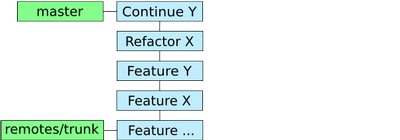
<figure><img src="/images/repository-start-story.png"
    alt="Repository at the start of this story" width="400" height="140"><figcaption>
      <p>Repository at the start of this story</p>
    </figcaption>
</figure>

<p>Luckily I was using Git and I hadn&rsquo;t pushed the relevant code to the
Subversion repository yet. (A simplified graph of the history is shown
in the image. The blue boxes represent the commits and the green the
references.)</p>
<p>The first action was to get the history sorted out. Since I made small
commits and thus not mixed features in the commits, I could easily
reorder them. Running &ldquo;<code>git rebase --interactive &lt;sha1&gt;</code>&rdquo; with the
SHA1 of the right commit popped up the editor where I changed the
order of the commits and I was done.</p>
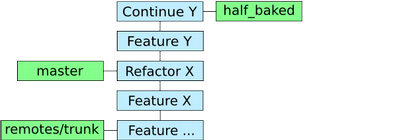
<p>The next step was creating a branch from the current HEAD. Since, as
far as I understand, a branch is just a reference pointing to a
certain commit, this action made sure my first attempt to implement
feature Y was saved. Still, I wanted to work on the code without my
first attempt being there. By resetting the current HEAD to an earlier
commit without the feature Y changes, this was possible.</p>
<figure><img src="/images/repository-after-rebasing-branching-and-resetting.png"
    alt="The repository after rebasing, branching and resetting" width="400" height="140"><figcaption>
      <p>The repository after rebasing, branching and resetting</p>
    </figcaption>
</figure>

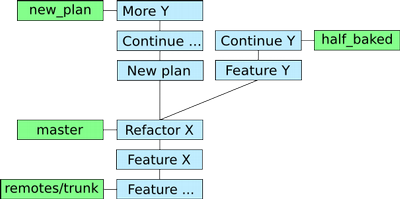
<p>Now, not falling into the same trap twice, I created a new branch from
master to try out the new way of implementing the new feature. Happily
committing away on this new branch I was able to make up my mind about
which approach would be the best and quickest solution. In the end I
decided to go with the new approach and merged it with master.</p>
<figure><img src="/images/repository-right-merging.png"
    alt="The repository right before merging" width="400" height="199"><figcaption>
      <p>The repository right before merging</p>
    </figcaption>
</figure>

<p>Now for the anticlimax of the story&hellip; The whole exercise was about
trying out a new way of implementing a feature without messing up the
Subversion repository. Although Git helped me all the way, the human
again proved to be the weakest link. By mistake I pushed the branch of
the half baked implementation to the repository. A quick &ldquo;<code>svn merge</code>&rdquo;
restored the situation and I pushed the master branch to the
Subversion repository after all. (I probably could also have used Git
to undo the commits, unfortunately I was in a hurry and didn&rsquo;t know
how from the top of my head.)</p>
<p>Lessons learned:</p>
<ul>
<li>Git is really flexible and, as
<a href="https://tomayko.com/blog/2008/the-thing-about-git">Ryan Tomayko states</a>,
it means never having to say &ldquo;you should have&rdquo;.</li>
<li>You still have to do the thinking yourself. :)</li>
</ul>]]></content>
  </entry>
  <entry>
    <title type="html"><![CDATA[Using Git when developing Plone applications]]></title>
    <link rel="alternate" href="https://markvanlent.dev/2009/05/03/using-git-when-developing-plone-applications/" type="text/html" />
    <id>https://markvanlent.dev/2009/05/03/using-git-when-developing-plone-applications/</id>
    <author>
      <name>map[name:Mark van Lent uri:https://markvanlent.dev/about/]</name>
    </author>
    <category term="git" />
    <category term="plone" />
    <category term="tools" />
    
    <updated>2021-07-16T07:25:56Z</updated>
    <published>2009-05-03T10:20:00Z</published>
    <content type="html"><![CDATA[<p>While I&rsquo;m enthusiastic about Git, I still have to communicate with
Subversion repositories like the Plone Collective. I also like my
editor (Emacs) to help me interact with Git. In this blog entry I&rsquo;ll
explain how I setup my work environment.</p>
<p>Choosing a distributed version control system was <a href="/2009/04/30/taking-version-control-to-the-next-level/">step one</a>. Step two is
incorporating it in my working life. This starts with retrieving and storing the
source code for the projects I&rsquo;m working on.</p>
<h2 id="git-svn">Git-svn</h2>
<p>One of the reasons I chose Git was the &ldquo;bidirectional flow of
changes&rdquo; that will be necessary. The Git repository on my computer
will have to pull in the changes from the Subversion
repository. Likewise, I have to make my changes available for others
by pushing them back to the central repo.</p>
<p><a href="https://git-scm.com/docs/git-svn">Git-svn</a> allows me to clone the necessary
part of a Subversion repository. For instance, to clone the buildout of project
X I can easily do:</p>
<div class="highlight"><pre tabindex="0" class="chroma"><code class="language-bash" data-lang="bash"><span class="line"><span class="cl">git svn clone https://svn..../projectX/buildout -s
</span></span></code></pre></div><p>This will clone (checkout) the project X buildout. By adding the &ldquo;<code>-s</code>&rdquo;
parameter I tell Git that the buildout directory has the standard
Subversion layout. (In other words: it contains trunk, branches and
tags directories.) There is plenty git-svn documentation out there, so
I won&rsquo;t describe it any further here. For more information see for
example
the documentation I linked to above or blog posts like
<a href="https://flavio.castelli.me/2007/09/04/howto-use-git-and-svn-together/">Howto use Git and svn together</a> and
<a href="https://www.viget.com/articles/effectively-using-git-with-subversion/">Effectively Using Git With Subversion</a>.</p>
<h2 id="svnexternals">svn:externals</h2>
<p>Okay, we&rsquo;ve got the buildout. Now at <a href="https://zestsoftware.nl/">Zest</a>
we basically have two types of buildout configurations. We either
include the products for the policy, theme, et cetera by using the
<code>svn:externals</code> property in the src directory, or we include those
products by using
<a href="https://pypi.org/project/infrae.subversion/">infrae.subversion</a>.</p>
<p>I haven&rsquo;t found a proper solution for projects that use the latter
approach (other than restructuring the buildout that is). At the
moment I just use Subversion instead of Git. However if the project
collects all the products with the <code>svn:externals</code> property, there are
options&hellip;</p>
<p>Personally I use the <code>git-svn-clone-externals</code> script that can be
found on GitHub. To be precise, I use the fork by
<a href="https://github.com/pjstevns/">Paul J Stevens</a>. By starting this script
in the root directory of the Git repository (in my case the buildout
directory) it finds the products in <code>src</code> and clones each of them.</p>
<p>Since I have a couple of buildouts with more than five products as
<code>svn:externals</code>, I got tired of manually making sure all changes in them
are committed <em>and</em> pushed back to the subversion
repository. Therefore I
<a href="https://github.com/markvl/git-svn-clone-externals">forked the git-svn-clone-externals repository</a>
and added two scripts that help me with this. By running the
<code>git-svn-externals-check</code> script in the <code>src</code> directory I can be pretty
sure everything is back in Subversion so my co-workers can access it.</p>
<h2 id="emacs">Emacs</h2>
<p>I use Emacs to code, thus I also wanted to use it to help me with the
version control stuff. For Subversion I use
<a href="http://www.xsteve.at/prg/emacs/psvn.el"><code>psvn.el</code></a> and I was looking
for something similar. I first tried <code>git.el</code> (which comes with Git)
because the key bindings were similar. But although it got me started
quickly, it didn&rsquo;t feel quite right. For instance, I could not find a
way to work with staged changes. And this is a feature I really
started to like and use.</p>
<p>To make a long story short: I switched to
<a href="https://magit.vc/">Magit</a> for the moment. Although it took me a
while to get used to the key bindings, I actually really like it! It
allows me to work with Git from Emacs and the command line in a
similar fashion. Actions taken in one of them do not get in the way of
the other.</p>
<p>I&rsquo;m not completely settled yet, but I do love working with Git. I hope
to be able to use it on more and more projects.</p>]]></content>
  </entry>
  <entry>
    <title type="html"><![CDATA[Taking version control to the next level]]></title>
    <link rel="alternate" href="https://markvanlent.dev/2009/04/30/taking-version-control-to-the-next-level/" type="text/html" />
    <id>https://markvanlent.dev/2009/04/30/taking-version-control-to-the-next-level/</id>
    <author>
      <name>map[name:Mark van Lent uri:https://markvanlent.dev/about/]</name>
    </author>
    <category term="git" />
    <category term="subversion" />
    
    <updated>2021-08-20T19:33:29Z</updated>
    <published>2009-04-30T18:20:00Z</published>
    <content type="html"><![CDATA[<p>After using Subversion for a couple of years, it&rsquo;s time for me to look
to the next generation of source control management systems.</p>
<h2 id="whats-wrong-with-subversion">What&rsquo;s wrong with Subversion?</h2>
<p>Before I start with this section: this isn&rsquo;t meant as a rant. Nor do I
want to call Subversion users
<a href="https://www.youtube.com/watch?v=4XpnKHJAok8">ugly or stupid</a>. Subversion
remains a great improvement compared to CVS. However, there are a
couple of things I miss in my daily work.</p>
<p>My main issue with Subversion is that I need the central repository on
the server. Not just to make commits, but also when I want to see what
happened in the past (review the logs or annotate a file with <code>svn blame</code>). This can be a problem:</p>
<ul>
<li>As a consultant I travel frequently. Most of the times I take the train and
try to get some work done. But whenever there is the need to access the
repository, I&rsquo;m dead in the water.</li>
<li>The communication with the server can be slow. I do not care whether it is
because I do not have a broadband connection at that moment or that I am not
the only one trying to connect to the server; I just don&rsquo;t want to wait too
long for the result.</li>
<li>The server could be unreachable. Coincidentally I&rsquo;ve encountered this twice in
the last period. One time the Apache configuration of our company server had a
problem. The other time there was a hardware problem on the server where one
of our clients hosts their repository. In both cases I could not continue to
work on the project I had to work on.</li>
</ul>
<p>Another annoyance of Subversion is that merging is required before you commit.
Assume that I am working on a certain file. Let us further assume a co-worker
committed a change that also updated that same file. Now <em>before</em> I can commit,
Subversion requires me to update the file. This isn&rsquo;t a big problem if there are
no conflicts, but if there are, I can only commit my changes after I resolved
them.</p>
<p>In other words: the changes as I intended them are never committed. I first need
to make more changes. The only way to prevent this is by working on a branch.
Then I can commit my changes and will only need to resolve the conflicts if I
decide to merge my branch back. But while creating branches is easy in
Subversion, merging can be painful. I know this is supposed to be better in
Subversion 1.5, but I still have to talk to version 1.4 repositories.</p>
<h2 id="distributed-version-control-systems-to-the-rescue">Distributed version control systems to the rescue</h2>
<p>For quite some time now, distributed version control systems (DVCS)
like Bazaar, Git and Mercurial are available. By design these systems
should take care of my number one problem with Subversion. At first
glance all three of the DVCSs I just mentioned seem suitable. But
which one is the best solution for me?</p>
<h3 id="mercurial">Mercurial</h3>
<p><a href="https://www.mercurial-scm.org/">Mercurial</a> (or &ldquo;hg&rdquo;) is one of the contestants.
But since there is little to no chance of convincing all my co-workers to switch
from Subversion, I need to be able to talk to our Subversion repository. There
is a set of scripts to do this, called <a href="https://pypi.org/project/hgsvn/">hgsvn</a>,
but it has the limitation that <q>there is no straightforward way to push
back changes to the Subversion repository</q> according to the project
page.<sup id="fnref:1"><a href="#fn:1" class="footnote-ref" role="doc-noteref">1</a></sup> There are also <a href="https://www.mercurial-scm.org/wiki/WorkingWithSubversion">other options</a>,
but these seem very laborious. This is a showstopper for me.</p>
<h3 id="bazaar">Bazaar</h3>
<p>On to the next candidate: <a href="https://bazaar.canonical.com/en/">Bazaar</a> (or &ldquo;bzr&rdquo;)
does have a plugin to access Subversion repositories:
<a href="https://pypi.org/project/bzr-svn/">bzr-svn</a>. This
keeps Bazaar in the race.</p>
<h3 id="git">Git</h3>
<p>The final DVCS I investigated was <a href="https://git-scm.com/">Git</a>. Git
natively supports bidirectional operation with Subversion.</p>
<h3 id="the-decision">The decision</h3>
<p>Although both Bazaar and Git seem to provide the most important
features I&rsquo;ll need, I chose Git. The first reason for not choosing
Bazaar was the way it handles
<a href="http://doc.bazaar.canonical.com/bzr.dev/en/user-guide/zen.html">branches and revision numbers</a>. Although
I admit that I&rsquo;m new to DVCS, if feels more natural to me to
consistently use globally unique revision numbers than having local
revision numbers and branches with
<a href="http://doc.bazaar.canonical.com/bzr.dev/en/user-guide/zen.html#each-branch-has-its-own-view-of-history">their own view of history</a>.</p>
<p>The other reasons for selecting Git over Bazaar are speed and
repository size. Robert Fendt did recently did
<a href="https://web.archive.org/web/20090426191029/http://ldn.linuxfoundation.org/article/dvcs-round-one-system-rule-them-all-part-3">research</a>
and this confirms the results of
<a href="https://www.infoq.com/articles/dvcs-guide/">other</a>
<a href="https://laserjock.wordpress.com/2008/05/09/bzr-git-and-hg-performance-on-the-linux-tree/">speed</a>
and
<a href="https://vcscompare.blogspot.com/2008/06/git-mercurial-bazaar-repository-size.html">repository size</a> tests.</p>
<h2 id="git-additional-benefits">Git: additional benefits</h2>
<p>I have worked with Git for a little while now and there are some
additional benefits of it over Subversion:</p>
<ul>
<li><a href="https://git-scm.com/docs/git-stash">Stashing changes</a>
allows me to e.g. store local changes and go back to a clean working
directory to work on something different for a while.</li>
<li>Changing history may be a bit controversial in version control, but
it can be very useful. It allows me to, for instance, squash commits
while
<a href="https://git-scm.com/docs/git-merge">merging</a>,
rearrange the order of commits with
<a href="https://git-scm.com/docs/git-rebase">rebase</a>
or add something to the previous commit with
&ldquo;<a href="https://git-scm.com/docs/git-commit"><code>git commit --amend</code></a>&rdquo;. Obviously
you don&rsquo;t want to do this when you&rsquo;ve already published your
changes, but it has served me well already.</li>
<li>I can create branches on my local repository to work on features or
an experiment, without bothering others with it.</li>
<li>Committing is <em>really fast</em>. Although I still regularly push my
changes to the Subversion repository, a &rsquo;normal&rsquo; commit is blazing
fast. Where a commit used to be a pause in my workflow, they now
hardly have any impact. This makes it easy to commit more often and
thus have commits do only one thing at a time.</li>
<li>The last two benefits can be combined: since the commits are
initially only local, I don&rsquo;t have to postpone committing until the
code is in a workable state. I can for instance create a failing
test, commit it and then continue to write the code to make it pass,
without having to worry about co-workers running into the failing
test.</li>
</ul>
<p>(Note that other DVCSs also have (most of) these advantages. I&rsquo;m only comparing
Git with Subversion here.)</p>
<p>All in all I am very enthusiastic! Granted: using Git is more complex
than Subversion and there were some problems I had to overcome in my
day-to-day work. (I&rsquo;ll talk about them in
<a href="/2009/05/03/using-git-when-developing-plone-applications/">a next post</a>.)
But the flexibility I gained! Incredible!</p>
<div class="footnotes" role="doc-endnotes">
<hr>
<ol>
<li id="fn:1">
<p>Update (2021-07-14): for the record, the limitation about pushing back to
Subversion is apparently solved since it is no longer listed in the
&ldquo;limitations&rdquo; section of the documentation.&#160;<a href="#fnref:1" class="footnote-backref" role="doc-backlink">&#x21a9;&#xfe0e;</a></p>
</li>
</ol>
</div>]]></content>
  </entry>
</feed>