<?xml version="1.0" encoding="utf-8"?>
<feed xmlns="http://www.w3.org/2005/Atom" xml:lang="en">
  <title>Posts tagged with “Restic” on Mark van Lent’s weblog</title>
  <updated>2025-09-13T00:00:00+00:00</updated>
  <link rel="self" type="application/atom+xml" href="https://markvanlent.dev/tags/restic/index.xml" hreflang="en"/>
  <id>tag:markvanlent.dev,2010-04-02:/tags/restic/index.xml</id>
  <link rel="alternate" type="text/html" href="https://markvanlent.dev/tags/restic/" hreflang="en"/>
  <author>
      <name>Mark van Lent</name>
      <uri>https://markvanlent.dev/about/</uri>
    </author>
  <rights>Copyright (c) Mark van Lent, Creative Commons Attribution 4.0 International License.</rights>
  <icon>https://markvanlent.dev/favicon.ico</icon>
  <entry>
    <title type="html"><![CDATA[Restic at the center of my backups]]></title>
    <link rel="alternate" href="https://markvanlent.dev/2025/09/13/restic-at-the-center-of-my-backups/" type="text/html" />
    <id>https://markvanlent.dev/2025/09/13/restic-at-the-center-of-my-backups/</id>
    <author>
      <name>map[name:Mark van Lent uri:https://markvanlent.dev/about/]</name>
    </author>
    <category term="backups" />
    <category term="restic" />
    <category term="tools" />
    
    <updated>2025-11-27T19:59:36Z</updated>
    <published>2025-09-13T00:00:00Z</published>
    <content type="html"><![CDATA[<p>Some time ago I started using <code>restic</code> for creating backups of my home directory
of my laptop. Now it has become my main solution for backing up my most valued data.</p>
<h2 id="the-old-script">The old script</h2>
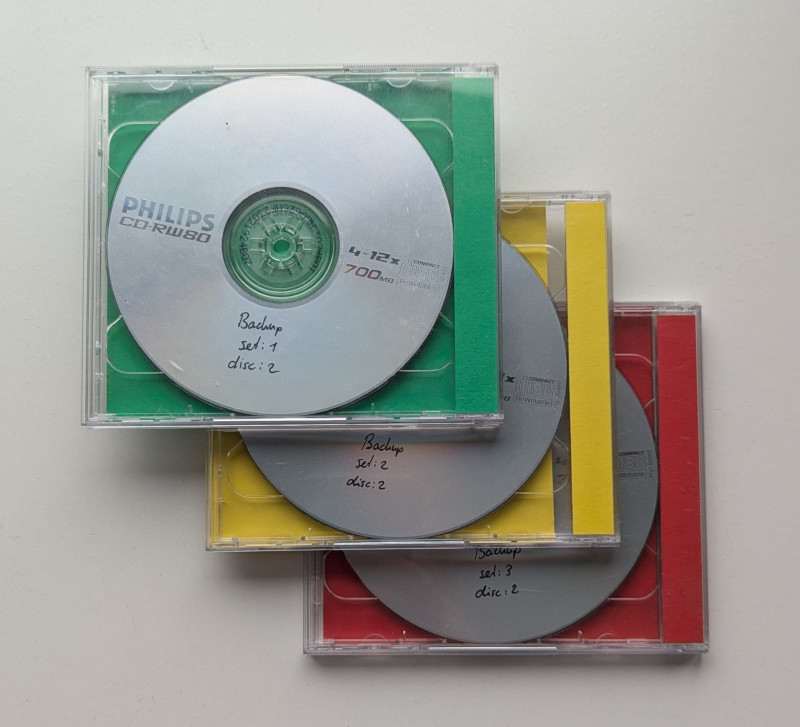
<p>In the olden days, when I was still using CD-ROMs (or actually
<a href="https://en.wikipedia.org/wiki/CD-RW">CD-RWs</a>) to store backups, I had three
snapshots (each a set of two CDs). When I created a new backup, I rotated them by
overwriting the oldest disks.</p>
<figure><img src="/images/cd-rw_backups.jpg"
    alt="Photo of my old sets of backup CDs"><figcaption>
      <p>My actual sets of CDs, last used in 2005: red was the most recent backup, yellow one version older and the set of CDs in the green case contains the oldest backup</p>
    </figcaption>
</figure>

<p>Later on, when I was using an external hard disk, I had a script that made
incremental backups using <a href="https://en.wikipedia.org/wiki/Hard_link">hard links</a>
so I could have multiple full backups, but not need <em>x</em> times the space.
Unfortunately I lost that script.</p>
<p>After not creating backups for a while, I wrote a Bash script which handled the
whole backup process:</p>
<ul>
<li>opening the (LUKS encrypted) external drive,</li>
<li>mounting it,</li>
<li>performing the backup, and finally</li>
<li>unmounting and closing the device again.</li>
</ul>
<p>The following line was handling the actual backing up:</p>
<div class="highlight"><pre tabindex="0" class="chroma"><code class="language-bash" data-lang="bash"><span class="line"><span class="cl">rsync -av --delete --exclude-from<span class="o">=</span>backup.excludes /home <span class="nv">$MOUNT_DIR</span>/<span class="k">$(</span>hostname -s<span class="k">)</span>/
</span></span></code></pre></div><p>Plain and simple.</p>
<p>This protected me from losing my data if my machine got stolen or if the hard
drive failed. And it served me well for a number of years. But on multiple
occasions I would have loved to have an older version of a file that got changed
or even deleted before my last backup. This triggered me to look for another
solution a few years back.</p>
<h2 id="restic-to-the-rescue">Restic to the rescue</h2>
<p>Since I didn&rsquo;t want to reinvent the wheel myself again, I was looking for backup
solutions and ran across <a href="https://restic.net/">restic</a>. After a bit of reading
and experimenting, I basically replaced the <code>rsync</code> line from the previous
script with the following:</p>
<div class="highlight"><pre tabindex="0" class="chroma"><code class="language-bash" data-lang="bash"><span class="line"><span class="cl">restic -r <span class="nv">$MOUNT_DIR</span> --verbose backup <span class="s2">&#34;/home/</span><span class="si">${</span><span class="nv">USER</span><span class="si">}</span><span class="s2">&#34;</span> --exclude-file<span class="o">=</span><span class="s2">&#34;/home/</span><span class="si">${</span><span class="nv">USER</span><span class="si">}</span><span class="s2">/backup.excludes&#34;</span>
</span></span></code></pre></div><p>And then I added a few more commands to the script:</p>
<ul>
<li>&ldquo;<code>restic -r $MOUNT_DIR check</code>&rdquo; to check the repository for errors</li>
<li>&ldquo;<code>restic -r $MOUNT_DIR forget --keep-last 7 --prune</code>&rdquo; to only keep the
last 7 snapshots</li>
</ul>
<h3 id="benefits">Benefits</h3>
<p>What did this change bring me?</p>
<p>For starters, if we assume I make a backup each week, I can go back at least 7
weeks in time. In practice I&rsquo;m not that consistent anymore so I can go back even
further in time.</p>
<p>What&rsquo;s more: according to restic each of my backups is about 105&ndash;100 GB of
data. But due to the compression and deduplication these 7 (incremental) backups
only use 69 GB <strong>combined</strong>.</p>
<p>Another benefit is that the backups are encrypted. So if I would want to store
them in the cloud, I can be sure the cloud provider cannot access my data.</p>
<p>And speaking of which: while I use <a href="https://restic.readthedocs.io/en/stable/030_preparing_a_new_repo.html#local">local storage</a>
(my external disk) and a remote <a href="https://restic.readthedocs.io/en/stable/030_preparing_a_new_repo.html#rest-server">REST Server</a>
(see below), restic supports a bunch of other backends: Amazon S3, Azure blob
storage and Google Cloud Storage to name a few.</p>
<p>A backup is worth nothing if you cannot restore from it. Besides restoring a
full snapshot, with restic I can also mount the snapshots to navigate the files
and view them individualy. This allows me to browse around in my snapshot just
like any other file system.</p>
<p>In case you had not noticed yet: I&rsquo;ve become a fan of restic.</p>
<h2 id="next-level">Next level</h2>
<p>Initially I was only using restic to make backups of my laptop to an external
hard drive. But recently I&rsquo;ve taken it to a next level and use it for offsite
backups as well.</p>
<p><figure class="float-left"><img src="/images/restic_via_vpn.svg"
    alt="Schematic of my backup solution: restic -&gt; HAproxy -&gt; VPN tunnel -&gt; Nginx -&gt; Rest Server" width="150px">
</figure>

I&rsquo;ve put a computer at a remote location and run the <a href="https://github.com/restic/rest-server">Rest
Server</a>. In my local network I have
a VM that acts as a transparent HTTP proxy and is connected to the remote box
via VPN.</p>
<p>This way any local machine (like my NAS) only needs to be able to run restic and
I&rsquo;m good to go. I just point restic to the internal VM and it handles the VPN
for me.</p>
<div class="highlight"><pre tabindex="0" class="chroma"><code class="language-bash" data-lang="bash"><span class="line"><span class="cl">restic -r rest:https://&lt;haproxy_host&gt;/&lt;repository&gt;
</span></span></code></pre></div><p>The reason I put Nginx in front of the Rest Server is so that it can handle the
authentication and TLS termination. Sure, the Rest Server itself can also do
this, but I feel Nginx is more battle tested.</p>
<p>This setup allows me to automatically run my backups each night since I do not
have to attach a USB disk. It also gives me an offsite backup, without a monthly
bill from a storage provider. What&rsquo;s more: it gives me a sense of control. I know
exactly how everything works and if disaser strikes and I need to restore all my
data, I can bring the remote machine home and have local access to it.</p>
<p>Setting this up was something I have been putting off for a while now, but this
project is finally finished.</p>
<h2 id="useful-resources">Useful resources</h2>
<p>Some of the resources that helped me:</p>
<ul>
<li>The <a href="https://restic.readthedocs.io/en/stable/">restic documentation</a></li>
<li><a href="https://blog.stabel.family/restic-on-synology/">Restic on Synology</a></li>
<li><a href="https://braincoke.fr/blog/2020/06/backup-all-the-things-with-restic">Backup all the things with restic</a></li>
</ul>
<p>To be honest, I do not recall why I chose restic over
<a href="https://www.borgbackup.org/">BorgBackup</a> (Borg for short) at the time. But
if you are in the market for a tool to create backups with deduplication,
compression and encryption, you might want to check out both projects and see
which fits your situation best.</p>]]></content>
  </entry>
  <entry>
    <title type="html"><![CDATA[Open tabs — December 2022]]></title>
    <link rel="alternate" href="https://markvanlent.dev/2022/12/30/open-tabs-december-2022/" type="text/html" />
    <id>https://markvanlent.dev/2022/12/30/open-tabs-december-2022/</id>
    <author>
      <name>map[name:Mark van Lent uri:https://markvanlent.dev/about/]</name>
    </author>
    <category term="book" />
    <category term="docker" />
    <category term="homelab" />
    <category term="restic" />
    <category term="security" />
    <category term="tabs" />
    
    <updated>2025-09-13T21:07:32Z</updated>
    <published>2022-12-30T00:00:00Z</published>
    <content type="html"><![CDATA[<p>The end of the year is a nice time to review my open tabs on my phone and
computer to see what&rsquo;s worth saving and what is not. So here is
<a href="/tags/tabs/">another round</a>.</p>
<p>Note that I do not necessarily endorse the articles or applications I link to.
Most of the links to tools are here specifically because they seem interesting
to me, but I have no actual experience with them&mdash;hence the need for a reminder
on this list.</p>
<p>I have tried to group the links somewhat, but other than that they are listed in
more or less random order.</p>
<h2 id="development">Development</h2>
<dl>
<dt><a href="https://daniel.feldroy.com/posts/autodocumenting-makefiles">Autodocumenting Makefiles</a></dt>
<dd>A nice trick to document your <code>Makefile</code>.
This article was also discussed on <a href="https://news.ycombinator.com/item?id=30137254">Hacker News</a>.</dd>
<dt><a href="https://github.com/TomNomNom/gron">gron</a></dt>
<dd>From the <code>README</code>: <q>gron transforms JSON into discrete assignments to make it
easier to grep for what you want and see the absolute &lsquo;path&rsquo; to it. It eases the
exploration of APIs that return large blobs of JSON but have terrible
documentation.</q></dd>
<dt><a href="https://asdf-vm.com/">asdf</a></dt>
<dd>A version manager for e.g. Ruby, Node.js, Python.</dd>
<dt><a href="https://sharats.me/posts/shell-script-best-practices/">Shell Script Best Practices</a></dt>
<dd>Some rules of thumb for writing shell scripts which were also
<a href="https://news.ycombinator.com/item?id=33354286">discussed on Hacker News</a>.</dd>
<dt><a href="https://levelup.gitconnected.com/how-to-change-git-default-branch-from-master-3933afab08f9">How to change git default branch from master</a></dt>
<dd>I had to (or wanted to) switch from using the name &ldquo;master&rdquo; for my main branch
to something else (&ldquo;main&rdquo; in most cases) for a couple of Git repositories. It is
not hard, but if you do not do it often, it is convenient to have a guide like this
to make sure you do not forget anything.</dd>
</dl>
<h2 id="blogs">Blogs</h2>
<dl>
<dt><a href="https://bitfieldconsulting.com/">Bitfield Consulting</a></dt>
<dd>I&rsquo;m linking the whole website here since it has a bunch of nice <a href="https://bitfieldconsulting.com/golang">Go related
articles</a> but also interesting articles
in the <a href="https://bitfieldconsulting.com/blog">blog</a>.</dd>
<dt><a href="https://blog.kronis.dev/articles">Kristiāns Kronis&rsquo; blog</a></dt>
<dd>I have a couple of articles on this blog still open to (finish) reading, like
<a href="https://blog.kronis.dev/articles/using-ubuntu-as-the-base-for-all-of-my-containers">Using Ubuntu as the base for all of my containers</a>,
<a href="https://blog.kronis.dev/tutorials/moving-from-gitlab-ci-to-drone-ci">Moving from GitLab CI to Drone CI</a> and
<a href="https://blog.kronis.dev/articles/on-burnout">On burnout</a>.</dd>
<dt><a href="https://www.vharmers.com/">Valentine&rsquo;s blog</a></dt>
<dd>Informative blog of which I still want to read the last two articles in the
<a href="https://www.vharmers.com/tags/opsec/">OpSec blog series</a>.</dd>
<dt><a href="https://www.linuxserver.io/blog">linuxserver.io blog</a></dt>
<dd>A blog by the community that maintains &ldquo;the largest collection of Docker
images on the web&rdquo; (their words).</dd>
</dl>
<h2 id="security">Security</h2>
<dl>
<dt><a href="https://www.goldfiglabs.com/guide/personal-infosec-security-checklist/">The Personal Infosec &amp; Security Checklist</a></dt>
<dd>Actionable best practices to harden your security posture.</dd>
<dt><a href="https://security-list.js.org/#/">Personal security checkist</a></dt>
<dd>Tips for protecting your digital security and privacy.</dd>
<dt><a href="https://defensivecomputingchecklist.com/">A Defensive Computing Checklist</a></dt>
<dd>Another list of tips on how to make your digital life more safe.</dd>
<dt><a href="https://routersecurity.org/">Router Security</a></dt>
<dd>A site with the focus on the security of routers. From the same author as the
previous link.</dd>
<dt><a href="https://aegis-icons.github.io/">Aegis-icons</a></dt>
<dd>Unofficial set of icons for the <a href="https://getaegis.app/">Aegis Authenticator</a>
application.</dd>
<dt><a href="https://ppn.snovvcrash.rocks/">Pentester&rsquo;s Promiscuous Notebook</a></dt>
<dd>Notes by and for a pentester.</dd>
</dl>
<h2 id="homelab">Homelab</h2>
<dl>
<dt><a href="https://github.com/BaptisteBdn/docker-selfhosted-apps">BaptisteBdn/docker-selfhosted-apps</a></dt>
<dd>A GitHub repository with guides on how to run a bunch of applications via
Docker.</dd>
<dt><a href="https://petersem.github.io/dockerholics/">Dockerholics Application List</a></dt>
<dd>Another list of applications you can host yourself using Docker containers.</dd>
<dt><a href="https://github.com/awesome-selfhosted/awesome-selfhosted">Awesome-Selfhosted</a></dt>
<dd>Yet another (<em>the</em>?) list of applications you can run yourself.</dd>
<dt><a href="https://github.com/awesome-foss/awesome-sysadmin">Awesome Sysadmin</a></dt>
<dd>A list of Free and Open-Source sysadmin resources.</dd>
<dt><a href="https://containrrr.dev/watchtower/">Watchtower</a></dt>
<dd>Automatically update your Docker containers if newer images are available.</dd>
<dt><a href="https://crazymax.dev/diun/">Diun</a></dt>
<dd>If you do not like the idea of automatically updating your containers with
Watchtower, you might want to look at this <strong>D</strong>ocker <strong>I</strong>mage <strong>U</strong>pdate
<strong>N</strong>otifier application.</dd>
<dt><a href="https://www.drone.io/">Drone</a></dt>
<dd>I&rsquo;m already running a <a href="https://gitea.io/en-us/">Gitea</a> instance and a
<a href="https://hub.docker.com/_/registry">Docker Registry</a>. Drone might be a nice
third component to automatically build projects and e.g. create Docker images
and push them to my internal registry.</dd>
<dt><a href="https://homelab.khuedoan.com/">Khue&rsquo;s Homelab</a></dt>
<dd>Khue Doan has a project to provision, operate and update his homelab. As such
it is a nice inspiration.</dd>
<dt><a href="https://grafana.com/oss/loki/">Grafana Loki</a></dt>
<dd>A log aggregation system that looks like a useful addition to my setup, since
I&rsquo;m already running <a href="https://grafana.com/grafana/">Grafana</a> to visualise some
metrics.</dd>
<dt><a href="https://vector.dev/">Vector</a></dt>
<dd>This also looks like a interesting tool to collect logs.</dd>
<dt><a href="https://github.com/smallstep/certificates">Step Certificates</a></dt>
<dd>I am already using a private certificate authority to create certificates for
the services in my homelab, but it would be nice to have a self hosted
<a href="https://www.rfc-editor.org/rfc/rfc8555">ACME server</a> to do the tedious work.
This tool might be what I need.</dd>
</dl>
<h2 id="entertainment">Entertainment</h2>
<dl>
<dt><a href="https://play.elevatorsaga.com/">Elevator Saga</a></dt>
<dd>Fun game where you program an elevator/set of elevators to meet certain criteria.</dd>
<dt><a href="https://www.movieofthenight.com/">Movie of the Night</a></dt>
<dd>While officially a <q>movie/series recommendation engine</q> I use
this site regularly to check if I can stream a movie or series in my country and
if so, on which service it is available.</dd>
<dt><a href="https://osmc.tv/">OSMC</a></dt>
<dd>An interesting looking open source media center, which you can run on a
Raspberry Pi or on their devices, like the <a href="https://osmc.tv/vero/">Vero 4K+</a></dd>
<dt><a href="https://www.amazon.com/Lazarus-Heist-Hollywood-Finance-Inside/dp/024155425X">The Lazarus Heist: From Hollywood to High Finance: Inside North Korea&rsquo;s Global Cyber War</a></dt>
<dd>A book about the
<a href="https://en.wikipedia.org/wiki/Lazarus_Group">Lazarus Group</a>, tipped in
<a href="https://darknetdiaries.com/transcript/119/">Darknet Diaries episode 119</a>.</dd>
<dt><a href="https://scottjucha.com/silverships.html">The Silver Ships Series</a></dt>
<dd>A book series by Scott Jucha, tipped in the
<a href="https://twit.tv/shows/security-now">Security Now podcast</a>. (The series is
mentioned in <a href="https://www.grc.com/sn/sn-887.htm">episode 887</a> for the first
time.) I&rsquo;ve finished the first book and loved reading it!</dd>
<dt><a href="https://nostarch.com/open-circuits">Open Circuits</a></dt>
<dd>A lovely book about electronic components with beautiful pictures.</dd>
</dl>
<h2 id="miscellaneous">Miscellaneous</h2>
<dl>
<dt><a href="https://pfauth.com/intentioneel-leven/persoonlijk-manifest/">Schrijf een persoonlijk manifest voor richting in je werk en leven</a> (Dutch)</dt>
<dd>I&rsquo;m not sure I&rsquo;ll ever write such a personal manifest, but just reading this
article gave me enough food for thought to make some decisions.</dd>
<dt><a href="https://www.lifewire.com/use-file-history-in-windows-10-3891070">How to Use File History in Windows 10</a></dt>
<dd>Useful article for people that want to backup and restore files on
Windows machines.</dd>
<dt><a href="https://restic.net/">Restic</a></dt>
<dd>I&rsquo;m in the process of testing this backup tool to see if I want to switch over
to restic from my current <code>rsync</code> based script to backup my Linux machines to an
external disk. If I go that route, I&rsquo;ll also have to have a look at
<a href="https://github.com/binarybucks/restic-tools">restic-tools</a>.</dd>
<dt><a href="https://shen.hong.io/reproducible-pdfa-compliant-latex/">Creating Fully Reproducible, PDF/A Compliant Documents in LaTeX</a></dt>
<dd>When I was perparing my CV and a cover letter, I wanted the resulting PDF to
be more accessible. This article gave me useful instructions on how to achieve
that.</dd>
<dt><a href="https://thepihut.com/blogs/raspberry-pi-tutorials/using-neopixels-with-the-raspberry-pi">Using Neopixels with the Raspberry Pi</a></dt>
<dd>I&rsquo;m toying with the idea of upgrading my home office with some LED
strips. Perhaps I&rsquo;ll use Neopixels and a Raspberry Pi (or similar board) to do
this.</dd>
<dt><a href="https://jvns.ca/blog/things-your-manager-might-not-know/">Things your manager might not know</a></dt>
<dd>An article about how you can help your manager (help you).</dd>
</dl>]]></content>
  </entry>
</feed>