Proxmox Backup Server
I have been using Proxmox Virtual Environment for a few years now, but I only recently started using Proxmox Backup Server. I wish I had done that sooner!
Backup via NFS
When I started using Proxmox to host some services, I configured VM backups almost immediately. For years, I have used an NFS mount to put the backups on my NAS. This was a functioning solution and I have also successfully used those backups to restore machines.
I had scheduled weekly backups early Monday morning and had retention configured so that exactly one old backup was kept. So if disaster struck on Monday, I could pick either the backup made earlier that day. But if I needed to restore something on a Sunday, the most recent backup was one week old.
While this was an acceptable risk for my situation, it was also not really efficient. The last time I made backups to the NAS (mid-November), this meant a total of 122 GB in size for 10 VMs and two backups per VM.
Proxmox Backup Server
A couple of months ago, in the same period I was working on my Restic backup solution, I also stumbled upon Proxmox Backup Server (or PBS for short).
I heard good things about it, so I decided to install it on a separate machine and give it a try. And I’m really happy with it. First of all, I have more backups, and still use about the same disc space.
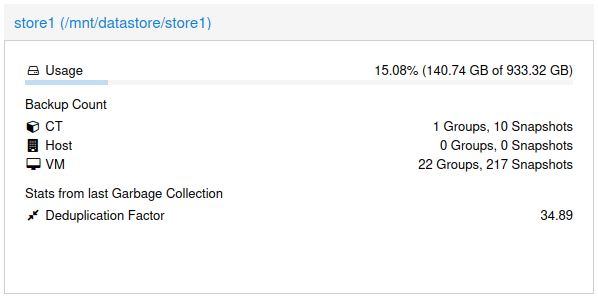
My datastore is currently using about 140 GB of disc space, which admittedly is about 15% more than the mid-November set of backups on my NAS. But it’s not a fair comparison.
For starters: instead of backing up only the 10 most important VMs, I am now creating backups for all of them. Currently this means 22 VMs and 1 container as you can see in the screenshot above.
Not only am I backing up more machines, instead of having only two backups, I now have 6 daily backups, 3 weekly and 2 monthly. Put differently, I can go back in time further than before and I only lose one day of data at most when I mess something up now (assuming I notice the problem immediately).
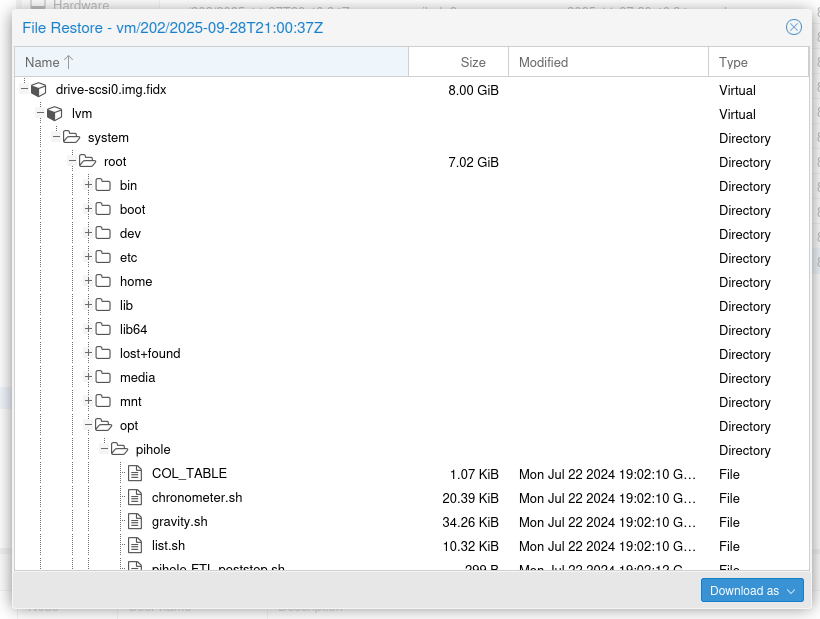
Something else I like is that I can restore individual files from backups. So I do not have to restore a whole VM just to get your hands on a single file. While this was not my main driver to start using PBS, it is a really nice bonus.
And I haven’t even mentioned yet that PBS can verify snapshots for you. Or that you can have a remote PBS with which to sync datastores.
Summarised: with Proxmox Backup Server I now have:
- backups of more than double the number of VMs (10 → 22)
- more backups (2 weekly backups → 6 daily, 3 weekly and 2 monthly)
- more features
This only costs me about 15% extra disc space in my specific situation. If that isn’t a good deal, I don’t know what is.